AI Code Generation Tools: 10 Options for Agent Workflows
Compare 10 AI code generation tools for agent-driven teams. See real use cases, limits, and how each fits your existing dev setup and review flow.
In this article
Generating code is the fast part. The slowdown starts after that, when the pull request needs fixes, the spec drifts, and the review loop stretches out. If you're using ai code generation tools right now, that is likely the bottleneck you feel in your day, not typing syntax.
This list compares ten tools through that lens. I'd judge each one by how well it fits an existing harness config, how much fix-round churn it causes, and how far it drifts from the spec before merge. That is the difference between a tool that looks good in demos and one that works in a live team.
1. Loupe
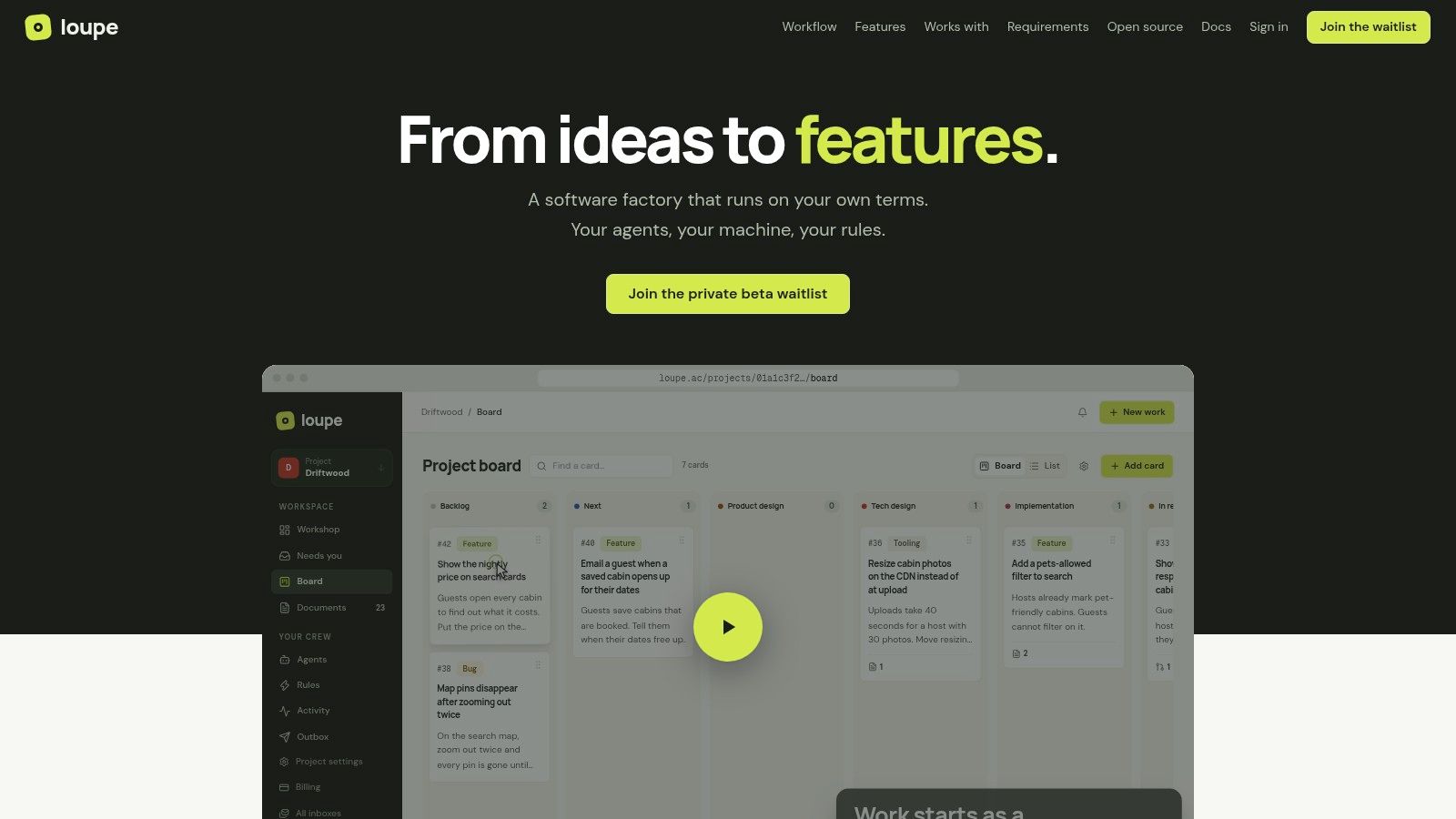
Loupe fits teams that want coding agents inside a controlled workflow, not loose in the repo. It runs the path from product design to merged pull request on one board, with explicit stages, human checkpoints, and agent review before people see the change. That matters when you care about fix rounds and spec drift, not just raw output.
The platform is built for the exact problem I keep seeing in agent workflows, fragmented handoffs. Work moves through product design, technical design, implementation, agent review, site review, then Done, and the board shows when a card is working, waiting, stuck, or needs you. The local bridge keeps workers on your machines or subscriptions, and the model setup stays flexible through Claude Code, Codex, OpenRouter, and MCP integrations, so you can keep an existing harness instead of rebuilding everything around one vendor.
Why it stands out in practice
The strongest part is the review chain. One agent opens the PR, a second agent checks design conformance, and then humans step in at the points Loupe labels “You.” That keeps the merge path closer to the approved design, which is exactly where a lot of agent tools fall apart.
Practical rule: if a tool can't show you where it drifted from the spec before merge, it's not ready for serious team use.
Loupe also gives you analytics that matter to delivery, like cost per finished card, merge rate, fix rounds, and hours to merge. That makes it useful for comparing models on your own workload instead of trusting generic benchmarks. The site review widget is a nice touch too, because UI feedback lands back on the originating card instead of disappearing into chat logs.
The trade-off is operational. Hosted use is still in private beta, GitHub.com is required for PR automation, and self-hosting means you're running Docker Compose and managing model keys. If your team wants a managed, polished SaaS with no setup, that is still a wait. If you want control, traceability, and a real workflow around agents, Loupe is one of the most complete options.
Pros
- End-to-end flow: product design through merged PR, with human checkpoints built in.
- Governance: dual-agent review and site-review annotations reduce rework.
- Control: local bridge, self-host option, and model-agnostic setup.
- Measurement: cost, merge rate, fix rounds, and hours to merge are visible on the board.
Cons
- Managed hosting limits: private beta only, so availability is constrained.
- Setup overhead: self-hosting and bridge management need real ops work.
- Platform constraints: GitHub.com support is required for PR automation today.
Website: Loupe
Internal reading: Loupe blog
2. GitHub Copilot
GitHub Copilot is the default choice for teams already working in GitHub. It lives inside VS Code, Visual Studio, JetBrains, and the GitHub web UI, so adoption is straightforward when repos, issues, and pull requests already sit there. That native fit matters more than feature count if your team wants one assistant across the tools it already uses.
It handles inline suggestions, chat with repository context, and multi-file edits. The PR review flow matters most for team use, because it pushes Copilot beyond solo autocomplete and into the merge process. Enterprise controls also matter when you need content exclusion and policy enforcement at the org level.
The main trade-off is billing. Usage-based credit models can be hard to forecast, and costs can rise fast if usage is not watched. Our breakdown of LLM pricing across models shows how quickly agent spend compounds in real workflows, which is the kind of review finance and engineering should do before rollout. GitHub Copilot's product page is the right starting point if your team wants broad GitHub-native integration.
I would pick it when the team already reviews work in GitHub and wants one assistant across editor, chat, and pull requests. I would not pick it just because it feels familiar if your main problem is controlling agent churn before merge.
Pros
- Native GitHub fit: strong repo, PR, and issue integration.
- Enterprise controls: policy controls and exclusion settings are clear.
- Broad editor support: works across common IDEs and the web UI.
Cons
- Billing complexity: usage-based credits need monitoring.
- Cost risk: spend can jump if usage is not governed.
3. Amazon Q Developer
Amazon Q Developer fits better when the codebase already lives close to AWS. It works in IDEs, the CLI, and the AWS Console, so it covers code generation and cloud-adjacent work in one place. That matters when the team spends time in AWS services and IAM, because the tool stays in the same operational context.
It can generate and edit code, explain code, and run guided multi-step tasks. The Java and .NET transformation features are useful for teams moving older code forward. Reference tracking and public-code suppression are worth checking early, since those controls often become part of the first security review, not an afterthought.
Billing is the trade-off. The transformation features use per-line fees, so the team has to watch more than one meter. That is manageable only when people know which workflow is consuming which quota.
The official product page is Amazon Q Developer. I would use it when AWS integration matters more than local-only code help. If your main concern is merge control and comparing model output, pair it with a workflow layer instead of asking it to cover the whole process.
Pros
- AWS-native fit: strong match for AWS tooling and services.
- Multi-step help: useful for agentic coding and guided workflows.
- Security posture: reference tracking and code suppression are practical for teams.
Cons
- Multiple meters: per-line transformation fees add billing complexity.
- Cost tracking: teams need to watch usage carefully.
4. Google Gemini Code Assist
Gemini Code Assist fits teams that build on Google Cloud and want code help inside that stack. It covers IDE completions, edits, chat, and terminal workflows, and it connects into products like Firebase, BigQuery, Cloud Run, and Apigee. That matters most when a change reaches into cloud services, not just local files.
The enterprise side is the main reason to look at it. Google positions it with security options such as VPC Service Controls, IAM, and indemnification, so platform teams have concrete controls to review. If your organization already standardizes on Google Cloud, that governance story can matter as much as the coding help itself.
Pricing is less straightforward. Hourly license rates are harder to read than simple seat pricing, so budget owners may need to convert them into a monthly view before approving rollout. The tool is not weaker for that reason, but procurement usually takes longer.
The product site details the enterprise security options if procurement needs documentation. I would use it when the codebase and cloud stack already sit in the same vendor environment. I would pass on it first in a mixed setup where workflow consistency matters more than cloud-native depth.
Pros
- Google Cloud fit: strong integration across cloud services.
- Security options: enterprise controls are clear.
- IDE plus CLI: useful across editor and terminal workflows.
Cons
- Pricing format: hourly rates may feel unfamiliar.
- Billing translation: finance teams may need help converting to monthly spend.
Website: Google Gemini Code Assist
5. Sourcegraph Cody
Cody is strongest when the question is, “Where does this live, and how does it connect to the rest of the codebase?” It uses Sourcegraph's code graph and search to ground suggestions in real repository context. That makes it useful for larger systems where a normal chat tool guesses too much.
It works in VS Code, JetBrains, Visual Studio, and the Sourcegraph web app. The Smart Apply flow helps when you want the assistant to propose an edit that fits the surrounding code instead of dropping a blob into your editor. Support for MCP and third-party models also helps teams keep options open.
The trade-off is platform dependency. Cody works best when paired with the full Sourcegraph stack, which can add cost and operational overhead. For smaller teams, that may be more tooling than they need. For large multi-repo orgs, it can be exactly the grounding layer that keeps agent output from wandering.
Choose Cody when deep code understanding matters more than fast generation. It fits “why is this here?” and “what else depends on this?” better than quick prototype spam. That makes it useful in review-heavy workflows where fit with the existing harness and fewer fix rounds matter more than raw output volume.
I treat Cody as a context engine first and a writer second.
Pros
- Deep context: code graph and search help ground output.
- Multi-repo strength: good for large codebases and cross-cutting questions.
- Flexible providers: MCP and third-party model support are helpful.
Cons
- Platform dependence: best results usually need Sourcegraph around it.
- Overhead: enterprise setup can raise total cost.
Website: Sourcegraph Cody
6. Cursor
Cursor fits teams that want the IDE to do more of the work. Planning, building, fixing, and reviewing all happen inside the editor, so you spend less time bouncing between tools. That helps on changes where the harness already exists and the question is how much clean-up the assistant creates before merge.
The model marketplace is useful in practice. Teams can choose between multiple frontier models, and enterprise controls like privacy mode and BYOK give larger orgs more control over how code moves through the tool. Background agents help when a task can keep running while a developer checks another change or reviews output.
The trade-off is churn. Pricing mechanics and plan changes have created confusion, and that matters because trust drops fast when access or billing changes under a team. In workflows that already require close attention to merge quality, a second layer of uncertainty around cost can slow adoption.
Cursor is available at cursor.com. I would use it for teams that want an integrated agentic IDE and can accept a product that is still changing. It is a weaker fit if you need stable commercial terms and a conservative rollout.
Pros
- Integrated agent flow: plan, build, fix, and review in one place.
- Model choice: marketplace and BYOK options give flexibility.
- Background work: useful for larger or parallel tasks.
Cons
- Pricing confusion: plan changes have caused user uncertainty.
- Commercial churn: teams should re-check terms often.
Website: Cursor
7. JetBrains AI Assistant
A JetBrains-heavy team will feel the fit fast. JetBrains AI Assistant lives inside IntelliJ IDEA, WebStorm, PyCharm, and the wider JetBrains stack, so it stays close to the editor where the work already happens. That matters when your harness, inspections, and review flow are already built around JetBrains tools.
It covers chat, code generation, refactors, and commit message help, and the Junie agent adds a more agent-like workflow. The main product page documents the provider routing options in detail. JetBrains-hosted models can route to third-party providers such as OpenAI, Anthropic, Google, and xAI, which gives teams more room to match assistant behavior with internal governance.
The trade-off is clear. Once a team moves outside JetBrains IDEs, the value drops. Mixed-editor teams will feel that gap quickly, especially if they compare merge quality, fix rounds, and spec drift across different tools.
I would use it when the team standardizes on JetBrains and wants strong inspections plus language-aware help in one place. I would pass if developers split across editors, because the setup benefits are tied to the IDE itself.
Pros
- Deep IDE fit: native across the JetBrains family.
- Flexible routing: multiple providers and governance options.
- Refactor-friendly: useful for IDE-heavy work.
Cons
- Ecosystem bound: less useful outside JetBrains.
- Enterprise setup: provider and governance choices may need admin work.
Website: JetBrains AI Assistant
8. Tabnine
Tabnine is less about replacing your assistant and more about adding a context and governance layer. The Enterprise Context Engine brings organizational context, cross-repo synthesis, and temporal understanding, so outputs stay closer to how your system behaves. That matters when you already use other assistants and want better grounding without changing the rest of the workflow.
It also gives teams deployment flexibility, including SaaS, VPC, and on-prem options. That makes it a serious fit for regulated environments where data handling shapes the purchase decision. Teams that need that setup usually care more about control than convenience.
The trade-off is buying friction. Public pricing is limited, and the enterprise context product often leads to sales conversations. For larger companies, that may be normal. Smaller teams can find evaluation slower than they want.
Reach for Tabnine when you need a context and governance layer more than a standalone agent. It works well alongside Copilot, Claude Code, or Cursor, especially when the goal is to reduce spec drift and keep fix rounds tighter before merge.
Pros
- Privacy posture: strong deployment options for regulated teams.
- Context engine: useful for cross-repo grounding.
- Augments other tools: designed to sit alongside existing assistants.
Cons
- Sales-heavy pricing: public detail is limited.
- Clarification needed: quotas and core assistant terms may need follow-up.
Website: Tabnine
9. Replit AI
Replit AI fits when you want code generation, runtime, database, and deployment in one place. It is a cloud development platform, so the agent can scaffold an app and push it toward something running without much setup. That makes it practical for greenfield prototypes and small products.
The agents can build apps, fix issues, and deploy directly in Replit. Higher tiers add more concurrency, which helps when the work is still exploratory and several threads are active at once. The platform is most useful when the main goal is speed from idea to live preview, not tight control over every step.
The trade-off is billing surprise. Credit-based pricing can drift when agents keep iterating on an ambiguous task, and that is exactly the kind of workflow where fix rounds can multiply. If your team cares about cost discipline, you need guardrails before you let it run loose.
The product page spells out the credit behavior per agent tier. I'd use it for prototypes, demos, and small apps where the platform can carry the whole stack. I would be more cautious on production work unless the team already understands the cost behavior and iteration limits.
Pros
- All-in-one flow: code, runtime, DB, preview, and deploy in one platform.
- Fast prototyping: good for getting from idea to live app quickly.
- Integrated collaboration: fewer tools to stitch together.
Cons
- Credit risk: ambiguous tasks can burn through usage.
- Cost surprises: iteration needs close monitoring.
Website: Replit AI
Internal reading: Loupe on agentic engineering
10. Devin Desktop
Devin Desktop is built for orchestration, not just autocomplete. It puts a full editor, agent sessions, diff review, and a model picker in one command center, so it fits bigger changes that need planning, delegation, and a clean merge path. Fast Context helps ground codebase understanding quickly.
The Agent Client Protocol ecosystem is a real advantage. Integrations with tools like Stripe, Vercel, Datadog, and Atlassian make it easier to fit into an existing engineering stack. That matters when the team already works through connected operational tools and wants the agent to stay inside that workflow.
The trade-off is product churn. The move from Windsurf to Devin Desktop means teams should re-check quotas, promos, and plan details before they standardize on it. Agent tools change fast, and this one is no exception.
The desktop product page lists current session and quota details. I would use it where the main problem is coordinating larger changes across sessions, reviews, and tools. I would also re-validate the commercial terms before making it part of a team standard.
Pros
- Command-center UX: strong for larger agent-driven changes.
- Tool ecosystem: ACP integrations widen the workflow.
- Fast grounding: useful when the codebase is large.
Cons
- Plan churn: the rebrand and product changes mean quotas need re-checking.
- Promo uncertainty: access terms can change.
Website: Devin Desktop
Top 10 AI Code Generation Tools, Quick Comparison
| Product | Core features | UX & quality metrics | Value proposition / Unique selling points | Target audience | Pricing / Deployment |
|---|---|---|---|---|---|
| Loupe | Board-based, rule-driven workflow; agent orchestration from product→PR; site-review widget; consolidated inbox | Built-in analytics: cost/card, merge rate, fix rounds, hours-to-merge; model-comparison experiments | End-to-end agent SDLC, dual-agent review, local bridge (run workers locally), AGPL open-source | Engineering managers, product/tech leads, DevOps, developer teams experimenting with agents | Self-host (AGPL, Docker Compose) free; hosted private beta (waitlist); no public pricing |
| GitHub Copilot (Microsoft/GitHub) | Inline completions, repo-aware chat, agent mode, PR review | Deep repo/PR context improves suggestion relevance; enterprise controls | Native GitHub/PR integration and org governance | Teams using GitHub and IDE plugins (VS Code, JetBrains) | SaaS via GitHub, usage/credit billing |
| Amazon Q Developer (AWS) | IDE/CLI assistant, agentic workflows, Java/.NET automated transforms | Enterprise safety controls; per-line metering for transforms | Tight AWS service & IAM integration; Bedrock-backed governance | AWS-centered teams, large enterprise Java/.NET shops | AWS SaaS, multiple metering (usage + per-line) |
| Google Gemini Code Assist | IDE completions/edits, agent mode, CLI, GCP integrations | Large context windows; enterprise security features | Deep Google Cloud integrations (Firebase, BigQuery, Apigee) | Google Cloud customers and enterprise teams | Standard/Enterprise editions; hourly license pricing |
| Sourcegraph Cody | Code graph grounding, code-aware chat, Smart Apply | Excels at multi-repo grounding and search-backed suggestions | Strong multi-repo context and code search grounding | Teams with large or many repos needing deep code understanding | SaaS + self-host options; enterprise pricing |
| Cursor (Anysphere) | Agent-first IDE (VS Code fork), planning/build/fix/review workflows, model marketplace | Integrated editor agent UX; background agents for continuous work | Editor-integrated agent workflows and model choice, BYOK options | Teams wanting integrated agentic IDE experience | Desktop/SaaS with tiered plans; pricing & plan changes reported |
| JetBrains AI Assistant | In-IDE chat, code gen, refactors, agent (Junie), provider routing | Native IDE UX across JetBrains family; consistent tooling | Deep JetBrains integration and flexible provider routing | JetBrains IDE users and teams standardizing on JetBrains tools | Subscription model; enterprise governance and routing options |
| Tabnine | Enterprise context ingestion, cross-repo vector reasoning, augmenting assistants | Privacy-first, deployment flexibility improves trust and accuracy | On-prem/VPC options, strong contextual grounding to verify outputs | Regulated enterprises and teams requiring strict data controls | SaaS / VPC / on-prem deployments; enterprise pricing via sales |
| Replit AI (Replit Agents) | Cloud IDE with agents, integrated DB/hosting, preview deployments | Fast idea→deploy workflow; collaborative runtime and previews | All-in-one prototyping: code, run, deploy, agents in one platform | Small teams, educators, rapid prototyping projects | SaaS with credit/effort billing; monitor usage to avoid surprises |
| Devin Desktop (Cognition), formerly Windsurf | Desktop IDE + multi-agent sessions, Fast Context, ACP plugin ecosystem | Strong command-center UX for orchestrating large changes; fast codebase grounding | Multi-agent orchestration, Fast Context for near-instant grounding, occasional model access | Teams coordinating multi-agent workflows and power users | Desktop app with local/cloud modes; quotas and promotional access vary |
Pick the Tool That Fits Your Current Setup
Start with the harness config and workflow your project already uses. That is the fastest way to tell whether an ai code generation tool fits the team or just adds another layer of noise. If the tool can't work inside your current repo shape, review path, and deployment habits, it will probably create more fix rounds than it saves.
Run one real card through it. Track fix rounds, spec drift, and hours to merge, then compare the result with your normal process. That gives you a clearer answer than feature lists, model names, or demo speed ever will.
Look closely at the kind of work you assign first. Tools like Loupe are strongest when you need governance, traceability, and model comparisons around the whole lifecycle. IDE-first tools can be better for small local changes, but they often leave the review and merge problem untouched.
The best choice is usually the one that matches how your team already ships. If your engineers live in GitHub, GitHub Copilot is the easy default. If you need cloud-native alignment, AWS or Google's tools may fit better. If you need deeper control over agent workflows, Loupe gives you the board, checkpoints, and analytics to measure what's really happening before code hits main.
Loupe gives teams a way to run coding agents with clear stages, human checkpoints, and model-level analytics, so you can judge more than raw output. If this topic matters in your workflow, visit Loupe and see how it handles product design, implementation, review, and merge in one board.
Crafted with Outrank