Human in the Loop AI Agents: A Practical Guide
Learn how human in the loop AI agents work, why checkpoints matter, and how to design oversight that keeps quality up without slowing your team down.
In this article
- Why Human Checkpoints in AI Agents Matter Now
- What Human in the Loop Really Means
- Where to Place Checkpoints for the Best Results
- A Real Workflow Walkthrough Using Loupe
- Product Design checks intent
- Tech Design checks architecture
- Live Review checks behavior
- When Human Review Quietly Makes Things Worse
- Make reviews concrete
- Governance and Regulation You Should Already Know
- Building Your First HITL Checkpoint Plan
You've got an AI agent that can take a feature from a rough request to working code. It can also misunderstand the request, choose the wrong architecture, or make a change that's expensive to undo. The hard part isn't deciding whether a human should be involved. It's deciding where human judgment changes the outcome enough to justify the interruption.
That's a workflow design problem, not a yes-or-no debate about autonomy. A useful starting point is to map the agent's work and ask which decisions carry risk, lock in important assumptions, or trigger effects outside the agent's workspace. That's the practical question behind agentic software development: where in your flow is human review load-bearing?
Why Human Checkpoints in AI Agents Matter Now
A code-completion tool suggests a line, and you decide whether to use it. An agent can do more: interpret a task, plan changes, edit files, run tests, and prepare a pull request. Each step can be useful, but each step also carries assumptions forward. If the agent gets the product intent wrong early, a polished implementation may only make the wrong idea harder to unwind.
That shift changes what oversight needs to accomplish. Reviewing every keystroke is noisy, while checking only the final result can be too late. Teams need to identify the decisions where human context or authority can prevent a consequential mistake, then put a checkpoint there.
The practical test: If the agent gets this decision wrong, can it recover safely on its own?
A low-risk draft can often proceed with later monitoring. A change that alters an approved design, affects production, or creates a costly path to reverse may need approval before the agent acts. The right control depends on the consequence, not on a blanket rule that every agent step needs a person.
This is why “add an approval button” isn't a complete HITL plan. The reviewer needs enough context to judge the decision, and the workflow needs a clear way to pause, request changes, or proceed. Otherwise, review becomes a click at the end rather than a useful control.
Ask your team where human review is load-bearing. Then design around those points, instead of making people supervise every intermediate action.
What Human in the Loop Really Means
Think of an AI agent like a co-pilot. It can handle routine work and move quickly, but a person still decides when the system needs permission, closer attention, or a chance to be corrected. The term human-in-the-loop (HITL) describes one way to set that control: a person reviews or approves a proposed action before it takes effect.
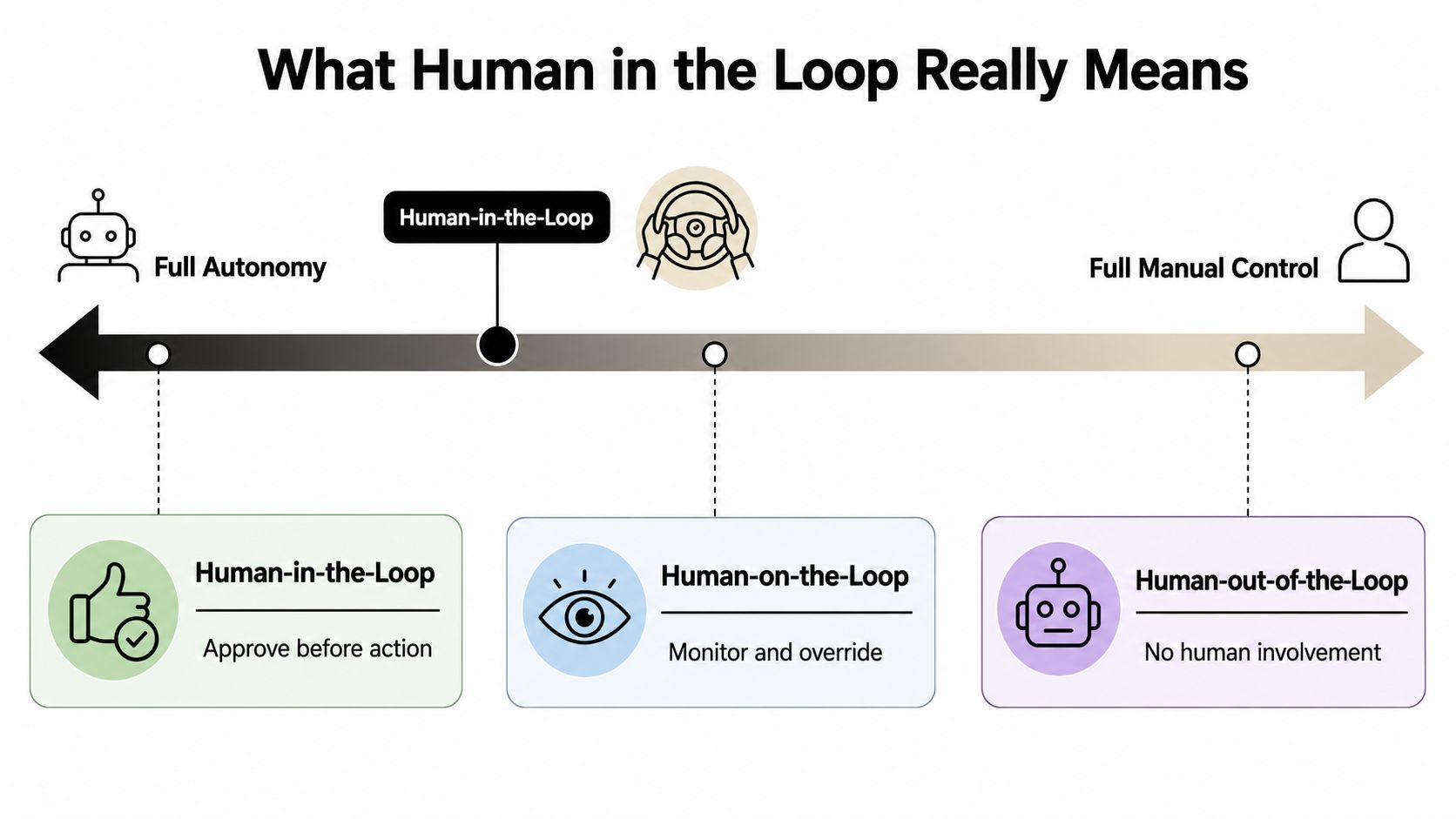
That's different from human-on-the-loop, where the agent can act while a person monitors and can intervene. In a human-out-of-the-loop setup, the agent acts autonomously without a person involved in that decision. These aren't competing definitions of responsible AI. They're different operating modes for different risks.
Consider an agent preparing a code change. It might draft a test plan without waiting for approval, provided someone can inspect the result. That's closer to human-on-the-loop. But if it's about to merge a change or trigger a deployment, a human-in-the-loop gate may be more appropriate because the action has broader consequences.
The distinction matters because oversight has a cost. Requiring approval for every routine action can slow work and make reviewers less attentive. Letting an agent proceed without a check can be a poor fit when mistakes are hard to reverse. NIST's AI risk-management framing treats human involvement as something to match to risk, and describes human-in-the-loop, human-on-the-loop, and active-learning approaches in its AI Risk Management Framework request for information.
A short definition you can use with your team is: HITL is a risk-based way to decide when an agent must pause for human judgment, when a person can monitor and intervene, and when a task can run autonomously. The point is not to put a human everywhere. It's to give people real authority at the decisions that need them.
Where to Place Checkpoints for the Best Results
Put a checkpoint at a decision boundary, where the agent's next step commits to an important direction or creates an external effect. In a coding workflow, that might mean approving requirements before implementation, reviewing a pull request before merge, or authorizing a deployment. The agent can usually handle low-risk steps between those points without asking for permission at each turn.
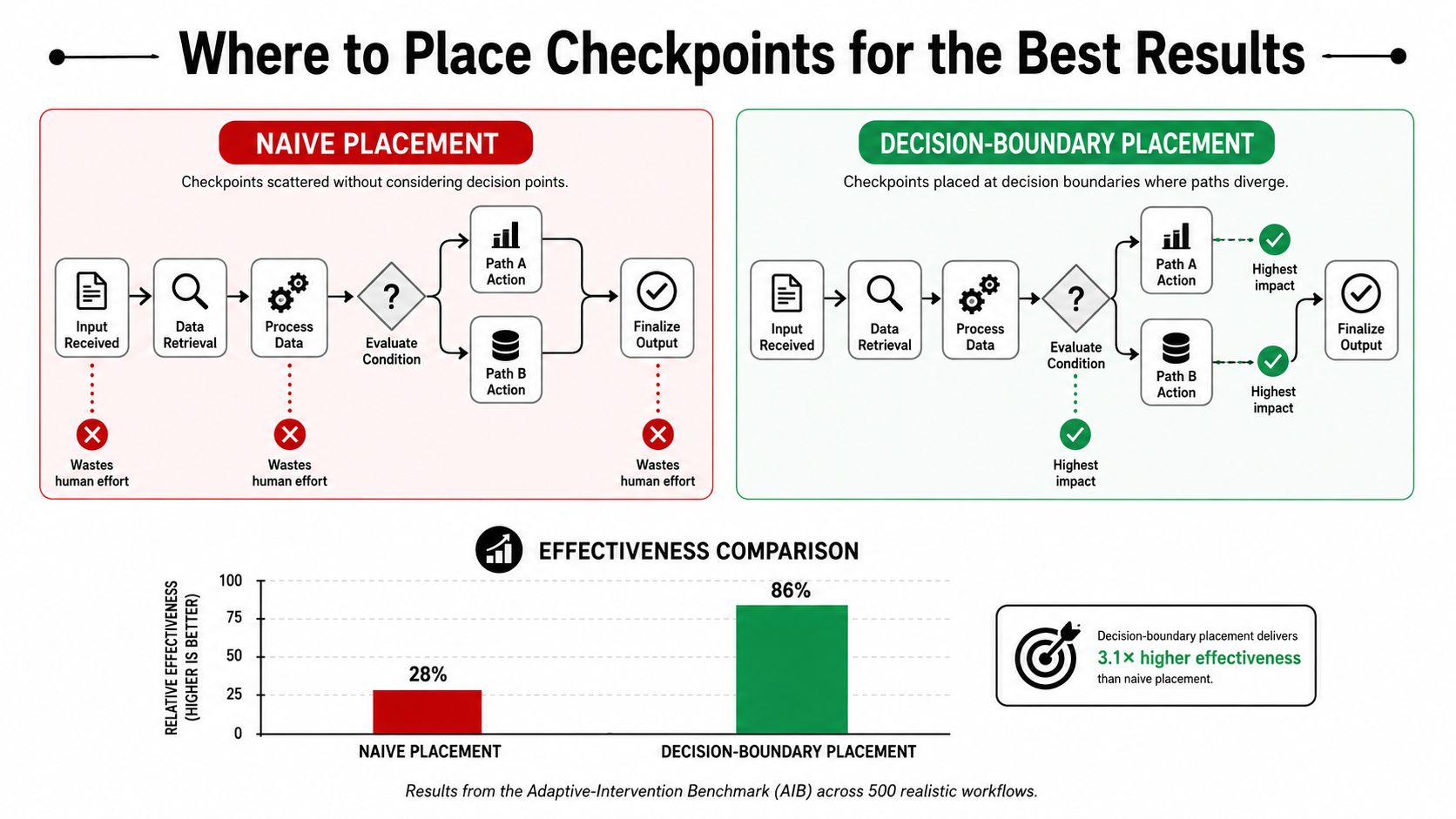
A study of 5,000 synthetic enterprise tasks compared fully autonomous execution, static human review, and adaptive intervention across financial processing, code generation, and customer-support workflows. The adaptive design routed 14.5% of decision steps to human review and achieved 98.2% task success. It also reported an 89% reduction in mean task latency compared with the static human-review baseline. These results are directional, not a promise of the same performance in every production setting. The study's adaptive-intervention benchmark supports a useful design principle: escalate selected decisions instead of pausing everything.
| Review-everything approach | Risk-triggered approach |
|---|---|
| Pauses repeatedly, including during routine work | Lets low-risk work continue |
| Can create review fatigue | Reserves attention for consequential decisions |
| Adds waiting time throughout execution | Places review where it can change the outcome |
The benchmark doesn't mean fewer interruptions are always better. If an escalation prevents a serious error, it may be worth the delay. But unnecessary requests also matter: a review that confirms an already-correct action consumes attention without improving the result.
Rule of thumb: Pause when the agent is about to commit to a consequential choice, not just because it has reached another step.
For a broader view of how those decision points fit into software delivery, compare them with the stages in an agentic software development lifecycle. Start with the places where a wrong choice would be costly, hard to reverse, or difficult to detect after the fact.
A Real Workflow Walkthrough Using Loupe
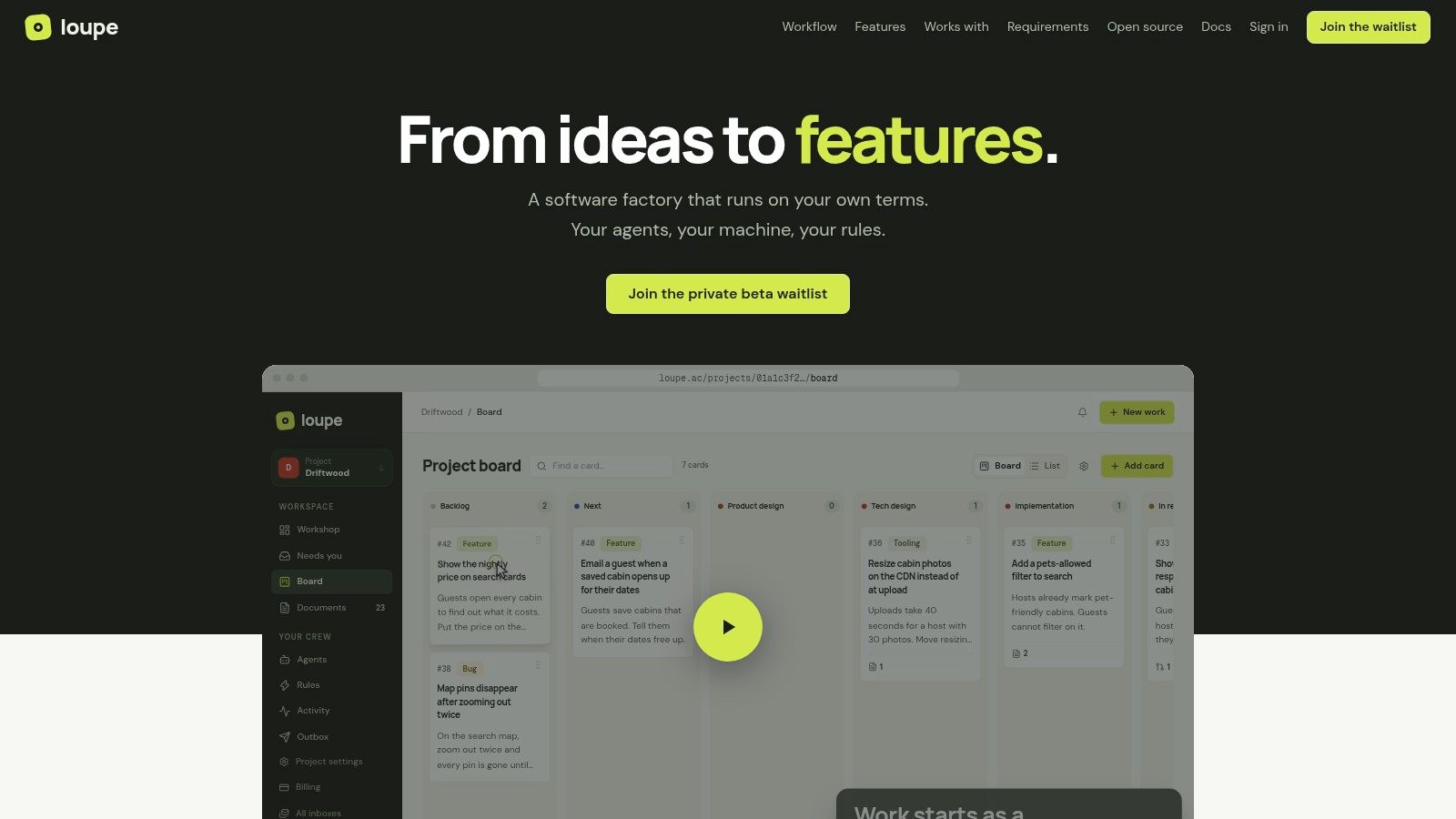
A board-based workflow makes checkpoints easier to reason about because each feature moves through defined stages, and each stage has a clear purpose. In Loupe, “You” checkpoints are concentrated in Product Design, Tech Design, and Live Review. Each asks a different human question.
Product Design checks intent
The product owner has the vision; the agent helps draw it out. A checkpoint here gives the person a chance to clarify what the feature should do before implementation builds on an incomplete or mistaken interpretation. This is a review of intent, not a request to inspect every planning step.
Tech Design checks architecture
At the technical design stage, the human answers questions from the agent and checks that the proposed architecture is sound. This is especially important when the agent's plan depends on a decision about where behavior belongs.
One recurring example in Loupe is an agent struggling to distinguish what should be configurable in a workflow from what needs to be built into the engine. A person can steer it toward the right boundary before that choice spreads into implementation. Good architecture decision records, or ADRs, and tools that check the shape of the code help the agent work within known constraints.
Live Review checks behavior
Once there's a preview to inspect, the human can judge whether the feature plays out well in use. That's different from checking whether the code matches a design. A reviewer can annotate the interface, note what feels wrong, and request changes based on the experience of the feature.
These checkpoints work because they name the responsibility: intent, architecture, behavior. Loupe's board stages and built-in “You” pauses make those review moments part of the workflow, alongside agent execution and design review. If you're comparing approaches to AI code generation tools, pay attention to whether they support review of the whole delivery path, not just code output.
When Human Review Quietly Makes Things Worse
More review doesn't automatically mean better decisions. A Stanford evaluation of hybrid human-agent problem solving found that early intervention during problem and constraint clarification could confuse a Llama-based agent and reduce performance. Human validation later, at the constraint-validation stage, produced more noticeable gains in some cases. The lesson is to consider when a person intervenes, not just whether a person is present.
A separate experiment found another risk. Participants in a human-in-the-loop condition adopted automated recommendations more often, but their decisions were less accurate than those in a delegation condition. Mean absolute deviation was 18.0 compared with 17.4, a statistically significant difference (p = 0.04) in the experiment published in PLOS ONE. A checkpoint alone didn't ensure that people caught or corrected errors.
Automation bias is the tendency to accept an automated recommendation because it seems trustworthy, even when you might miss a mistake. In a coding workflow, that can look like approving a proposed design without checking whether it matches the product need, or accepting a clean-looking change without examining its evidence.
Make reviews concrete
A useful review gives the person something specific to evaluate. Instead of asking “approve?”, show the relevant design, changed files, test evidence, unresolved uncertainty, and any external action the agent proposes. Then define what the reviewer is responsible for confirming, such as product intent or a security-sensitive behavior.
Record the rationale when someone approves, rejects, or changes the proposal. That creates a clearer account of what was decided and gives the team a way to spot repeated confusion or weak review prompts.
Keep the scope bounded. Ask a reviewer to validate a defined outcome, not to supervise every internal step. If a person can't understand what they're being asked to decide, the checkpoint risks becoming a formality rather than meaningful oversight.
Governance and Regulation You Should Already Know
Human oversight is also a design obligation for some AI systems, not just an engineering preference. Under Article 14 of the EU AI Act, high-risk AI systems must be designed so natural persons can effectively oversee them while in use. The regulation entered into force on August 1, 2024, and the provision says oversight measures should be proportionate to the system's risks, autonomy, and context. The text of Article 14 describes practical capabilities for overseers, including understanding relevant limitations, monitoring operation, detecting unexpected performance, and intervening when necessary.
That has a direct implication for agent workflows: assigning a person responsibility isn't enough if they can't see what the system is doing or stop it. A reviewer needs a usable interface, relevant information, and a genuine way to intervene. A record of the decision and the action that followed can make the control easier to examine later.
NIST's risk-based framing offers a complementary way to think about the design. Oversight shouldn't be uniform across every task. A low-risk action may be handled with monitoring or sampling, while a consequential action may call for approval before execution. The key is to connect the amount and form of oversight to the risk, rather than treating a single approval step as sufficient for every situation.
For teams, that means asking whether a checkpoint is usable in practice. Can the reviewer see what matters? Can they identify an anomaly? Can they stop or change the action before it takes effect? If not, the workflow may label a person as responsible without giving them effective control.
Building Your First HITL Checkpoint Plan
Start with decisions that are consequential and difficult to reverse. Don't begin by adding an approval to every stage. Begin by naming what the human must judge and what evidence the agent must provide.
- Approve requirements. Ask a product owner to confirm that the agent has understood the intended behavior before implementation proceeds.
- Review before merge. Check that the change matches the approved design and that the relevant test evidence is visible.
- Authorize deployment. Require a person to approve actions that affect a live environment or are difficult to undo.
Then track a small set of measures. Loupe teams look at the number of interruptions, fix rounds per feature, and spec adherence. Add time spent waiting for review and whether a review changed the proposed action. These measures help distinguish useful intervention from a checkpoint that only adds delay.
A low interruption count isn't automatically a win. It matters only if quality and auditability stay stable. The adaptive-intervention study reported an 89% reduction in mean task latency compared with static human review while maintaining a 98.2% task-success rate. That's evidence for testing decision-boundary placement, not a guarantee that every team will get the same result. See the study's latency and success-rate results.
Treat each checkpoint as a hypothesis: it should prevent a meaningful class of error or improve a decision. Review the measures, adjust the gate, and remove checks that don't help. Good oversight gives agents room to work while keeping humans in control where their judgment matters.
Loupe organizes coding-agent work across product design, technical design, implementation, and review, with workflow stages that pause for human input when a decision needs it. If you're mapping checkpoints into your own development process, visit Loupe to see how a board-based workflow can make those handoffs visible.