Kanban Board Software: 10 Picks for Engineering Teams
Compare 10 kanban board software options for engineering teams. Workflow rules, integrations, honest pros and cons, and self-hosted picks for 2026.
In this article
Cards have been sitting in In Progress for a week. The status meeting starts, and someone asks what's blocked, who's waiting on review, and whether the work has even started. The board was supposed to answer those questions already.
Good kanban board software does more than arrange cards in columns. It reflects how work moves, makes waits and blockers visible, and connects status changes to the tools where engineering work happens. The idea has roots in Toyota's pull-based manufacturing system, where work was replenished in response to actual demand, as this history of Kanban in software development explains. In software teams, that principle matters when the board shows not only what's in progress, but what can move next and what needs attention.
Kanban isn't a niche choice. The 15th State of Agile report summary found that 61% of surveyed organizations used Kanban as an agile technique, and 77% used Kanban boards. Teams also pair boards with other ways of working, rather than treating the board as a complete process by itself.
This list compares tools on two practical questions: Do workflow rules move cards without constant manual updates? Do integrations keep the board in step with code, reviews, and agent-driven work? The picks range from simple drag-and-drop boards to self-hosted options and systems designed to move work forward with coding agents.
1. Loupe
Loupe treats the board as a control surface for agentic delivery. Cards run through product and technical design, implementation, review, and a GitHub pull request, with state shown as working, waiting, stuck, or needing attention. Epic lanes keep large efforts readable without adding a column for every exception.
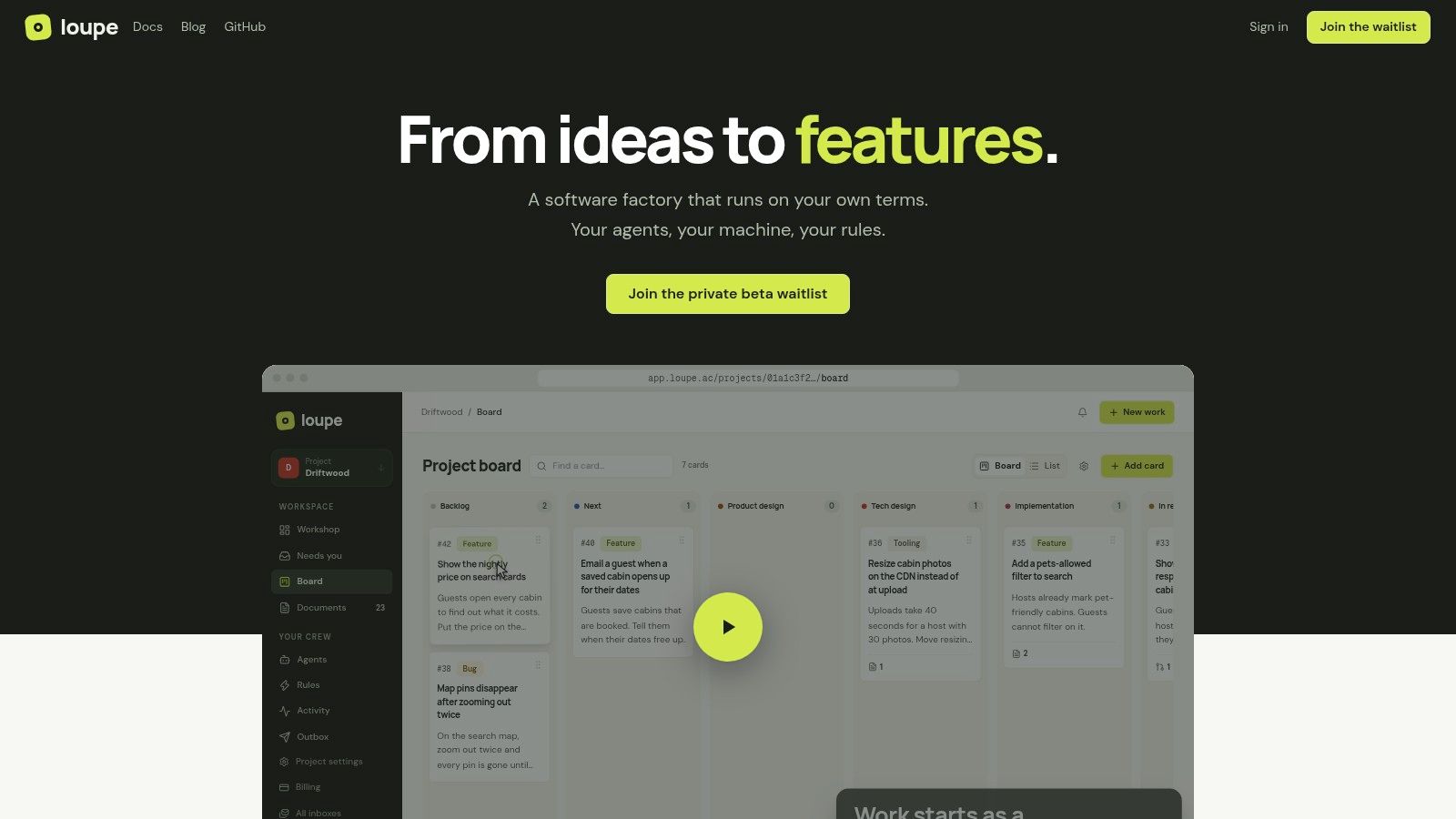
The daily test is whether cards advance because the work advanced. Loupe can let agents draft designs, build from an approved plan, and check a pull request against that plan. People can comment on design docs or annotate a preview page, and that feedback goes back to the work item instead of living in a separate thread. Rules can move cards forward and stop them where a human has to decide; the inbox collects pending reviews and questions so handoffs stay visible.
Practical rule: Let agents handle repeatable steps, but keep approval gates where product intent, security, or release risk needs a person.
For teams adopting coding agents, that approval trail matters. A software-engineering survey report describes widespread AI code-generation use alongside gaps in governance policies. On Loupe, agent activity is meant to be inspectable: cost per finished card, merge rate, fix rounds, and time to merge give a way to check whether automation is shortening delivery or only producing more review load.
Setup is the boundary. Workers run on your machine and subscriptions, with support for Claude Code, Codex, OpenRouter, GitHub, and MCP clients. The project is AGPL-3.0 and can be self-hosted with Docker Compose; the hosted service is in private beta and pricing is not listed. You need a Mac or Linux machine running the bridge, a GitHub.com repository, and Claude Code or Codex with a subscription or API key. GitHub Enterprise and other forges are not supported yet.
If your process already includes agent-authored changes, Loupe makes the board enforce the path from plan to PR. If you only need people dragging tasks between To Do and Done, the agent requirements will feel like extra machinery.
2. Jira
Jira is a work and issue tracker for teams that need their board tied to a defined engineering process. Kanban boards sit alongside Scrum boards, backlogs, project views, configurable workflows, and reporting. That breadth helps when issues need fields, permissions, automation, and a clear record of what happened.
The main advantage is that the board isn't isolated from the rest of the work. Teams can connect card movement to issue tracking and reporting, then use Atlassian products or marketplace apps to join up other parts of their setup. For an organization with several workflows, that flexibility can be valuable. A team can represent review, testing, or release as real process states rather than trying to squeeze everything into a generic “Doing” column.
The cost of that flexibility is configuration. An administrator may need to shape fields, permissions, workflows, and automation before the board feels natural. A small team that only wants to move cards through a few stages can end up maintaining more system than it uses.
Jira is a strong fit when the board is part of a wider issue-management system. It's less compelling when the team wants a lightweight view and little administration.
- Choose it for: Custom processes, issue tracking, and reporting that need to work together.
- Watch for: Setup effort and features that depend on plan and configuration.
- Test before adopting: Make sure the board reflects the actual path from intake to delivery, not an idealized workflow no one follows.
3. Linear
Linear suits teams that want the board close to engineering work without turning process into an admin project. It combines issue tracking with projects, cycles, and team workflows in a clean, developer-focused interface. Incoming work can be triaged, organized, and tied to day-to-day tasks, while GitHub integration, an API, MCP access, and agent-related capabilities can keep planning near code and review activity.
The daily test is whether cards move because work happened. In Linear, model the path from triage to build to review, then check what still needs manual cleanup. If engineers must restate pull request status by hand, the board is already drifting.
A tighter set of product concepts is the appeal and the limit. Issues, projects, and cycles give teams a shared vocabulary, but strict governance or unusual workflow rules need verification before migration. The free plan is limited to 250 issues and two teams; paid capabilities vary by plan.
A polished board helps only if it reflects the work people actually do.
For agent-assisted delivery, decide where human review sits before automating status. This guide to AI engineering workflow discusses the handoffs to consider when AI enters software delivery.
Linear works well when a focused tracker and a smooth path from planning to engineering matter more than deep customization. Try it with real triage and review work, not sample cards.
4. GitHub Projects
GitHub Projects puts planning close to the repositories where many developers already work. A project can display work as a board, table, or roadmap and include GitHub issues and pull requests alongside project ideas. Custom fields, filters, sorting, grouping, charts, and workflow automation help teams adapt a project view to their needs.
Its strongest practical benefit is avoiding duplicate records. If issues and pull requests already live in GitHub, teams can organize them in a project rather than copying status into a separate tracker. Automation can support triage and field updates, while different views let developers and leads look at the same work in different ways.
That closeness is also the main limitation. GitHub Projects fits best when engineering work already lives in GitHub. Teams seeking a standalone, highly customized workspace for broader planning may find it less suitable, and they should test whether its workflow and reporting features match how their team works.
- Good fit: Teams that want project planning connected to GitHub issues and pull requests.
- Potential friction: Work spread across other code hosts or teams that need a general-purpose workspace.
- Before rollout: Check how your current issue and review process appears on the project board, including what happens when a pull request changes state.
The base tier of Issues and Projects is available for free. That makes it practical to evaluate the board against existing engineering work before adding another project-management system. It won't automatically make a stale board accurate, though. Teams still need clear rules for which fields and statuses represent the current state of work.
5. Trello
Trello keeps the Kanban model plain: boards, lists, and cards. People can drag cards between stages and add checklists, due dates, labels, and attachments. Built-in automation and integrations through Power-Ups extend the board, while paid plans add options such as custom fields and additional views.
That simplicity is Trello's best feature. A cross-functional group can start with a board without learning the vocabulary of a software issue tracker. It's useful for lightweight projects, team coordination, and work where the card itself is the main record.
Engineering teams can hit its limits when they need a detailed development workflow. Jira and Linear are better suited to software issues, while Trello may need integrations or workarounds to connect code reviews and release activity. That doesn't make it a poor board. It means the team should be clear about whether it wants a visual task list or a system connected to the full engineering lifecycle.
Try Trello when the workflow is simple enough to explain in a few columns. If cards need to carry complex dependencies, engineering-specific data, or tightly controlled transitions, test those requirements early rather than assuming a Power-Up will solve every gap.
- The upside: A low learning curve and a free plan for trying board-based work.
- The trade-off: Advanced engineering workflows may require add-ons or process compromises.
- Check the workspace cost: Available features and costs depend on the plan and billable workspace membership.
6. ClickUp
ClickUp treats Kanban as one view inside a wider project-management workspace. Teams can switch among boards, lists, calendars, Gantt views, and other ways of looking at work. Tasks, custom fields, Docs, forms, dashboards, sprint management, automation, and integrations sit alongside the board.
This works when a team wants project planning and collaboration in one product. A board can serve the people who prefer visual stages, while other teammates use a list or calendar to manage the same work. The free plan includes Kanban boards, unlimited tasks, and unlimited members, which gives teams a way to try the product without immediately committing to a paid plan.
The trade-off is the range of options. More views and settings can mean more choices to configure and explain. Storage and features vary by plan, so a team should check what it will use and what comes with its selected tier. A minimal engineering team may find the all-in-one approach heavier than necessary.
ClickUp makes sense when Kanban is one part of a broader work-management setup. It's less attractive if the goal is a small, focused board that developers can update with almost no ceremony. Start with the stages and fields you need. Add more only when a real coordination problem calls for them.
7. Asana
A launch board can look calm while the code record drifts. Asana is strongest when product, design, marketing, and engineering need one shared plan: tasks can sit on a board, in a list, or on a calendar, with status updates and collaboration around the same work.
The useful part is coordination without forcing every team into engineering vocabulary. Rules can assign owners, move tasks, and clear routine handoffs, but test whether they react to review and agent-driven work or only nudge people to update cards by hand. Goals, portfolios, approvals, resource management, workflow, and AI features depend on plan and usage.
Asana is not a dedicated issue tracker. If developers need granular issue state, close coupling to code review, or a single source that stays in sync with delivery, verify that before rollout. Otherwise engineers end up maintaining the board plus the system of record.
Design work often needs feedback tied to intent and implementation, not another status column; a documented product design review process fits that gap better than extra automation.
The free Personal plan can suit individuals or very small teams. For a mixed group, run one real project and check total cost across team size, tier, and AI use. The pass/fail test is simple: contributors see the work they need, and developers do not keep a second, disconnected record.
8. Taiga
Taiga supports Kanban and Scrum workflows, giving agile teams a project-management option with hosted and self-managed possibilities. Its hosted plans are organized into published tiers, while private-cloud and self-managed deployment options may suit teams that want more control over where the system runs.
The choice between hosted and self-managed deployment is a real trade-off. A hosted plan avoids having the team operate the application itself. A private-cloud or self-managed setup puts more responsibility on the organization, but may better fit its deployment requirements. Taiga also supports both Kanban and Scrum practices, which can help teams using different ways of planning work.
Before settling on it, check how the product fits your engineering environment. Listed hosted tiers have storage allowances, and advanced support or dedicated hosting may require higher-cost plans or a sales discussion. Integrations and workflow details also need to match the systems your developers already use.
Taiga is worth considering for teams that want agile project management without choosing a proprietary-only system. It may be a less natural fit if the team needs deep integration with code hosting or expects the board to run a complete software-development lifecycle.
Keep the evaluation grounded in ordinary work. Put a real project on the board, test the states your team uses, and check whether developers can follow a card from intake through review without extra status copying. If the workflow feels close but not quite right, confirm which parts are configurable before asking the team to change its habits.
9. KanbanFlow
KanbanFlow puts Kanban mechanics and flow measurement at the center of the product. Boards support work-in-progress limits, swimlanes, and subtasks, while timers support time tracking. Reporting includes cumulative flow, throughput, and cycle or lead time, with an API, webhooks, email-based task creation, and integrations for connecting other systems.
That focus suits teams that want a Kanban-specific tool rather than a broad project-management suite. WIP limits give teams a way to make capacity visible, and swimlanes can separate meaningful classes of work. They work best when each lane reflects a real difference in priority or workflow. Too many categories make the board harder to scan, as this guide to Kanban swimlanes explains.
Cycle time measures how long a work item takes to move between defined points in a process. A board can help teams distinguish active work from waiting or blocked time, and see where cards are piling up. This overview of Kanban flow metrics describes how analytics can separate those parts of the process. The board makes the delay easier to investigate; it doesn't fix a bottleneck by itself.
KanbanFlow has a free version with no stated time limit. Its Premium plan adds reporting, integrations, and collaboration controls. The trade-off is scope: teams that need deep code-host integration or a full development lifecycle may need another tool alongside it. Choose it when flow practices matter more than having every project-management feature under one roof.
10. Kanboard
Kanboard is the small, self-hosted option: free, open-source, and MIT licensed. It gives you configurable columns, drag-and-drop movement, WIP limits, search and filters, subtasks, comments, attachments, and automatic actions for basic workflow rules.
Those automatic actions can move cards, assign work, or change fields when conditions are met, which removes some manual babysitting. The limit is depth. Rules stay simple, and keeping the board in step with code, reviews, or agent-driven work depends on integrations you choose, wire, and maintain.
Self-hosting shifts responsibility to your team. You control where the application and data run, and you also own hosting, upgrades, backups, and security configuration. Put a named owner on that work before a shared workflow depends on it.
- Good fit: Teams that want deployment control and no per-user subscription.
- Trade-off: A simpler feature set, with operations and integration upkeep in-house.
- Evaluate: Whether its automatic actions and integration path cover your daily flow.
If you are weighing self-managed tools, this guide to self-hosted project management helps frame the operating cost. Count admin time as part of the tool.
Kanban Board Software: Top 10 Tools Compared
| Product | Core workflow | Standout strengths | Best suited for | Pricing and deployment |
|---|---|---|---|---|
| Loupe, Recommended | Agent-led flow from product design to reviewed pull request, with human checkpoints | Design-conformance reviews, preview annotations, agent integrations, cost and quality analytics | Teams coordinating AI agents across the software lifecycle | AGPL-3.0; free self-hosting with Docker Compose; hosted service in private beta |
| Jira | Configurable issue tracking with Kanban and Scrum boards | Extensive workflows, reporting, and integrations | Engineering teams with complex processes | Paid plans; features vary by plan |
| Linear | Issues, projects, and cycles in a developer-focused workspace | Streamlined interface and agent-related capabilities | Software teams seeking focused planning and issue tracking | Free tier with limits; paid plans available |
| GitHub Projects | Boards, tables, and roadmaps linked to GitHub issues and pull requests | Keeps planning close to code and repositories | Teams already managing work in GitHub | Issues and Projects have a free base tier |
| Trello | Lightweight boards, lists, and cards | Simple setup, visual tracking, and automation | Teams needing straightforward task coordination | Free plan; paid plans add features |
| ClickUp | Boards within an all-in-one project workspace | Many views, Docs, dashboards, and task tools | Teams consolidating project and collaboration tools | Free plan; paid tiers vary in features and limits |
| Asana | General project management with board, list, and calendar views | Cross-functional planning and project coordination | Product and business teams managing varied work | Free Personal plan; advanced features on higher tiers |
| Taiga | Agile Kanban and Scrum project workflows | Hosted and self-managed deployment options | Agile teams seeking flexible deployment | Hosted paid tiers; self-managed options available |
| KanbanFlow | Kanban boards with WIP limits and flow tracking | Throughput, cycle-time, and lead-time reporting | Teams focused on Kanban practices and flow metrics | Free version; paid plan adds advanced features |
| Kanboard | Minimal, self-hosted Kanban boards | Open-source, configurable columns, and basic automation | Teams wanting a simple tool with deployment control | Free and open source; teams manage hosting and maintenance |
How to Choose Without Overthinking It
Run a real sprint through two candidates before you read another pricing page. The failure mode is familiar: a board looks clean in a demo, then engineers finish a review, merge the pull request, and still drag the card by hand because the rule engine missed the event. That is the daily tax. Pick the tool whose automation and integrations keep status truthful while code, reviews, and agent runs change underneath it.
Pick Jira or Linear when card state must follow issue state, workflow rules, and reporting. Jira suits teams that will maintain detailed workflows and accept the administration that comes with them. Linear suits teams that want fewer knobs and a tighter developer workflow.
Choose GitHub Projects when the work already starts as issues and pull requests and the board should stay close to repositories. Use Trello, ClickUp, or Asana when design, product, support, or operations also need to read and move the same work. Trello stays light. ClickUp pulls more project surfaces into one workspace. Asana handles cross-functional plans without forcing everyone into software terms.
Look at Taiga, KanbanFlow, or Kanboard when hosting model, lean scope, or Kanban practice matters more than a broad suite. Taiga covers agile delivery with hosted and self-managed paths. KanbanFlow keeps attention on WIP limits and flow metrics. Kanboard gives you a small self-hosted system and leaves uptime, backups, and maintenance with your team.
Loupe fits when the board has to coordinate agent-driven engineering with visible human approval gates. The useful check is whether execution and approval are separate stages: an agent can complete implementation, and a person still controls whether the result enters review or merges.
Judge visibility by what changes in the room. A good board makes stuck cards obvious, shows where work waits, and gives blocked items enough context for a standup to act. Use that evidence to guide the discussion, then verify movement with delivery data instead of assuming a cleaner view fixed the flow. The Lean metrics guide to identifying flow problems covers the practical use of bottleneck and blocked-work signals.
For agent workflows, compare against a baseline from your own repo history. The 2022 State of Kanban report found that 87% of respondents considered Kanban more or much more effective than methods they had previously used; treat that as user-reported value, then measure your own time to merge, review rounds, blocked time, and cost per merged card on comparable work.
Trial two boards on a real sprint before committing. Connect the tools developers already use, let automated moves fire, break a few rules on purpose, and keep the board that stays accurate when nobody is babysitting it.