Product Design Review Process That Ships Faster
A practical product design review process with clear stages, agent-assisted reviews, and engineering handoffs that cut rework without slowing teams down.
In this article
- Why Most Product Design Reviews Stall Before Implementation
- Where the Feedback Goes Missing
- The Prototype-First Rule and Why Plans Alone Aren't Enough
- Review the Plan Against Something That Moves
- Designing Review Cards and Documents That Read at a Glance
- The Card Holds the Short Version
- The Doc Holds the Heavy Detail
- Annotate the Plan Once and Let the Agent Revise Everything
- One Pass Instead of Five Threads
- What the Agent Review Actually Checks Before Engineering
- What the First Agent Checks
- Why a Second Agent Checks Conformance
- Capping Revision Rounds and Routing Questions to Your Inbox
- Set a Maximum and Make It Visible
- Give Stuck Agents a Way to Ask
- Handoff to Engineering and a Review Checklist You Can Reuse
- What Goes in the Handoff Package
- A Checklist You Can Paste Into Your Board
Your design doc got approved last Tuesday. Everyone nodded. By Friday, engineering has opened twelve threads asking what the doc means, and half the answers already exist somewhere in a comment, a chat message, or a meeting note nobody can find.
That's not a people problem. It's a product design review process problem. The fix that works is simple to state and harder to stick to. Always prototype the UI, review the plan against that prototype, then let an agent review the result before engineering commits.
Why Most Product Design Reviews Stall Before Implementation
The usual review looks fine on paper. A doc gets written, a meeting happens, someone says approved, and the card moves on. The stall starts a day later, when an engineer tries to build from it and finds the decisions were never really closed.
Where the Feedback Goes Missing
Feedback lives in too many places. One point is in the doc, one is in chat, one was said out loud and never written down. Recent survey evidence puts scale on that mess, with 90% of surveyed companies reporting delayed launches from late stage design changes and 43% of design review feedback lost across disconnected applications, as described in Machine Design reporting on design review feedback loss.
When context is lost, the same question gets debated twice. Worse, it gets answered twice, differently. The engineer builds against the second answer, the designer expected the first, and the review starts over.
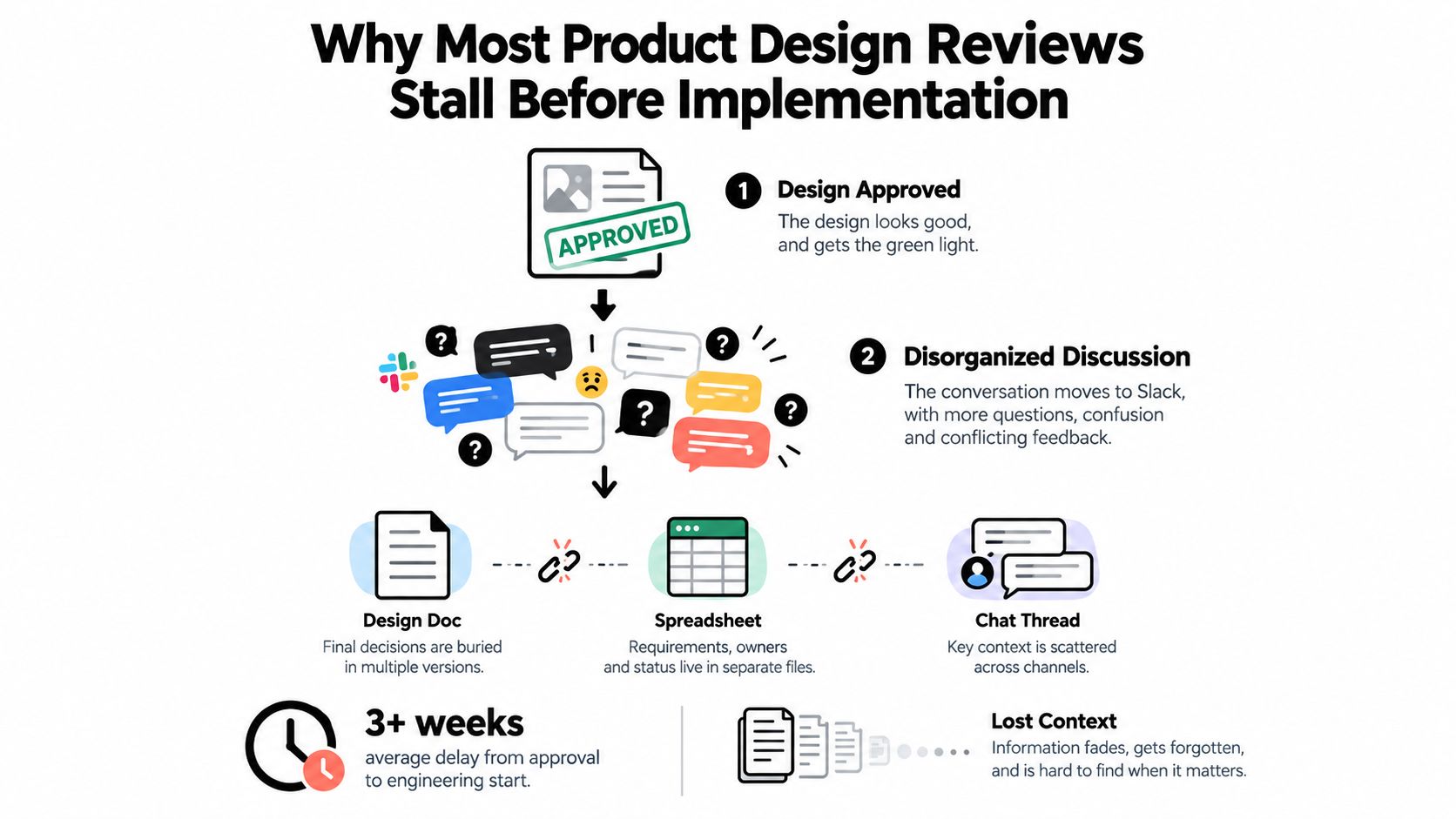
Adding meetings doesn't fix this. A meeting creates more talk, and talk is the thing that's already getting lost. What helps is keeping the comment attached to the exact part of the design it refers to, with a named owner and a clear state.
- Disconnected artifacts: The plan, the prototype, and the comments sit in three tools, so nobody sees the full picture.
- Unclear ownership: A question with no owner stays open while everyone assumes someone else holds it.
- Soft approval: Approved in principle means the hard parts were skipped, and they resurface during build.
Practical rule: If a reviewer can't point to the exact line, frame, or screen a comment belongs to, that comment will get lost.
The shift is to make the review an evidence check, not a ritual. What proof shows this design is ready? Which feedback changed which artifact? Can you trace a decision from comment to final build? If you measure anything, measure lost feedback, late changes, and fix rounds. Attendance tells you nothing.
The Prototype-First Rule and Why Plans Alone Aren't Enough
A written plan lets everyone imagine a different product. That's why reviews of text alone run long and settle little. People debate words because there's nothing concrete to disagree about.
Review the Plan Against Something That Moves
The rule we run is plain. Always prototype the UI, then review the plan against the prototype. The prototype doesn't need polish. It needs to test the one uncertainty that could kill the design.
That focus matters. Prototype work pays off when it checks an unfamiliar integration, a critical performance path, data migration, concurrency rules, or a security control, following the sequence of building a small spike, recording the result, and updating the decision in Process Street guidance on software design workflow prototypes. A pretty prototype that tests nothing is just decoration.

The money argument is strong. A software engineering synthesis puts avoidable rework at 40 to 50% of effort on contemporary projects, with roughly 80% of that rework traced to 20% of defects, in University of Maryland research on peer review and avoidable rework. The same body of work puts peer review detection at about 60% of defects, rising toward 80% with cross review.
So catch the costly defects early, while the fix is still a doc change. Once code exists, the same defect means redesign, retest, and redeploy. A prototype moves that discovery to the cheap end.
This isn't a new idea. Structured reviews became formal practice in the 1970s through Michael Fagan's inspection process at IBM, with defined roles, entry criteria, and exit criteria, as summarized in IEEE TechNav material on formal review roles and criteria. The core lesson still holds. Review before downstream commitment, judge against set criteria, and keep open issues visible until they're closed.
A prototype turns an opinion fight into an evidence check. You stop asking who sounds right and start asking what the test showed.
Spend your expert attention on the small set of risks that cause most rework. Don't review every line with equal weight.
Designing Review Cards and Documents That Read at a Glance
Reviewers skim first and read second. If your card doesn't land in ten seconds, people either bounce off it or dig in the wrong place. Structure fixes both.
The Card Holds the Short Version
A good product design card carries a clear description and not much more. It should tell a reviewer what the work is, who it's for, and what decision is needed. That's the whole job.
The detail lives in the linked product design doc. Specs, edge cases, constraints, and revision history belong there, where they don't bury the board. This split keeps the board scannable and the doc complete.
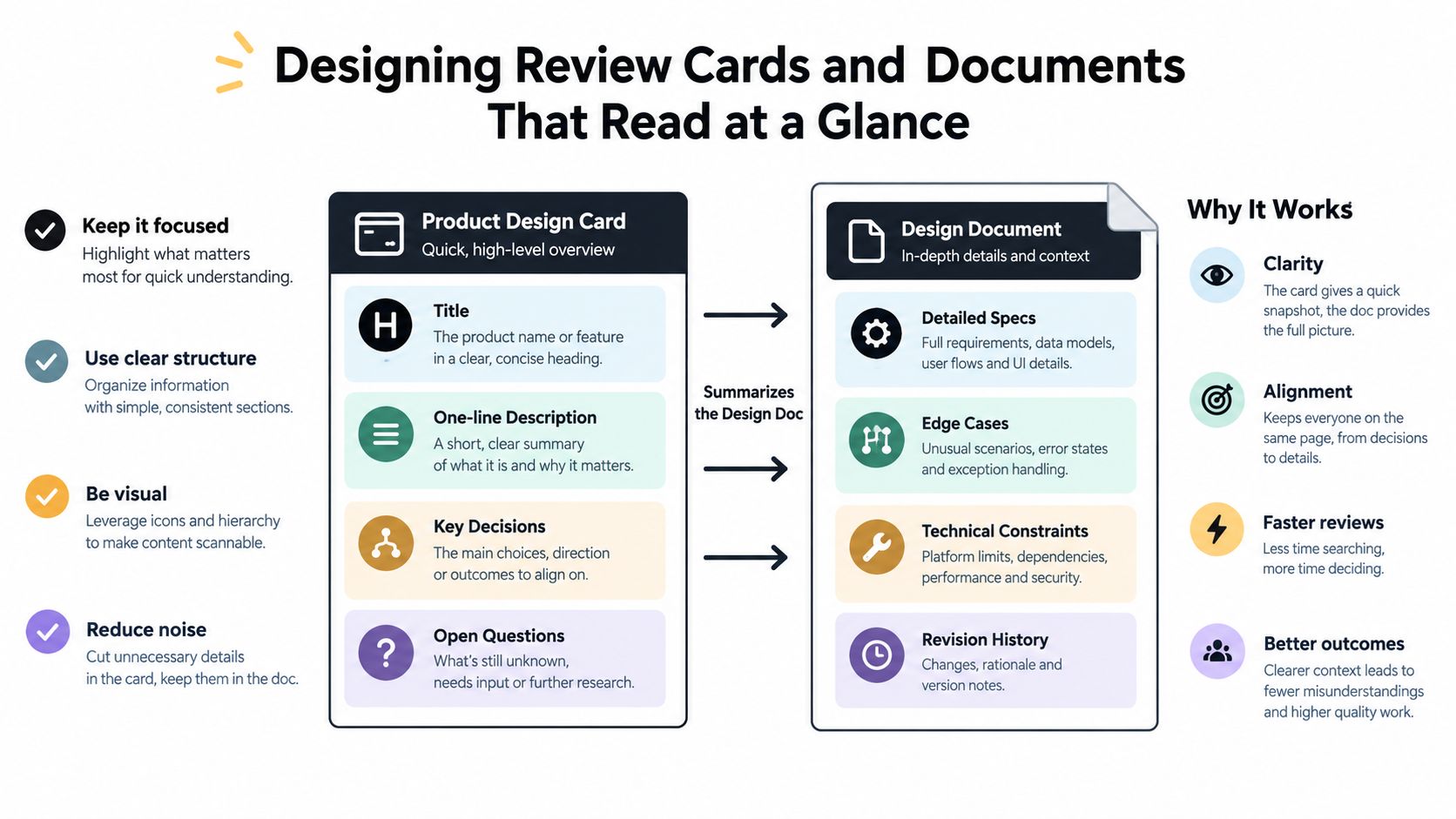
Keep the minimum set small and repeat it every time.
- Problem: One or two lines on what's broken or missing for the user.
- Chosen approach: What you're doing, stated plainly, plus the prototype link.
- Open questions: The decisions still needed, written as questions with owners.
- Links: Requirements, prior feedback, and the design doc, all in one place.
The Doc Holds the Heavy Detail
The design doc answers what the card can't. It covers error handling, data rules, technical limits, and the reasons behind the chosen path. If a reviewer wants depth, it's there. If they don't, the card already gave them enough.
Start each review by naming the decision, its purpose, and what closes it. Reviewers then check requirements, prior feedback, standards, and test evidence before arguing the hard points, which matches the structure in CoLab guidance on structured design review steps. Approval should name the exact revision it applies to.
A quick test works well. Show the card to someone fresh and ask them to say back the problem and the ask. If they can't, the description is doing too much or too little. Fix the card before you fix anything else, because every reviewer hits it first.
Annotate the Plan Once and Let the Agent Revise Everything
The old way wasted hours. I'd read a plan, copy my notes into a chat with a coding tool, ask for one section to change, then re-explain the rest. Each round lost a little context.
One Pass Instead of Five Threads
Now I annotate the plan directly. Line comments and suggested rewrites go on the doc itself, and the agent revises everything at once. No back and forth to Claude Code. That single change cut review time in half in practice, because the transfer step is gone.
Annotated feedback removes the guesswork about what a comment refers to, since the note stays attached to the exact frame, page, section, or live element that caused the issue, as set out in KROCK guidance on annotated design review feedback. The revised version links back to the original, so you can compare the two side by side.
Say a reviewer finds three problems. The empty state has no copy, the error path is missing, and a permission rule contradicts itself two sections later. In chat, that's three separate exchanges and three chances to drift. As annotations, it's one consolidated set the agent applies in a single pass, and each fix stays tied to the line that triggered it.
- Read the rendered doc: Review the plan as it will be read, not as raw text.
- Annotate in place: Mark the exact passage, say what's wrong, suggest the change if you can.
- Send it once: Hand the agent the full set through one revision request.
- Compare versions: Check the new draft against the old before you approve.
In Loupe, that loop runs on the board itself. Designs render in place for line comments and approvals, agents revise from the annotated feedback, and the discussion stays with the card. That's the mechanic. There's no magic beyond keeping the note, the artifact, and the revision together, so nobody has to reconstruct intent from a chat log later.
What the Agent Review Actually Checks Before Engineering
Human approval isn't the last gate anymore. Between approval and build sits an agent review, and it earns its place by catching the dull, costly stuff humans skim past.
What the First Agent Checks
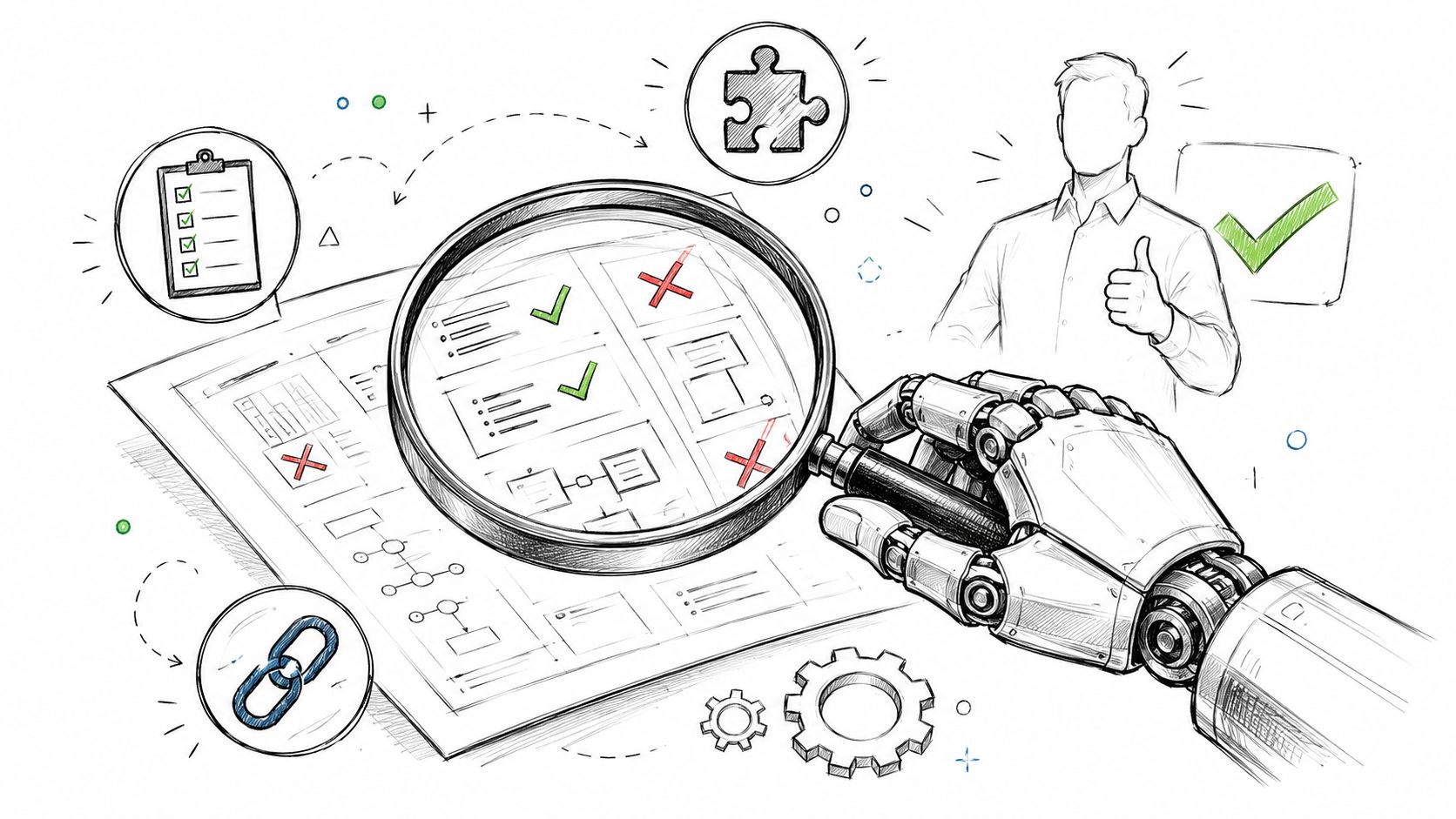
The agent works against the approved design, not from memory. It checks intent against requirements, so each requirement maps to something in the plan. It checks internal consistency, so section two doesn't contradict section five.
It also hunts for gaps. Missing error handling, undefined empty states, unclear permissions, and data rules that were never written down. These are exactly the holes that turn into Slack threads during build.
Why a Second Agent Checks Conformance
Then a second agent runs a separate pass. It compares the built work against the technical design and flags drift before any human opens the preview. One agent builds, another verifies. That separation is the point.
Speed alone doesn't justify trust. Research on autonomous coding agents found their pull requests finish fast but get accepted less often than human ones, pointing to a conformance gap, in arXiv research on autonomous coding agent pull request acceptance. Agents also introduce mistakes and security flaws, and the distance between developer and generated code makes after the fact review harder.
So stage the oversight. Humans set intent and constraints before execution, watch key decisions during it, and inspect evidence after. Reserve human judgment for high risk calls like accessibility, privacy, security, irreversible data changes, and user harm. Let agents grind through routine checks, and read up on AI code generation tools and their review tradeoffs if you're picking the stack that feeds this stage.
Don't ask whether a human is in the loop. Ask which decisions the human owns, and what evidence they see before approving.
Capping Revision Rounds and Routing Questions to Your Inbox
Reviews rarely stall because people are slow. They stall because nothing forces an ending. Comments keep coming, nobody calls it, and the work drifts.
Set a Maximum and Make It Visible
We configure a maximum number of revision and fix rounds. When the cap hits, the work either escalates to a named decision maker or goes back for redesign. It doesn't get a sixth quiet round of comments.
That cap isn't harsh. One review framework notes most creative deliverables settle within two to three revision rounds, and suggests a short decision meeting with key decision makers when comments stay open after a fifth round, per GoProof guidance on capping design revision rounds. A visible limit makes reviewers bring their real concerns early instead of saving them for round four.
Give Stuck Agents a Way to Ask
The second half is the inbox. When an agent hits a blocking question, it sends that question to my inbox instead of guessing or stalling in silence. I answer once, the answer lands on the card, and the run resumes.
That's been working really well. A stuck agent that guesses creates rework. A stuck agent that waits creates delay. A stuck agent that asks creates one small decision, which is cheap.
| Situation | Without a rule | With cap and inbox |
|---|---|---|
| Endless comments | Rounds drift with no owner | Cap forces escalation or redesign |
| Agent is blocked | Guesses or sits idle | Question lands in one inbox |
| Disagreement drags on | Another comment cycle | Short decision meeting, named owner |
This is the governance layer that keeps autonomy useful, and it's the same pattern described in human in the loop AI agents and checkpoint design. You're not reviewing everything. You're reviewing the moments that were designed to need you, and the cap guarantees those moments arrive instead of being postponed forever.
Handoff to Engineering and a Review Checklist You Can Reuse
Handoff is where the whole process either pays off or falls apart. If engineering has to ask what was decided, the review failed no matter how good the meeting felt.
What Goes in the Handoff Package
Send one package, not five links across three tools. It holds the approved design doc at the named revision, the prototype link, the recorded decisions with their reasons, the resolved annotations, and the conformance notes from the second agent. Anyone can trace a line of the build back to the comment that caused it.
The three steps carry through to this moment. The prototype proved the risky part, the plan was reviewed against it, and the agent review checked conformance before a human saw the preview. Engineering starts from evidence, not from a summary of a summary. For the wider frame behind this flow, see agentic software development from design to merged code.
A Checklist You Can Paste Into Your Board
- Prototype exists: It tests the riskiest uncertainty, and the result is recorded on the card.
- Card reads at a glance: Short description, clear ask, detail pushed into the design doc.
- Open questions answered: Each one has an owner and a recorded resolution.
- Annotations resolved: Every comment is applied, rejected with a reason, or still visibly open.
- Fix round cap set: The maximum is configured and the escalation route is named.
- Approval is pinned: It names the exact revision being handed over.
Keep it this plain on purpose. The point was never ceremony. It's that decisions stay visible, evidence stays attached, and the next person doesn't have to guess what you meant.
If your reviews keep dissolving into chat threads, put the prototype, the annotated plan, and the agent checks on one board and let the rules enforce the endings. Loupe runs that exact flow from product design through conformance review to merged pull request, with human checkpoints where they belong. See how it works at Loupe and try the prototype first rule on your next card.