AI Engineering Workflows That Ship Better Software
Build an AI engineering workflow with Loupe, from product and technical design to implementation, review, governance, and measurable delivery.
In this article
- Why AI Workflows Need a Control Loop
- Speed Without Proof Moves the Work
- Core Elements of an AI Engineering Workflow
- What Makes an AI Engineering Workflow Work
- Build the Agent-Driven SDLC in Loupe
- Step 1 Product and UX Design Session
- Step 2 Technical Design and Approval
- Step 3 Implementation and Design Conformance
- Step 4 Feature Review and Merge
- Measure Delivery Beyond Generated Code
- The DORA Trade-Off
- What We Track Per Card
- Set Human Checkpoints by Risk
- A Practical Decision Split
- Use Loupe as a Traceable Delivery Record
- One UX Card From Prototype to Merge
- Rules and Adversarial Review
- Adopt the Workflow Incrementally
- A Four Step Starting Plan
- Fix Common Workflow Bottlenecks
- The CI Bottleneck We Actually Hit
- Other Recurring Failures
- Operating Checklist
Give an agent a prompt and get a pull request. That's the popular advice, and it's incomplete. A fast pull request doesn't prove the change matches the product intent, follows the approved design, or stays cheap to maintain. A good AI engineering workflow doesn't start with code generation. It starts with a control loop that keeps intent, evidence, and approval tied to the same piece of work from design to merge.
Why AI Workflows Need a Control Loop
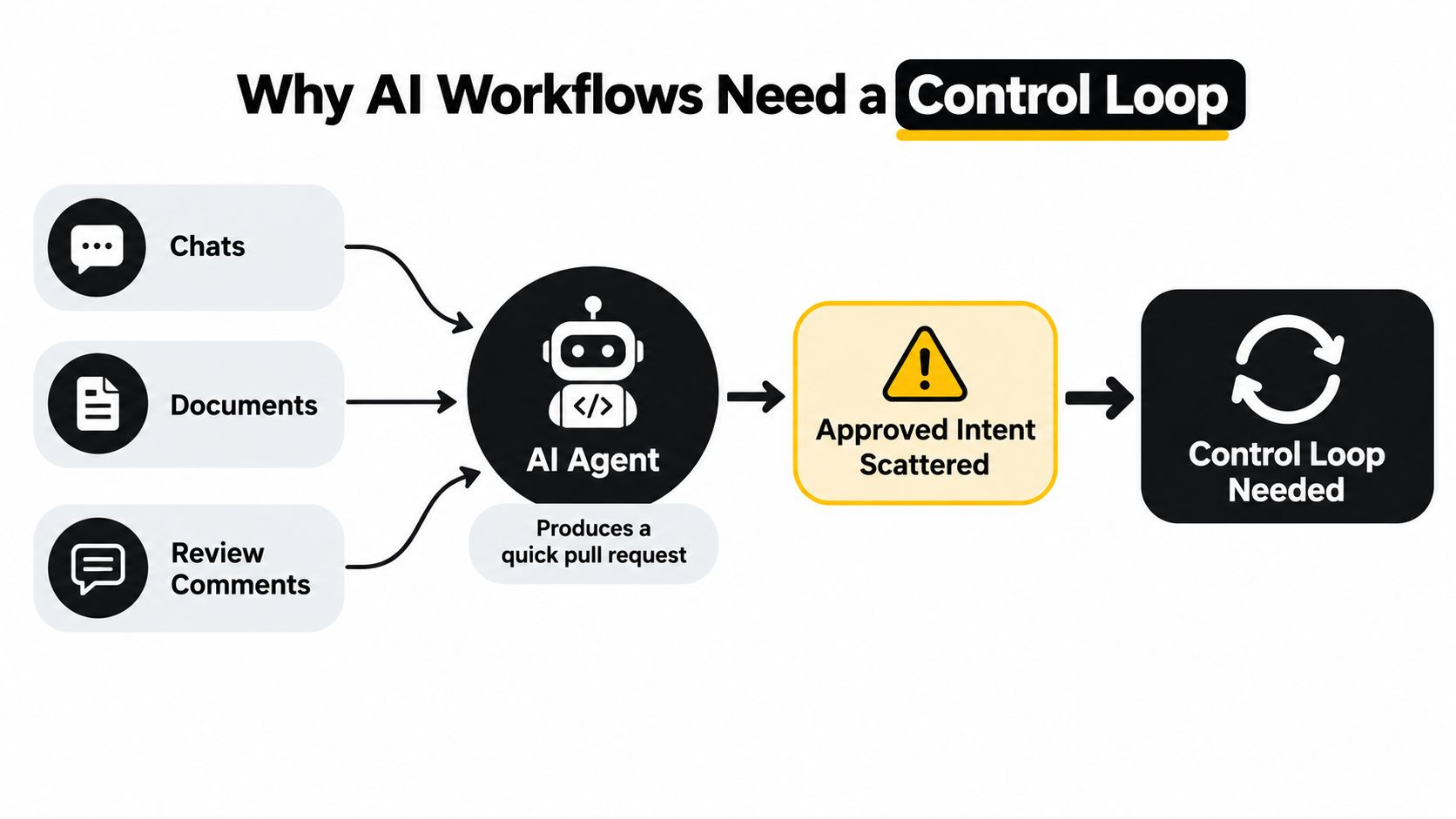
An agent can open a pull request in minutes while the actual intent sits in three places at once. A product decision lives in chat, a technical constraint lives in a document, and a correction lives in a review comment. The agent sees only part of that picture, so it builds with confidence and still builds the wrong thing.
That's the failure of a prompt to pull request chain. Each step looks fast, but nobody can prove what was approved, what changed, or who accepted the risk.
Speed Without Proof Moves the Work
Adoption is already broad. In a GitHub survey of 2,000 non-student enterprise respondents, more than 97% had used AI coding tools at work, as reported in GitHub's survey on the growing AI wave. Use is not the same as trust or control.
Speed also doesn't guarantee better delivery. In Stack Overflow's 2025 survey, about 70% of developers who use AI agents said the tools reduced time on specific tasks, yet only 38% said agents improved code quality, and 45% cited debugging AI-generated code as a major frustration, according to the Stack Overflow 2025 survey results. The gap between those numbers is the point. Generation got faster. Verification did not.
A pull request is output. It isn't evidence that the right work was done.
A control loop closes that gap. Each stage has an entry artifact, an exit check, and a named decision. The card carries the approved intent forward, automated gates check what can be checked by machine, and humans decide what needs judgment. When a check fails, the work goes back with the failure attached, not as a fresh prompt with lost context.
That's the difference between a sequence of prompts and a governed AI engineering workflow. One produces code. The other produces code with a record of why it exists, what it had to match, and what proved it was ready.
Core Elements of an AI Engineering Workflow
Think of a production line. Work enters in a defined form, moves through stations in a set order, and can't leave a station until its checks pass. A person inspects the steps where judgment matters. The line records what happened at each station.
An informal prompt chain has none of that. Context gets pasted by hand, approvals happen in chat, and state lives in someone's memory. A workflow replaces memory with a board where each card shows its stage, its state, its documents, and its open questions.
What Makes an AI Engineering Workflow Work
| Element | Delivery Purpose | Evidence |
|---|---|---|
| Source context | Gives the agent the approved intent, constraints, and repo state | Linked product and technical documents on the card |
| Staged execution | Keeps design, build, review, and merge in a fixed order | Stage and state shown on the board |
| Explicit handoffs | Makes each transfer between agents and humans visible | Named owner and artifact at each step |
| Approval states | Stops risky transitions until a person decides | A You checkpoint with a clear decision |
| Verifiable gates | Checks deterministic rules before work advances | Test results, scans, and design conformance review |
| Delivery analytics | Shows whether the system improves outcomes, not just output | Cost per card, fix rounds, hours to merge |
Two rules hold these elements together. First, agents work from bounded instructions, not open-ended permission. A card defines the task, the allowed tools, and the success check before anyone runs an agent. Second, evidence accumulates on the card itself. Test output, review notes, and approvals stay attached to the work item, so a later reviewer doesn't rebuild the story from scattered threads.
This structure starts before code. Teams that treat product and UX design as a reviewed stage, similar to a structured product design review process, give the implementation agent a target it can be checked against. Skip that stage and the first real review happens on finished code, where changes cost the most.
The mental model is simple. Cards carry intent. Agents do bounded work. Gates check evidence. Humans own decisions. Everything else in this article is that model applied in practice.
Build the Agent-Driven SDLC in Loupe
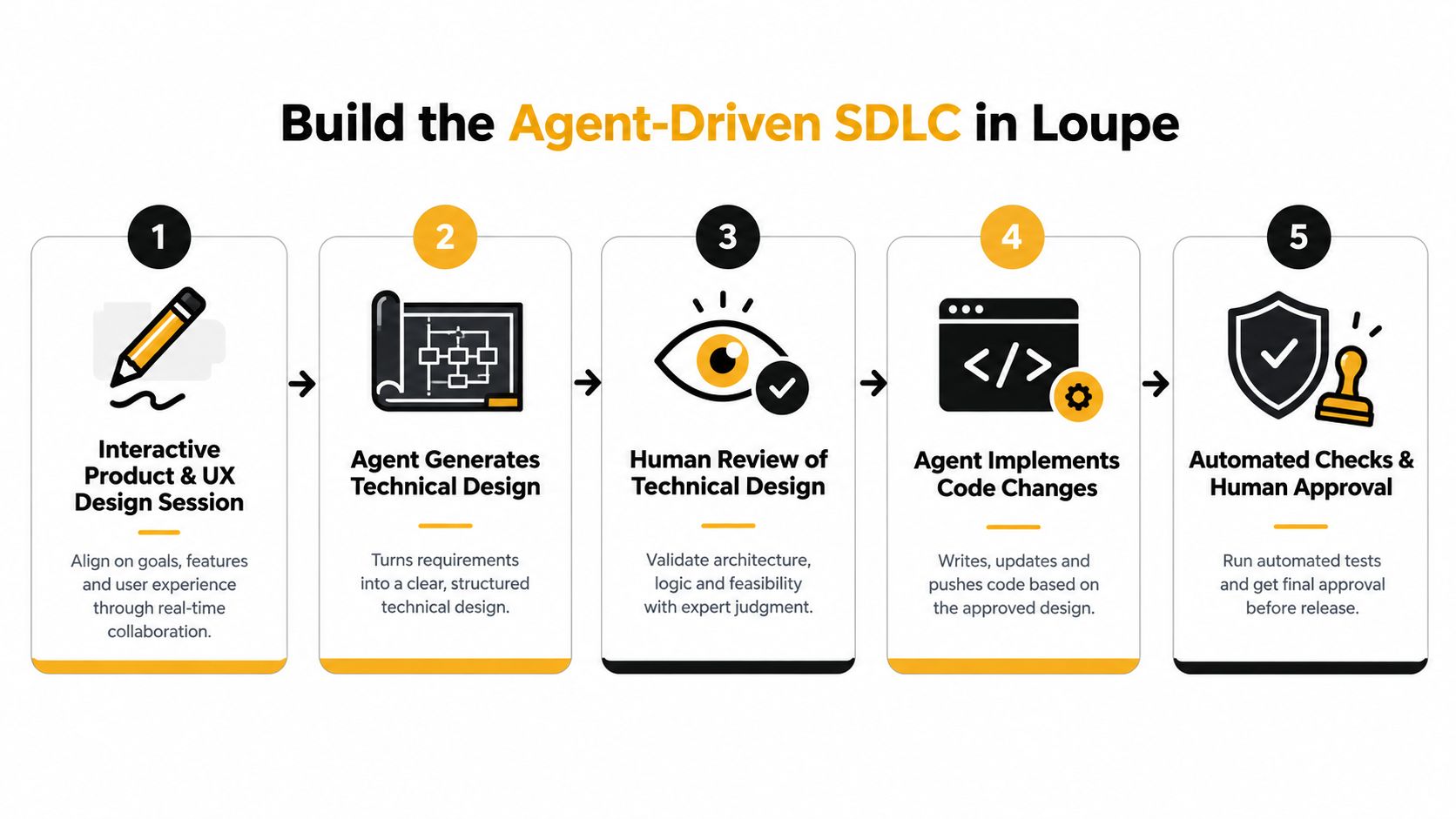
One feature shows the model better than definitions do. Here's the flow we run, in the order it happens, with the artifact and exit condition at each step.
Step 1 Product and UX Design Session
The card starts with an interactive product and UX design session. I work with the agent live, answer questions, and shape the feature before any technical choices get made. The artifact is a product design the agent can point to. The exit condition is simple. The design says what the feature does, who it's for, and what it deliberately doesn't do.
Step 2 Technical Design and Approval
Next, the agent generates a technical design from the approved product design. I review it and approve it, or send it back with comments. This is the first hard checkpoint, and it matters most. An error caught in a design document costs a rewrite. The same error caught after implementation costs code, tests, and review time.
The sequencing here reflects how limited agents still are on hard tasks. SWE-bench Verified holds 500 human-validated software-engineering tasks, and GPT-4o resolved 33.2% of tasks with the strongest evaluated scaffold, per OpenAI's introduction of SWE-bench Verified. An agent that solves a minority of benchmark tasks shouldn't choose its own architecture unchecked. It should implement against a design a person approved.
Step 3 Implementation and Design Conformance
After approval, a worker agent implements the feature and opens a GitHub pull request. A second agent then reviews the change against the approved technical design. This check is narrow on purpose. It doesn't ask whether the code is clever. It asks whether the code matches what was approved.
Using separate roles here has support beyond our own setup. A three-agent protocol with a coder, a reviewer, and a critic that audits the review through structured disagreement achieved the highest pass rate on LiveCodeBench while using fewer agents than a five-agent baseline, as described in the adversarial review protocol paper. Disagreement between agents surfaces weak agreement that a single reviewer waves through.
Step 4 Feature Review and Merge
Then I review the feature, not the code. I use the running preview in its site context and check behavior against the product design. Line by line code review is the agent review's job and CI's job. My job is judging whether the feature does the right thing.
- If it matches, I approve and Loupe merges the pull request.
- If it doesn't, my feedback goes back on the same card and the agent revises with full context.
- If the card is stuck or waiting, its state says so on the board, and the open question sits in one inbox instead of a chat thread.
Each handoff has the same shape. Artifact in, check, decision, artifact out. Nothing advances on an agent's claim that it's done.
Measure Delivery Beyond Generated Code
Lines of code and pull requests opened are activity metrics. They tell you agents are busy. They don't tell you the team ships better software, and tracking them alone can hide real harm.
The DORA Trade-Off
Google's 2024 DORA research found that 75.9% of respondents relied on AI for at least part of one or more daily responsibilities, yet a 25% increase in AI adoption was associated with a 1.5% decrease in delivery throughput and a 7.2% reduction in delivery stability, alongside a 3.4% improvement in code quality and a 3.1% increase in code-review speed, according to Google Cloud's announcement of the 2024 DORA report. Read that carefully. Review got faster and code quality rose, while throughput and stability fell.
That's not a contradiction. Faster implementation pushes more work into review, testing, and deployment. If those stages don't scale, queues grow, batch sizes grow, and rework eats the gain. Your AI engineering workflow has to measure the whole system or it will optimize the wrong part.
DORA's guidance points the same way. A 25% increase in AI adoption was also associated with a 7.5% improvement in documentation quality, per DORA's guide on innovating with generative AI, which reinforces that gains show up in some places and costs show up in others. You need both columns.
What We Track Per Card
- Cost per finished card, counted only when work is accepted and merged
- Fix rounds, the number of correction cycles before approval
- Hours to merge and merge rate, which expose queue and review problems
These numbers make model choice an experiment instead of an opinion. We ran Claude versus Sonnet as the implementer and saw an 80% gain in cost per card. That result only means something because both models ran under the same card definitions, same design approval, and same acceptance checks. Change the harness and the comparison is noise.
External benchmarks argue for the same discipline. In one code-review benchmark, Claude Code achieved a 32.1% pass rate, ahead of Devin at 24.8%, PR-Agent at 23.1%, and Codex at 20.1%, and even combined tools resolved only about 41.5% of issues found by human reviewers, per the code-review benchmark study. Pick models on completed, accepted work in your own repo. A deeper breakdown of that math sits in our LLM cost comparison.
Rule for model tests: same repository snapshot, same test command, same permissions, same success check. Otherwise you're comparing setups, not models.
Set Human Checkpoints by Risk
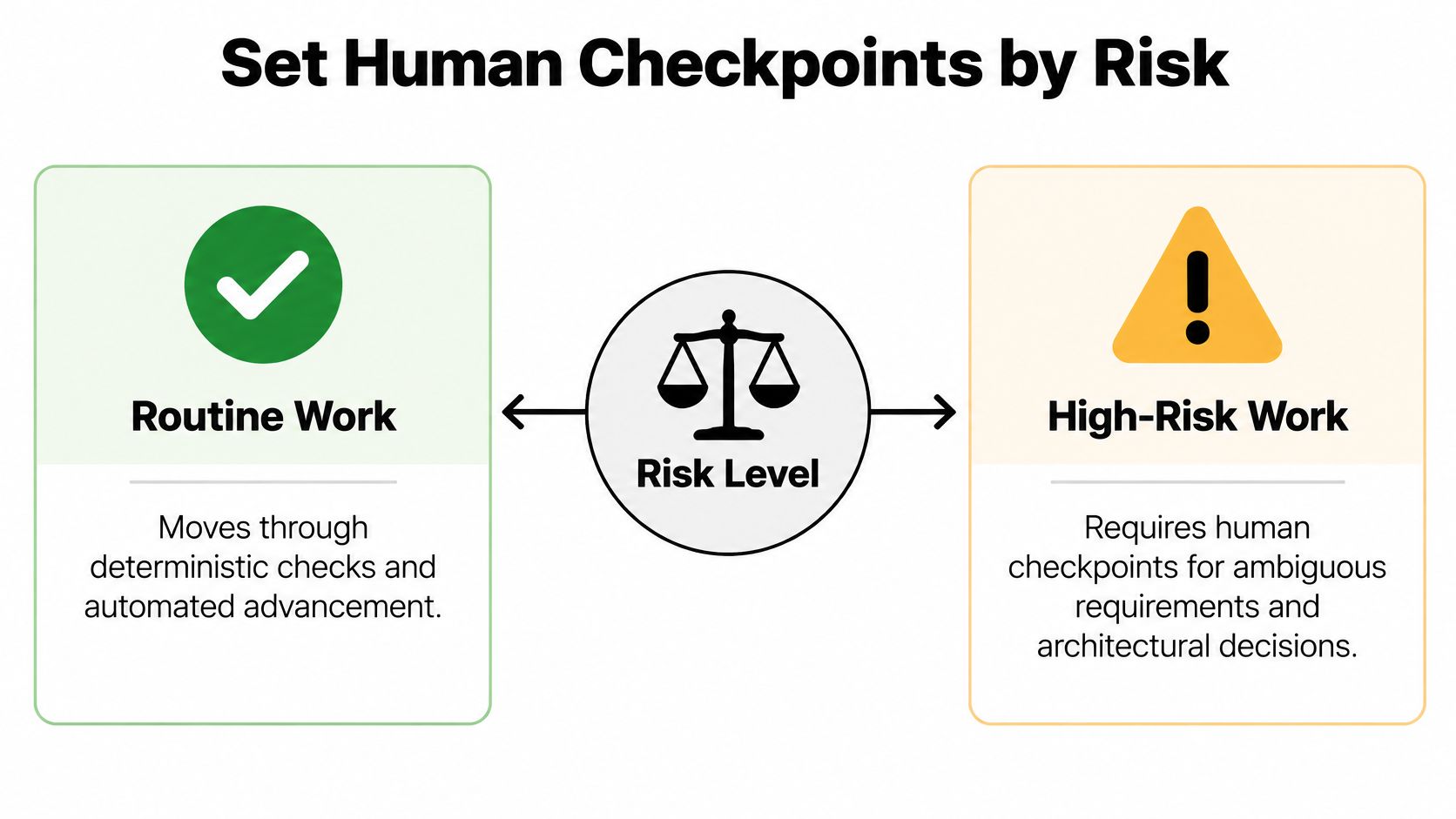
Full autonomy and full manual approval both fail. One ships unchecked work. The other makes agents pointless. The middle path is checkpoint policy based on risk and reversibility.
The caution in the market supports this split. Enterprise research found security and compliance were the leading AI-agent challenges, cited by 39% of respondents, and fewer than half of organizations automated QA, security, and compliance testing, as summarized in the enterprise agent governance research. Teams worry most about exactly the changes that deserve a human gate.
A Practical Decision Split
Let agents proceed automatically when the change is low risk and easy to reverse. Documentation edits, isolated tests, and formatting can move through deterministic gates like type checks, unit tests, and security scans without waiting on a person.
Require named approval when the change is hard to reverse or easy to get wrong:
- Database migrations, authentication, payments, and infrastructure
- Externally visible UX that customers will judge directly
- Ambiguous requirements where the spec leaves a real choice open
- Failed or flaky validation, where the evidence itself is in doubt
A checkpoint only works if it's designed, not ceremonial. A card labeled You should state the decision required, link the supporting artifact, show the test or review evidence, and name the allowed next actions. Approve, request changes, or take control. If the reviewer has to hunt for context, the checkpoint is a bottleneck wearing a governance costume.
Human review also catches things agent review doesn't. A study of 278,790 review conversations across 300 open-source GitHub projects found human reviewers added feedback on understanding, testing, and knowledge transfer, and exchanged 11.8% more review rounds for AI-generated code than for human-written code, per the study of human feedback in agent-supported review. More rounds on agent code is a signal, not a nuisance. It says the work needs more scrutiny, so budget for it.
Place human checkpoints before irreversible transitions. Design approval, merge, and production release. Let automation handle everything deterministic in between. Our longer treatment of this balance is in the guide to human-in-the-loop AI agents.
Use Loupe as a Traceable Delivery Record
Traceability sounds like paperwork until something breaks. Then the only question that matters is who approved what, based on which evidence. A board that keeps stage, documents, questions, and actions on one card answers that in seconds.
One UX Card From Prototype to Merge
Take a UX change. The card starts with a prototype and linked product documents. The agent drafts the technical design, and I comment on specific lines in place rather than in a separate doc. Suggested rewrites stay attached to the passages they concern, and the agent revises from those notes.
During implementation, questions don't scatter. Anything waiting on me, a review, a decision, a blocked question, lands in one inbox. I can answer, resume the run, or take control of the card and work with the agent live. When I hand it back, the card keeps everything that happened while I held it.
At review time, I open the preview deployment and annotate the actual UI elements. A note on a button goes back to the same card, tied to that element. The agent revises against feedback that points at the thing itself, not a screenshot described in chat.
Rules and Adversarial Review
Configurable workflow rules keep this consistent. A rule can advance a card when its gate passes, request work from the next agent, or stop the card at a You checkpoint. The same policy applies to every card, so progression doesn't depend on who remembers the process.
The single automation that removed the most manual work for us was adversarial agent review. A reviewer agent checks documents and implementations against the specification and pushes back before I ever see them. It saves hours by ensuring better document quality and spec adherence, because the first draft that reaches me has already survived a hostile read.
Governance isn't extra process on top of the work. It's the record the work leaves behind as it moves.
That record is the product of the workflow. Requirement, design, approval, pull request, preview feedback, merge. Every step has a location and an accountable actor, human or agent. When a change causes trouble later, you don't reconstruct the story. You open the card.
Adopt the Workflow Incrementally
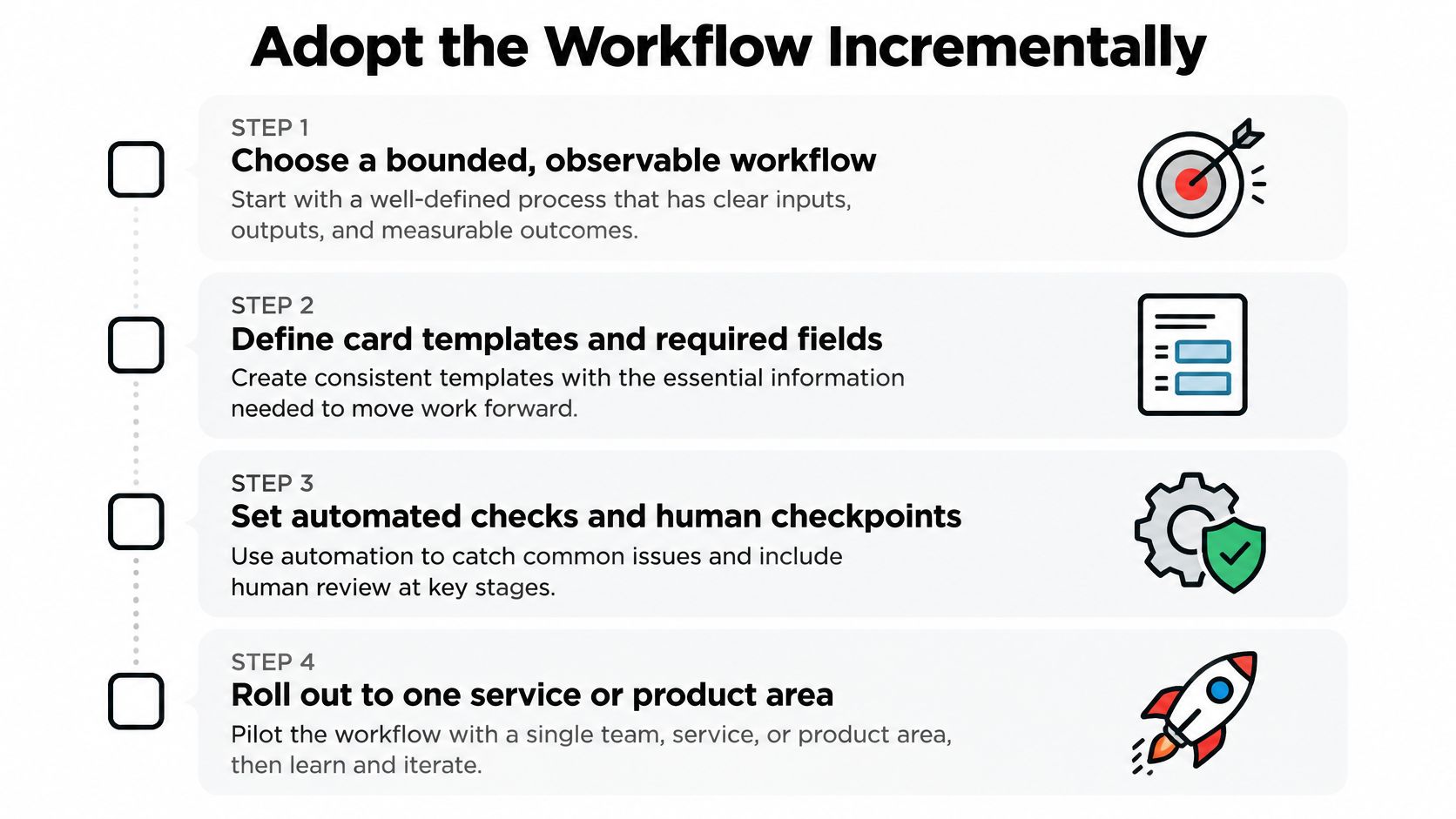
Don't migrate everything at once. Pick one service or one product area where work is frequent, observable, and painful enough to matter. A bounded rollout gives you a baseline and a place to fix your templates before they spread.
A Four Step Starting Plan
- Define the card. Set templates with required artifacts per stage, the exit condition for each stage, agent permissions, and who owns each approval. Write the You checkpoints into the template, not into team habit.
- Connect your existing tools. Loupe works with Claude Code, Claude Design, Codex, OpenRouter, GitHub, and MCP clients, so agents you already run plug into the board instead of being replaced by it.
- Choose your deployment. Self-host with Docker Compose running web, worker, and Postgres components if you need data control. Or use the hosted version in private beta if you'd rather not operate it. Self-hosting matters for distributed teams that can't send code and documents to a third party.
- Baseline before you judge. Record current cost per card, fix rounds, hours to merge, and merge rate for a few weeks. Then compare. Review the exceptions, the stuck cards and the repeated fix rounds, instead of celebrating raw agent output.
Keep cards and pull requests small during the rollout. Small batches limit the damage when an agent gets it wrong and shorten the loop between feedback and fix. A workflow that's easy to correct beats a workflow that's ambitious and opaque.
Expand only when the first area runs clean. Clean means cards rarely sit in waiting without an owner, checkpoints get answered with evidence attached, and your metrics move on accepted work. Then copy the templates to the next area and adjust the risk rules to fit it.
Fix Common Workflow Bottlenecks
Most workflow failures repeat. Each one has a specific cause and a specific fix, and none of them is fixed by a stronger model.
The CI Bottleneck We Actually Hit
Our analytics showed agents spending most of their time running the full CI locally. They were being careful in the most expensive way possible, burning time and tokens re-running checks that the CI would run anyway. The fix was to change their skills and hooks so they run only the checks required for the change and rely on the actual CI environment for the rest. Agent time dropped back to implementation, where it belongs.
The lesson generalizes. When a stage is slow, check what the agent is doing inside it before you blame the model.
Other Recurring Failures
- Fragmented context: intent lives in chat, docs, and comments. Fix it with one card holding linked documents and every decision.
- Weak spec adherence: the implementation drifts from the design. Fix it with adversarial review against the approved spec before human review.
- Ambiguous ownership: work waits because nobody knows who decides. Fix it with visible You checkpoints that name the decision and the owner.
- Slow UX feedback: reviewers describe screenshots in text. Fix it with annotations on the preview itself, saved to the card.
- Inconsistent advancement: cards move when someone remembers. Fix it with board rules that advance or pause work the same way every time.
- Useless model comparisons: each model gets different tasks and checks. Fix it with identical cards, test commands, and acceptance criteria.
Operating Checklist
- Before implementation, is there an approved design on the card?
- Before review, did automated gates and design conformance pass?
- Before merge, did a named person approve with evidence attached?
- Every week, do cost per card, fix rounds, and hours to merge get reviewed?
An AI engineering workflow succeeds when verification keeps pace with generation. Agents will keep getting faster. That only helps if your control loop proves, at every stage, that the fast work is also the right work.
Loupe gives your team that control loop in one board, with staged cards, agent handoffs, human checkpoints, and per-card cost and quality analytics from product design to merged pull request. Run it self-hosted or through the hosted private beta and see how your own workflow holds up. Start at Loupe.