AI Agent Context Management: Techniques, Costs and Accuracy
Learn AI agent context management: memory, windowing and retrieval, and how each one changes accuracy and cost.
In this article
- What Context Means for an AI Agent
- What gets sent on each step
- Session context isn't permanent memory
- Pick a Context Technique for Each Stage
- Context techniques compared by cost, accuracy and use
- Choose the trade-off deliberately
- Match the technique to the stage
- Why Agents Miss Facts Buried in Long Context
- Capacity and reliable recall aren't the same
- Arrange context around the next decision
- Run a position test
- How to Build a Layered Context System
- Create records an agent can recover
- Make the handoff testable
- What Should Never Enter Shared Context
- Separate authority from evidence
- Set rules for promotion into memory
- Metrics That Show Whether Context Works
- Context metrics and what each one reveals
- Compare policies without changing everything else
- Make the next decision small
Your coding agent has read the repository, run the tests, and started fixing the build. Then it forgets the requirement you gave it at the start: keep the existing login flow unchanged. You repeat yourself, pay for another run, and wonder why an agent with a large context window missed something so basic.
AI agent context management is how you control what the agent sees, remembers, and retrieves. Done well, it helps you avoid paying to resend useless logs while keeping important decisions available. It also sets a security boundary between approved instructions and untrusted material.
What Context Means for an AI Agent
Think of the agent's context as a working desk. The context window is the fixed amount of information the model can use at once, measured in tokens, which are pieces of text rather than whole documents.
Say a coding agent reads 20 files, runs tests, and receives a 300-line build log. By turn 40, your requirement from turn 1 sits beneath a pile of old output. These are example task sizes, but the desk problem is real: conversation, file reads, searches, and command results compete for space.

What gets sent on each step
An agent usually works in a loop: inspect the current context, choose an action, receive a result, and continue. Without filtering, each new request carries the growing desk back to the model, increasing the input it must process.
GitHub's Copilot CLI documentation describes a practical control: tool output larger than 20 KiB goes into a temporary file, while the model receives a file path and preview. The agent can inspect the full output when it needs an exact error.
Session context isn't permanent memory
Keep these jobs separate:
- Session context: The current task, recent actions, and active failures. You can compact or discard it after the run.
- Durable memory: Repository conventions, approved decisions, and user preferences. These need rules for storage, updates, and deletion.
GitHub's description of Copilot sessions and Memory makes this distinction between active conversation context and longer-term repository understanding.
Context management means deciding what stays on the desk and what goes into a drawer the agent can open on request.
Pick a Context Technique for Each Stage
Context techniques compared by cost, accuracy and use
Each technique controls what the agent can use for its current step. Its cost depends on how much context it carries or retrieves, and its correctness risk depends on what it hides or summarizes.
| Technique | What It Keeps in Context | Cost Effect | Main Correctness Risk | Best For |
|---|---|---|---|---|
| Full transcript | Every message and tool output | Cost rises with every turn | Key requirements get buried | Very short tasks |
| Sliding window | The last N turns only | Capped and predictable with a turn-size limit | Early requirements are dropped | Chat with no long goal |
| Observation masking | Agent actions, with older tool output hidden | Can reduce repeated input from tool output | Hidden evidence may need recovery | Long coding runs |
| Summarization | A short summary of older turns | Lower input volume, but each summary call costs tokens | Summaries can drop exact constraints | Long discussions and planning |
| Retrieval (vector or key-value search) | The top few snippets for the current step | Low per step when results stay bounded | Misses when the search query is weak | Large document sets and past decisions |
| External durable state | Approved decisions, requirements, and review findings | Small, fixed core prompt with task evidence added | Only as good as what was saved | Multi-stage workflows |
| Subagent isolation | Only a short result returned to the main agent | Each subagent incurs its own cost | Limits leakage and bloat, but may omit evidence | Parallel or tool-heavy subtasks |
Choose the trade-off deliberately
Full transcript needs no separate memory system. For a small edit, keeping the conversation intact may be worth the growing prompt.
A sliding window bounds working history by dropping older turns. For a long task, store the original requirements elsewhere so they remain available.
Observation masking hides older tool results while preserving the agent's actions. Keep the current failure visible and leave a pointer to older evidence, so the agent can recover it if needed.
Summarization suits discussions with repeated proposals and explanations. Store exact constraints separately: “support existing accounts” may omit a detailed compatibility rule.
Retrieval loads evidence for the current question instead of the whole library. In the LongBench v2 study, Qwen2.5-72B-Instruct improved by 4.1 percentage points with a 32k-token retrieval context compared with the full 128k-token context without retrieval-augmented generation.
External durable state carries decisions across fresh sessions. It needs maintenance: an outdated design can steer an agent toward outdated behavior.
Subagent isolation keeps an investigation's searches and logs away from the main agent. Ask for evidence and unresolved questions, not just a conclusion.
Selection rule: Keep exact requirements, compress discussion, and fetch evidence when the current task needs it.
Match the technique to the stage
A stage boundary is a good time to assemble a fresh working set, like handing the next person a concise folder of approved decisions and relevant evidence.
- Product design: Save the approved product document and accepted decisions as durable items. Keep rejected ideas out of the active requirements.
- Technical design: Start with the approved product document, technical constraints, and open questions.
- Implementation: Use observation masking for repetitive tool output. Keep the approved design available and write a short handoff when execution stops.
- Review: Supply the approved design, current changes, and latest findings. Reviewers should not have to reconstruct the goal from build history.
This stage-based approach fits agentic software development, where agents carry work through distinct stages rather than sharing one endless chat. For pull requests, Loupe recommends a second GitHub account for agents, so you can approve their work.
Why Agents Miss Facts Buried in Long Context
Say a reviewer flags an authorization problem at turn 3 of a 60-turn run. The agent later fixes the layout but leaves that problem untouched. The comment is still present, yet the agent hasn't applied it.
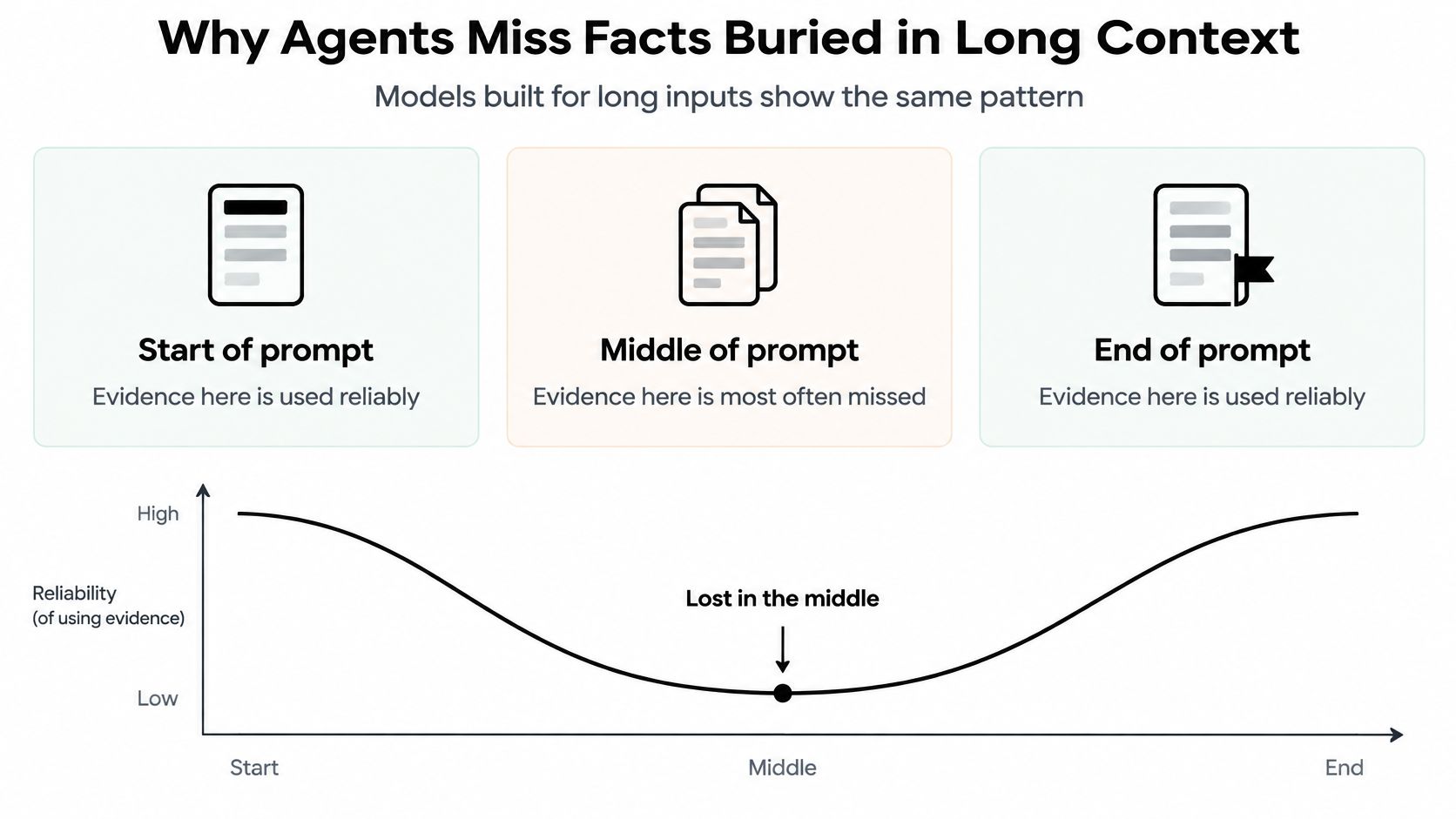
The Lost in the Middle study found that models generally used relevant evidence most reliably near the beginning or end of a prompt, with substantially weaker performance in the middle. That pattern also appeared in models designed for long inputs, across multi-document question answering and key-value retrieval.
Capacity and reliable recall aren't the same
A context limit tells you how much can fit. It doesn't promise that the model will apply every detail correctly.
Context rot describes declining recall as the input grows, even before the window is full. In a coding task, this can look like an agent repeating a rejected approach after reading more files and logs.
The LongFuncEval benchmark reports these ranges across its evaluated settings:
- 7% to 85% performance drops as the number of available tools increased.
- 7% to 91% retrieval degradation as tool-response length increased.
- 13% to 40% degradation as multi-turn conversations became longer.
These ranges describe benchmark conditions, not a forecast for your repository. They identify useful stress tests: a crowded tool menu, lengthy responses, and a growing conversation.
Arrange context around the next decision
For the authorization fix, place the current objective and acceptance criteria near the beginning. Put the latest blocking feedback near the end, where the agent receives its next action request.
Summarize stale discussion instead of repeating the whole debate. Keep the raw review comment retrievable so the agent can verify its exact scope.
A requirement being present isn't the same as the agent following it.
Run a position test
Try a quick position test with a representative prompt. Put a critical requirement near the beginning, then move the same wording into the middle while keeping the rest unchanged.
Check whether the agent follows it in both versions. For example, ask it to add a settings page without changing login behavior, then inspect the proposed files and tests for that boundary.
If adherence changes, improve prompt assembly before increasing the context budget. Repeat the check with another task so a lucky response doesn't become your default policy.
How to Build a Layered Context System
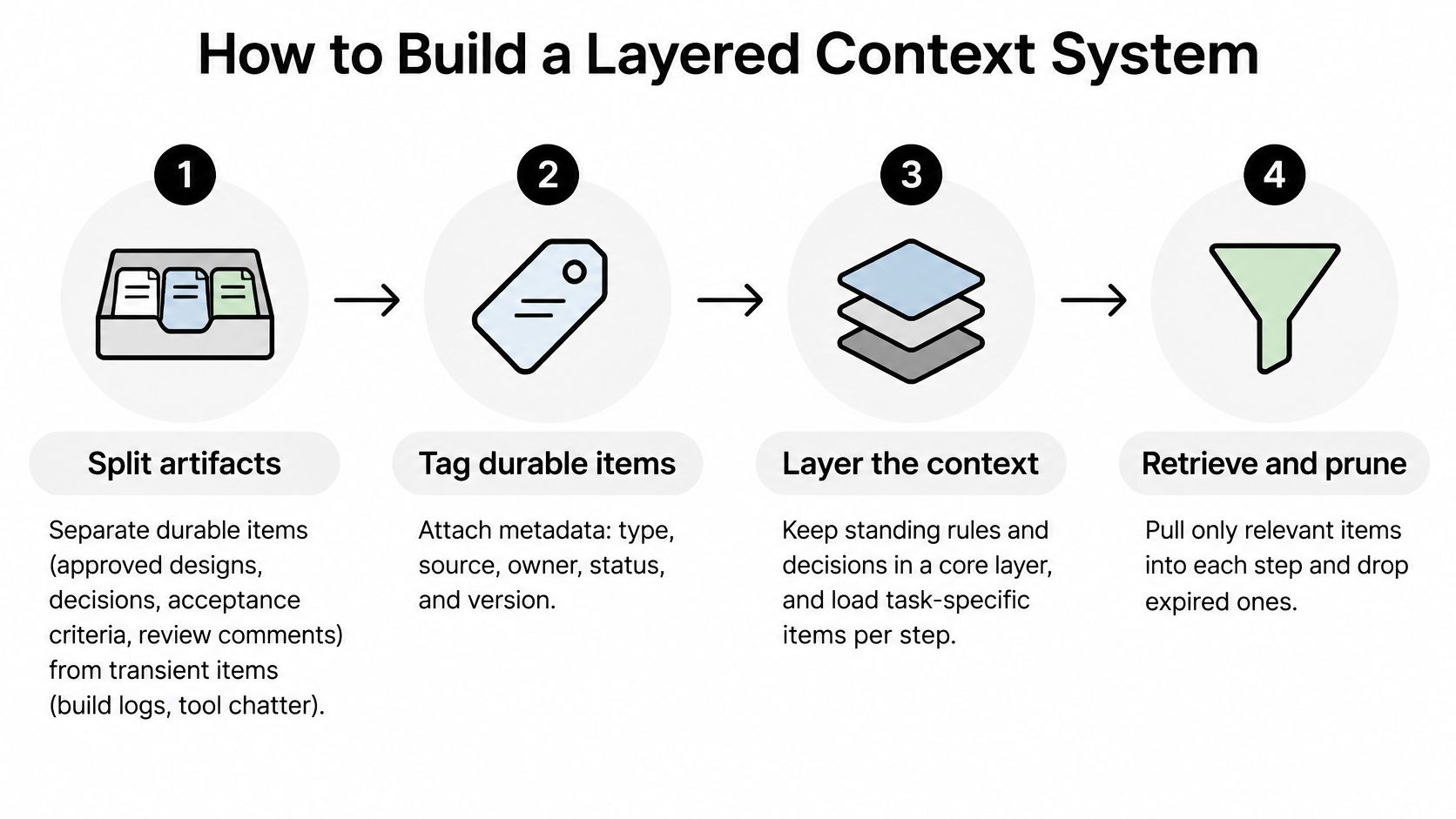
Build memory as a small set of records the agent can query, not a transcript it must reread. For a settings-page task, that means separating the approved behavior from temporary installation errors and exploratory searches.
The agent-memory benchmark paper compares approaches including windowing, external key-value storage, graph-based episodic memory, and compression-based summarization. It evaluates retrieval quality alongside faithfulness, memory footprint, and latency, which is a better starting point than judging whether a summary sounds polished.
Create records an agent can recover
Split durable artifacts from transient output. Store approved designs, decisions, acceptance criteria, and accepted review findings separately from build logs and tool chatter. This prevents a successful test run from displacing the requirement it was meant to verify.
Attach card, repository, commit, stage, author, and timestamp to each durable item. These fields let the agent distinguish a current decision from a similar note about an older change.
Link each summary to its raw source. A summary of an account-permission rule should point to the approved document or review comment, so the next agent can check the original wording.
In our workflow, the implementation worker writes notes tagged
build-notes. A fix round answers each review finding with evidence under a Review answers section, which the next agent review checks. This gives the reviewer a specific response to inspect rather than a general claim that the work is finished.Write a compact handoff at each stage change. Include the objective, constraints, decisions, open questions, changed files, and verification evidence, because another worker can't infer decisions that remain only in your local conversation.
Retrieve a small ranked evidence set for the current stage. For example, start with three to five items: the approved design, the relevant decision, and the latest blocking findings. Treat that as a trial configuration, not a universal optimum.
Compress older discussion, but retain access to exact details. If a summary says the new settings page supports account administrators, retrieval should still answer whether that means organization owners, delegated administrators, or both.
Persist confirmed facts and expire session details. Save an approved repository convention, but don't turn an agent's untested guess about the authentication layer into a permanent rule.
Make the handoff testable
A useful handoff states what remains uncertain. “Tests pass” is weaker than naming the test command, its result, and the behavior that hasn't been checked.
For the settings-page example, record whether the agent tested permission changes, whether browser review is pending, and which commit the evidence describes. Then the next worker can continue from known state rather than rerunning every investigation.
Handoff check: Could a fresh worker explain the goal, the remaining blocker, and the evidence without reading the full conversation?
If not, improve the record before adding more history. A clear handoff costs writing effort, but it gives you something concrete to review, correct, and reuse.
What Should Never Enter Shared Context
More shared memory isn't always better. If an agent saves an instruction hidden in a repository file, the next stage may treat that instruction as a trusted decision.
Say a README contains a line telling the agent to ignore prior rules and push to main. The agent copies it into a planning summary, saves that summary, and a later worker reads it without the original file context. An untrusted observation has become an apparent instruction.

Separate authority from evidence
Use different handling rules for these groups:
- Trusted decisions: Approved requirements and human decisions, with a named owner and clear scope.
- Untrusted observations: Repository files, issue comments, web content, browser feedback, tool results, and agent-generated notes.
Untrusted doesn't mean useless. A compiler error is valuable evidence, but it has no authority to change your deployment policy.
A security evaluation of isolated agent execution reported 2.19% attack success when external data and subtask traces were isolated and only schema-validated JSON crossed the boundary, without additional defenses; broader evaluations reported 0.78% on AgentDojo and 4.25% on ASB. The work also distinguishes persistent injected instructions from irrelevant or verbose observations that degrade decisions.
Schema validation isn't a complete defense. A correctly shaped field can still contain malicious text, so validate allowed values and keep permissions separate from content.
Set rules for promotion into memory
- Record provenance: Keep the source, trust status, and approval history attached to each item.
- Set retention and deletion rules: Temporary browser output should have an expiry, while superseded decisions should be marked inactive.
- Require human approval: An untrusted observation must not become a durable instruction just because an agent summarized it.
Use human-in-the-loop agent checkpoints where observations become binding decisions. Promote typed artifacts such as approved requirements or accepted findings between stages, not complete transcripts.
Keep the execution configuration explicit, too. In our workflow, a worker sees only what you push, so you must read the lifecycle file, correct the guesses, and commit it.
Metrics That Show Whether Context Works
Context metrics and what each one reveals
| Metric | What It Measures | Context Problem It Reveals |
|---|---|---|
| Cost per finished card | Total model spend for a completed task | Bloated prompts from unfiltered tool output |
| Fix rounds | Review cycles before a change passes | Lost requirements or stale context |
| Hours to merge | Elapsed time from start to merged change | Slow recovery when state is missing |
| Retrieval recall at k | Share of needed evidence in the top k results | Weak search queries or wrong chunking |
| Design-conformance failures | Defects against the approved design | Buried requirements or lossy summaries |
| Answer faithfulness | Whether a summary or answer matches its source | Summaries that change scope |
A good result lowers spend or completion time without increasing missed requirements, unsupported answers, or review failures. Cheaper prompts aren't an improvement if the team pays for more repair work.
Compare policies without changing everything else
Choose a baseline and a candidate policy. For example, compare a full transcript with observation masking plus a structured handoff.
Keep the model, tools, review rules, and task mix stable. Otherwise, you won't know whether better results came from context handling or from an easier batch of work.
Use a practical trial:
- Choose a limited scope: Pick a board or repository with familiar review rules.
- Match the work: As an example trial size, assign each policy about 20 cards with a similar mix of UI work, bug fixes, and integration changes.
- Track the complete cost: Include implementation, summarization, subagent work, review, and failed attempts when calculating spend.
- Inspect failures: Read repeated review findings and compare summaries with their original requirements.
Use an LLM cost comparison to understand model pricing separately from context-policy effects. A model swap and a context change can move the same metrics, so don't combine them in the first test.
Make the next decision small
For a starter experiment, run the policies over two weeks and compare cost per finished card and fix rounds side by side. Add a manual check that each completed change still matches its approved design.
Don't adopt a policy because it won on average cost alone. Look for expensive exceptions, such as a summary that dropped a permission constraint or retrieval that repeatedly missed a current decision.
Small batches can mislead, especially when a difficult integration lands in only one group. Repeat the test with another matched batch before changing the team default.
Loupe offers a board-based workflow for coding agents across product design, technical design, implementation, and review, with human checkpoints and per-card analytics. Visit Loupe to explore a workflow where approved documents, review findings, and cost per finished card give you concrete ways to evaluate context handling.