AI Agent Observability: Metrics and Traces
AI agent observability that tracks cost per card, tokens in and out, fix rounds, traces, and A/B model tests so you can see what actually shipped.
In this article
- Why Agent Logs Are Not Enough
- Follow the card, not the last message
- Metrics That Show a Finished Card
- Read cost and review effort together
- Count fixes that resolve findings
- How to Trace and Instrument One Agent Run
- Set up the execution path
- Capture useful fields without copying everything
- Use a span field checklist
- What A/B Experiments Reveal About Models
- Make the comparison fair
- Investigate failures before choosing
- Who Approved the Agent and Why
- Record permission at each card transition
- Connect approval to the approved version
- Start With Cost, Fixes, and One Experiment
- Set a practical acceptance check
89% of organizations had implemented some form of agent observability, but only 62% had detailed tracing of individual steps and tool calls, according to a 2026 Second Talent report citing LangChain survey data; offline evaluation reached 52.4% versus 37.3% for online evaluation, while organizations already running agents in production reported 94% observability adoption, 71.5% full tracing, and 44.8% online evaluation.
The gap matters because seeing activity isn't the same as understanding a result. For coding agents, useful observability should prove that a work item finished, show what it cost, and explain who allowed it to continue.
Why Agent Logs Are Not Enough
Say a coding agent picks up a card to add a password-reset screen. Its log says the implementation completed and a pull request opened. The card looks healthy.
But the work has burned a day. The agent retried a failing tool, rewrote the same file, and paused for a person who never saw why their approval was needed. The final log line hides the expensive parts.
A log is a record of an event. A trace connects events into an execution path, so an engineer can follow the work from its starting objective to its final outcome.
Follow the card, not the last message
An agent run isn't a single request. It plans, calls a model, uses tools, retries, passes work to another agent, and stops for approval. Each action can succeed while the overall card still fails.
A tool might return stale information without raising an error. The model might produce valid code that doesn't match the approved design. A handoff might lose the review comment that explains the required change.
A log that says failed is weaker than a trace that identifies the model call, tool, prompt growth, state change, or handoff behind the failure.
Logs still help. Keep useful error messages and operational details, but attach them to the relevant trace and span rather than leaving them in a separate pile.
AI agent observability combines that execution history with measures of accepted work. A busy agent isn't necessarily a productive agent, and a successful model response isn't proof of a finished card.
The practical starting point is a small set of outcome-linked metrics, a trace that preserves the whole work item, and an experiment view that helps you choose a model based on results.
Metrics That Show a Finished Card
Agent metrics that tie a run to a finished card
| Metric | What to count | What a bad number means |
|---|---|---|
| Cost per finished card | Input tokens, output tokens, tool calls, and time, priced for the whole card | A cheap model that creates extra review still costs more |
| Tokens in | Tokens sent on each model call, including replayed context and tool results | The prompt is growing every loop |
| Tokens out | Tokens generated by the model | Answers are long, retried, or off task |
| Fix rounds | Review cycles until the change passes, with evidence for each finding | The agent is not matching the approved design |
| Time by activity | Minutes in design, implementation, review, tool waits, and human waits | A particular stage, not necessarily the model, is the bottleneck |
| Latency P50 / P95 / P99 | Duration by model and workflow stage, plus time to first token if streaming | Investigate provider slowdown and prompt growth separately |
| Tool-call count | Named tool spans and retries or timeouts | The agent is looping on the same tool |
| Merge rate | Share of cards that merge after review | Activity is high but accepted work is low |
| Human interventions | Times a person must take the card or answer a question | The workflow is pausing more than the rules expect |
Start with four numbers a manager can read without a tracing degree: cost per finished card, tokens in, tokens out, and fix rounds. Add time spent in each activity so you can explain delays rather than only reporting them.
Read cost and review effort together
Cost per finished card covers the whole run, not an isolated API response. Calculate model charges from token counts multiplied by the applicable provider price table, then account for billable tools and execution costs.
Keep human effort visible alongside that spend. If you price review time, label the estimate and use a consistent rate. Otherwise, show review time separately rather than pretending API spend is the total delivery cost.
A cheaper model can lose if a reviewer repeatedly sends its work back. Compare cost with fix rounds before deciding that a lower bill means better performance.
Input tokens include instructions, prior context, and tool results sent to the model. As Span Observer's guide to agent cost and OpenTelemetry explains, replaying context and tool results can increase input usage on each loop; GenAI conventions also expose model, provider, operation, and tool names.
Output tokens measure what the model generates. Long output isn't automatically wasteful, but repeated explanations or discarded code are reasons to inspect the run.
Count fixes that resolve findings
A fix round should answer a review finding with evidence the next reviewer can check. Don't count every file edit as a separate round.
In our process, the implementation worker writes build notes tagged build-notes. A fix round responds to a finding under a “Review answers” section, which the next agent review checks.
Time by activity separates implementation from review, tool waits, and human waits. That distinction prevents you from blaming a model for a card that spent most of its life awaiting a decision.
Use the supporting rows to diagnose the cause. Percentile latency reveals slow outliers, tool counts expose repeated attempts, and merge rate and interventions show whether activity becomes accepted work.
For concrete task patterns, the AI agent examples guide helps connect these measurements to recognizable workflows.
Keep a summary row per finished card, backed by its detailed calls. Cutting tokens or latency isn't a win if the change creates more review work.
How to Trace and Instrument One Agent Run
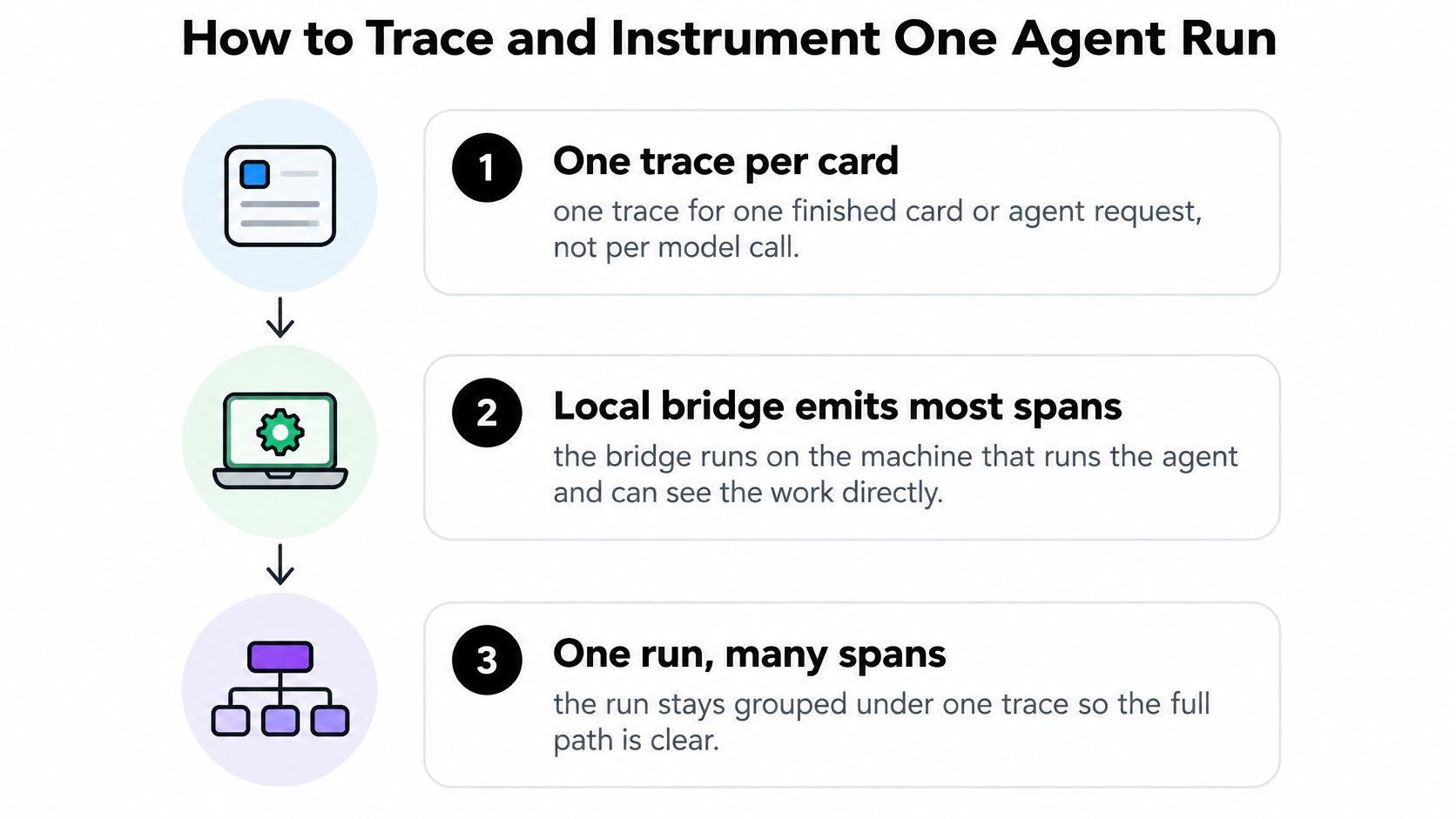
A trace ties the work on one card together, from its first action to its final outcome. Each span records a timed operation within that trace, such as a model call, tool use, or review step.
Set up the execution path
Create a trace for each card or agent request.
Use the work item as the top-level boundary, then record its ID, start and end times, and final outcome.Define “finished” before collecting data. For a coding card, opening a pull request may be only a checkpoint. If work resumes later, connect the new activity to the same card rather than creating an unrelated history.
Instrument the boundaries each component controls.
The agent runtime, tool wrapper, or workflow service should emit spans for the work it handles. Add manual instrumentation where no component records a boundary.A recorded tool call does not necessarily include model usage, a remote handoff, or a browser approval. Check the trace for these gaps and add the missing events.
Carry the trace ID across the workflow.
Pass it through design work, review comments, tool calls, pull-request creation, agent handoffs, and human checkpoints. Each component should preserve the card relationship when it records an event.Keep task and parent-task identifiers as well. The OpenTelemetry GenAI agent convention proposal distinguishes a task objective from execution actions and includes relationships involving agents, artifacts, and memory. These links help you investigate whether a problem came from a decision or from the context available to the agent.
Add child spans for model calls, tools, and agent steps.
Nest each span under the step that caused it. A tool retry belongs to the operation or agent step that initiated it.For example, an implementation agent runs a test, reads the failure, and changes a file. Record those actions in order. If a reviewer requests a correction, connect the new work to that finding.
Capture useful fields without copying everything
Record metadata by default.
Model spans need model and provider identity, input and output tokens, latency, and errors. Tool spans need the tool name, duration, status, and retry count.Keep prompts, completions, source code, and tool payloads out of routine traces. You can selectively capture content from failed or sampled runs, but first redact sensitive fields, limit access, and use references to protected artifacts where possible.
Roll child usage up to the parent trace.
Sum model usage across the card, while retaining retries, fix rounds, and activity durations. The daily.dev guide to agent traces, costs, and tool failures describes how parent and child spans support a run-level view.Avoid adding a parent's aggregated usage to its children's totals. Track elapsed time separately from summed activity time: parallel agents can accumulate more active time than the card's wall-clock duration.
Use OpenTelemetry names when exporting.
Apply the GenAI semantic conventions supported by your instrumentation, then add workflow fields such as card ID and review outcome. Keep standard model and token attributes instead of replacing them with private names.
Record the convention version so changes to instrumentation do not alter dashboard queries.
Check project readiness before agents run.
A readiness guide can list what a project needs before agents can work on it, such as a connected agent, a ready bridge, and the agent account that pushes code.Treat readiness as an operational check. Confirm that the expected account performs the work and that each trace reaches your backend with its card association intact.
Use a span field checklist
Fields to put on each span
| Span | Fields to record | What you can answer |
|---|---|---|
| Parent card or request | Trace ID, card ID, start and end, final outcome | What did this work item cost, and did it finish? |
| Model call | Model, provider, tokens in, tokens out, latency, error | Which call was slow or expensive? |
| Tool call | Tool name, duration, status, retry count | Which tool failed or repeated work? |
| Human checkpoint | Who acted, timestamp, approve or send-back | Who allowed the agent to continue? |
Record the document version or commit used at each step, not just a link that always opens the latest version. Otherwise, you may inspect a corrected document instead of the stale context the agent received.
Capture check: A trace should show recorded actions and evidence. It should not claim to expose the model's private reasoning.
Open a completed trace and follow it in order. You should be able to find the evidence for each step, locate a failed child operation, and distinguish agent work from human-assisted work.
If the graph stops at the pull request, the review boundary is missing. If it contains only model calls, instrument the tools and workflow transitions too.
What A/B Experiments Reveal About Models
Tokens per solved task differed by up to 40-fold in an evaluation of three coding-agent harnesses and two language models on 50 Terminal-Bench Pro tasks, while paired pass-rate differences were 0–8 percentage points and generally weren't statistically distinguishable from zero.
That isn't a promise that your team can achieve the same savings. It shows why similar success rates don't imply similar resource use. The task can stay unchanged while the model and harness produce very different execution paths.
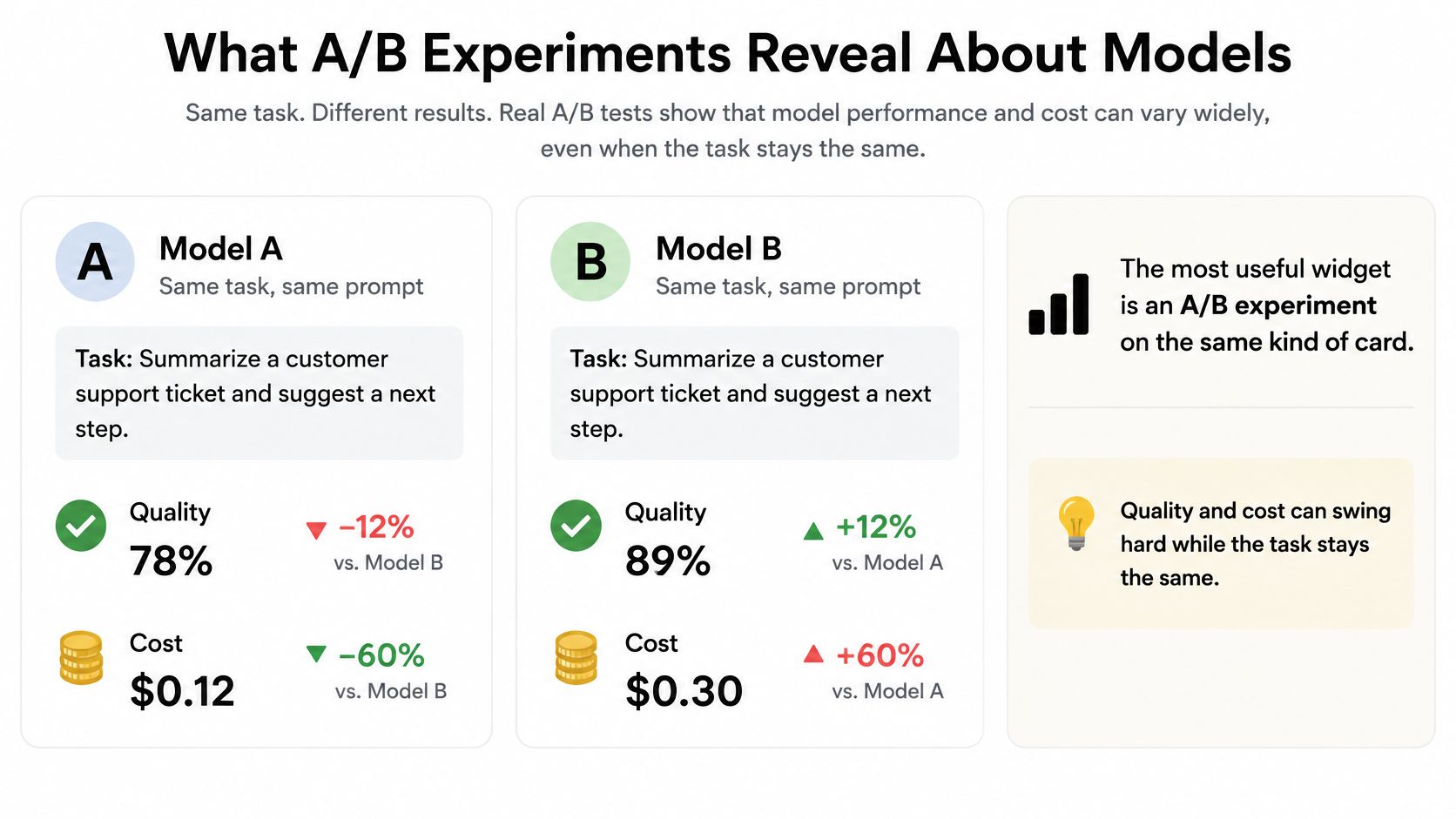
For choosing a model, the most actionable dashboard widget is an A/B experiment, not a token sparkline.
Make the comparison fair
Hold the task mix steady and change the model or the harness, not both. Include representative cards, such as UI changes, API work, and bug fixes, rather than giving an option only the easiest tasks.
Keep the approved requirements, tool access, review rules, and completion criteria comparable. Tag each run with its experiment assignment so you don't have to reconstruct groups from model names later.
Read these fields side by side:
- Cost per card: What each option spends to reach the accepted result.
- Tokens in and out: Whether the difference comes from context use or generation.
- Fix rounds: How much correction reviewers require.
- Time to completion: Whether accepted work arrives sooner.
- Success or merge rate: Whether the option finishes the assigned work at an acceptable level.
The winner should have acceptable success and the lowest cost per accepted outcome. Lowest API spend alone isn't enough, especially when review effort differs.
Investigate failures before choosing
A short test on easy cards can make a model look reliable without testing the work that usually causes trouble. Check the mix of completed, failed, and abandoned cards before reading the averages.
Inspect failure traces before blaming the model. Unclear requirements, a broken tool, stale context, and workflow rules can all produce a bad result. Keep those causes separate so the experiment doesn't become a vote on unrelated infrastructure problems.
Many teams already have usable monitoring tools: in the 2025 Stack Overflow Developer Survey, 43% of AI-agent developers reported using Grafana and Prometheus for agent observability, while 32% reported using Sentry. Those tools can support an experiment view when the exported telemetry includes experiment assignment, model identity, and card outcome.
Don't switch models until an experiment shows fewer fix rounds or lower cost per merged card, without an unacceptable loss in success.
Record the decision and its supporting cards. That gives you a baseline to challenge when the model, harness, or workload changes.
Who Approved the Agent and Why
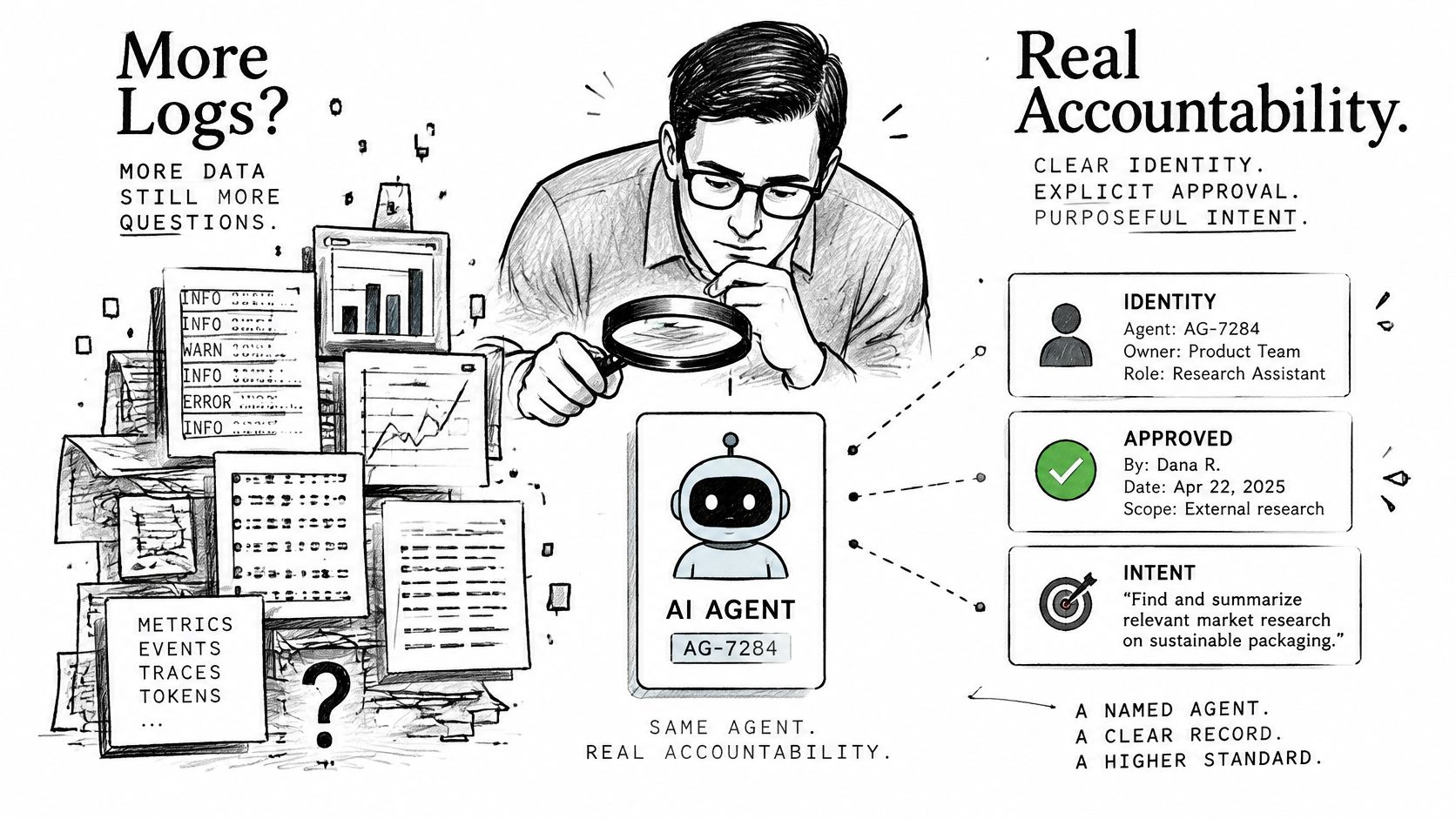
Extra logs don't create accountability. A dashboard can show every tool call and still fail to explain which agent acted, which person approved it, or whether the action was within scope.
MIT Technology Review's reporting on research examining four widely used agent frameworks describes agent identifiers that were often limited to a single run and missing records of human approvals. Those gaps make it harder to investigate unauthorized actions and oversight failures after a bad merge.
The distinction is between a detailed activity record and evidence of permission.
Record permission at each card transition
For every move between workflow states, keep an auditable event with:
- Agent identity and version: The persistent actor, plus the configuration used for this work.
- Delegated task and scope: What the agent was asked and permitted to do.
- Evidence used: References to the approved design, review findings, and relevant artifacts.
- Reviewer identity and approval time: Who made the decision and when it happened.
- Rejected actions and policy outcome: What was denied and which rule applied.
- Recovery status and termination reason: Whether work was rolled back, recovered, stopped, or completed.
A run-only identifier isn't enough when the same agent account opens pull requests throughout the week. Keep the stable identity separate from the temporary execution ID.
Also separate the person who made a decision from the actor who recorded it. An agent entering a person's instruction shouldn't become the approving identity merely because it submitted the event.
Connect approval to the approved version
Follow the normal software path: an approved product or technical design, implementation, a second review, and the human checkpoint that permits continuation. Store the design version the reviewer checked, not just the current document.
The human-in-the-loop AI agents guide provides context for placing human decisions inside that workflow. A checkpoint should state what the person is approving, rather than asking for a vague confirmation.
This matters for self-hosted teams and anyone who must explain why an agent was permitted to change a repository. The diff shows what changed; the approval record explains the authority behind it.
Don't embed full customer records or secrets in approval events. Point to access-controlled artifacts and retain only the decision metadata needed for the audit.
Tomorrow, pick a merged card. Check whether its trace names the agent, the approving person, and the design it was checked against. If an identity or design reference is missing, the dashboard isn't accountable yet.
Start With Cost, Fixes, and One Experiment
Start with a small operational check, not a new collection of charts. You need enough evidence to judge a work item before you need another monitoring tool.
- Record the finished-card measures. Capture cost, tokens in, tokens out, fix rounds, and time in each activity. Ignore extra charts until those measurements are available and their definitions are consistent.
- Confirm trace capture. Check that the bridge emits the parent trace and the model and tool spans, with metadata-only capture by default. Inspect an actual card rather than trusting an enabled integration switch.
- Run an A/B test on similar cards. Keep the option that performs better on cost per accepted result and fix rounds, while maintaining acceptable success. Use the LLM cost comparison guide to frame the spending comparison.
Set a practical acceptance check
After two weeks, aim to open a card and see its spend, slow stage, review rounds, and approving person. That's a target for your setup, not a promised performance improvement.
If a measurement is missing, fix capture before adding another tool. If a definition is ambiguous, settle it before comparing models.
Loupe fits teams that want coding agents working on a board rather than in a loose chat log. It's a software factory built to be driven by AI agents, and Loupe itself runs no AI models: your agents, your machine, and your rules do the work, while the bridge does most of the instrumentation.
You keep ownership of everything you and your agents put into it, including documents, versions, comments, suggestions, and decisions. Use it when you want card-level costs, fix rounds, and model experiments alongside the work; skip it if you only need a generic metrics backend and already export OpenTelemetry elsewhere.
Pick ten recent cards, fill the five measurements by hand if necessary, and only then trust the dashboard.
Loupe brings coding-agent work, review checkpoints, and outcome metrics into the same board-based workflow. Visit Loupe if you want to compare models by finished cards, review effort, and cost rather than token charts alone.