AI Code Review: How to Set Up a Safe Workflow
Learn how to run AI code review with clear policies, dual-agent checks and human checkpoints. Steps, metrics and fixes included.
In this article
- Which Changes Need Which Level of Review
- How to Set Up the Review Pipeline
- How the Dual-Agent Review Loop Works
- One round, start to finish
- Why the cap is three rounds
- Human Checkpoints You Should Not Remove
- Metrics That Show Whether Review Works
- Common Problems and How to Fix Them
- Start With One Repository This Month
Your pull request queue has eleven items. Two are docs changes that can't break anything. Three are small fixes. One touches the login flow. All of them are waiting for the same thing: a person with time to read carefully.
That queue is why teams buy AI code review tools. The tools are easy to switch on and hard to trust. The fix isn't a smarter model. It's a written rule for which changes get which level of review, plus a set of numbers that tell you whether the review is doing anything. Teams are still early here: in 2024, 31.35% of 319 U.S. IT professionals surveyed by ServiceNow reported using AI for code editing and review.
Which Changes Need Which Level of Review
Start with the rule that prevents most damage: AI review never approves a change on its own. It reads, it flags, it explains. A person still clicks approve.
Review level should follow risk, not habit. Send everything to a full five-pass review and a docs typo waits two days. Send everything to a light pass and an auth change slips through on a quiet Friday afternoon.
So write the policy before you compare tools. One table covers almost every change your team ships.
| Change type | AI review | Human review | Required checks |
|---|---|---|---|
| Docs or comment-only change | Light pass for accuracy and typos | One reviewer | Build passes |
| Test-only change | Coverage and flakiness pass | One reviewer | Test suite passes |
| UI copy or style change | Design conformance pass | One reviewer plus preview check | Preview deploy, screenshots |
| Small bug fix, no sensitive paths | Full five-pass review | One reviewer | Unit tests, linter, type check |
| Refactor under 200 changed lines | Full five-pass review | One reviewer | Regression tests, static analysis |
| New API endpoint | Full review plus design conformance | Service owner | Contract tests, dependency scan |
| Auth or permissions change | Full review plus security pass | Senior engineer and security owner | Threat model check, secret scan |
| Payment or personal data handling | Full review plus security pass | Senior engineer and security owner | Data-flow check, audit log test |
| Database migration | Full review plus rollback check | Senior engineer and data owner | Dry run on staging, tested rollback script |
Three rows carry most of the weight: auth, payment data, and migrations. Each one needs a named senior engineer plus a security or data owner, no matter how tidy the report looks.
Speed is the reason many teams adopt this. A controlled GitHub study from October 2023 found that developers using GitHub Copilot and Copilot Chat completed code reviews 15% faster and described the reviews as more actionable. That's a real gain, from one tool and one study group. It says nothing about whether your payment path is safe.
Three questions for any change:
- Does it touch a sensitive path? Auth, permissions, payments, personal data, migrations. If yes, the table sends it to a senior reviewer.
- Does it change what users see? Then someone has to look at a preview, not just a diff.
- Is there an approved design? If not, the AI has nothing to check conformance against, and the review is guesswork.
Practical rule: a clean AI report earns a faster look, never a skipped one.
Once the policy exists, the code review checklist gives reviewers the items to confirm on each row, so approval means the same thing every time.
How to Set Up the Review Pipeline
AI review works as a gated, defect-focused pipeline, not an approve button. Each stage has a job, and nothing moves to the next stage until the earlier one passes.
Here's the shape of that pipeline before we walk the steps.
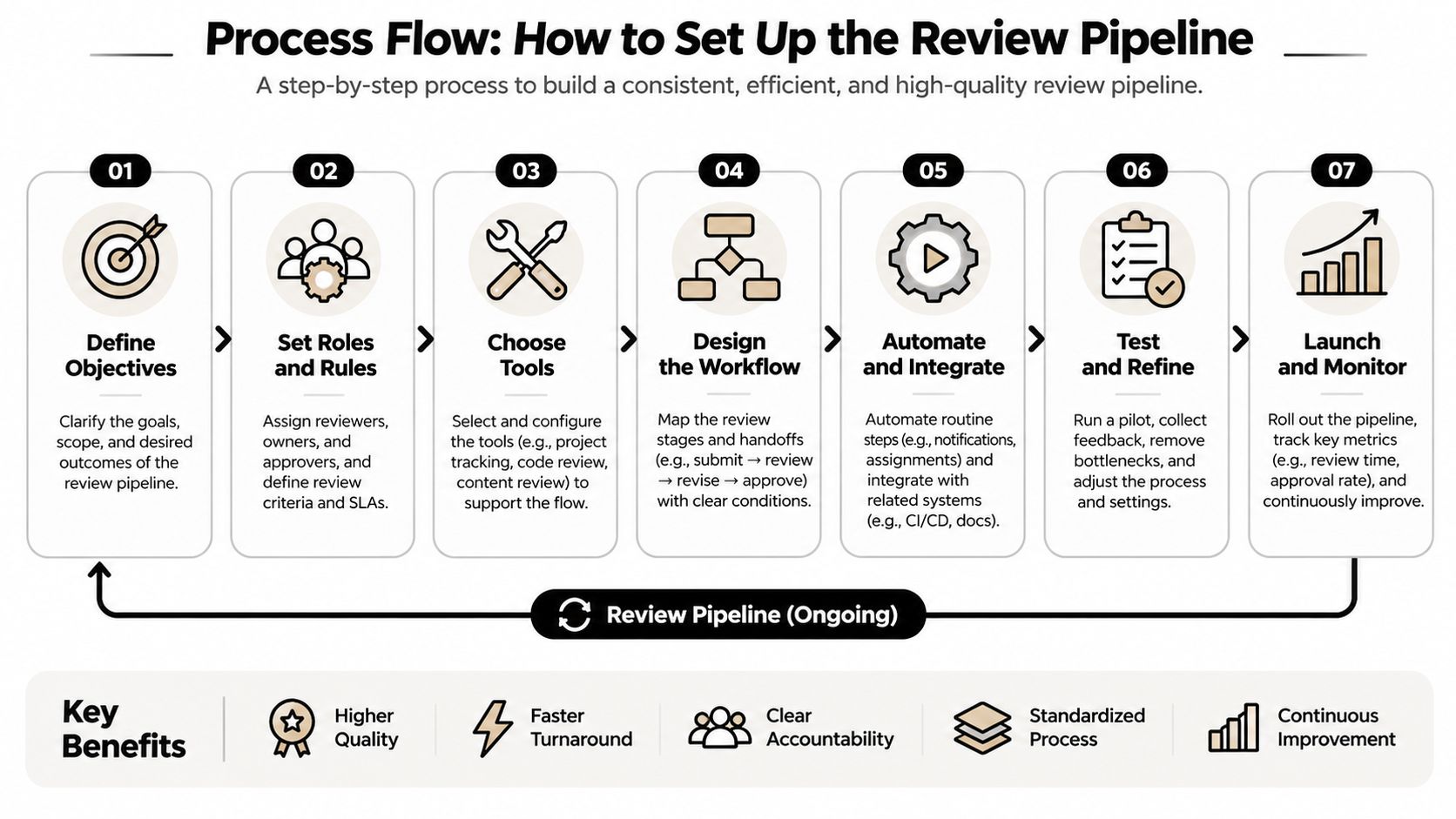
1. Give the agent the design, not just the diff. Send the approved technical design, the changed files, the tests, your repo conventions, and a list of security-sensitive paths. Without the design, the agent can only judge style and local logic, because it has no plan to compare the code against.
2. Run the executable checks first. Unit tests, static analysis, type checks, dependency scanning, secret detection. Only changes that pass these go to AI review, because an LLM review is probabilistic and a failing test isn't. AI-assisted code does start from a better baseline: a 2024 GitHub study of 202 experienced Python developers found developers with Copilot access were 53.2% more likely to pass all 10 unit tests. A better starting line is not a finish line.
3. Run five separate passes. Functional correctness, regression risk, security, maintainability, design conformance. Separate passes stop one concern from hiding another. A security miss buried inside a naming comment is still a security miss.
4. Demand evidence with every finding. File and line, severity, a reason, and a reproducible test or a suggested patch. A finding you can't verify is noise wearing a uniform.
5. Deduplicate, rank, and hand over a short list. Only actionable issues reach a human, in batches sized to about 200 lines per hour of reviewer time. A study of design and code reviews identified 200 lines of code per hour or less as an effective individual review rate, and at that pace reviewers found more than half of defects in code reviews. Bigger batches lose findings, not just time.
The gate exists for a reason. Current benchmark evidence on review agents shows even the strongest detect only about one-third of known defects; one reported system reached approximately 31% known-defect detection with 99.1% usefulness under a particular evaluator. High usefulness, low coverage. That combination is exactly why a positive report can't trigger a merge.
A reviewer that is pleasant to read and wrong about coverage is more dangerous than no reviewer, because it buys confidence you haven't earned.
When you vet vendors, check whether they support this staged shape at all. The questions in this guide to AI code review tools are a faster filter than a model bake-off.
How the Dual-Agent Review Loop Works
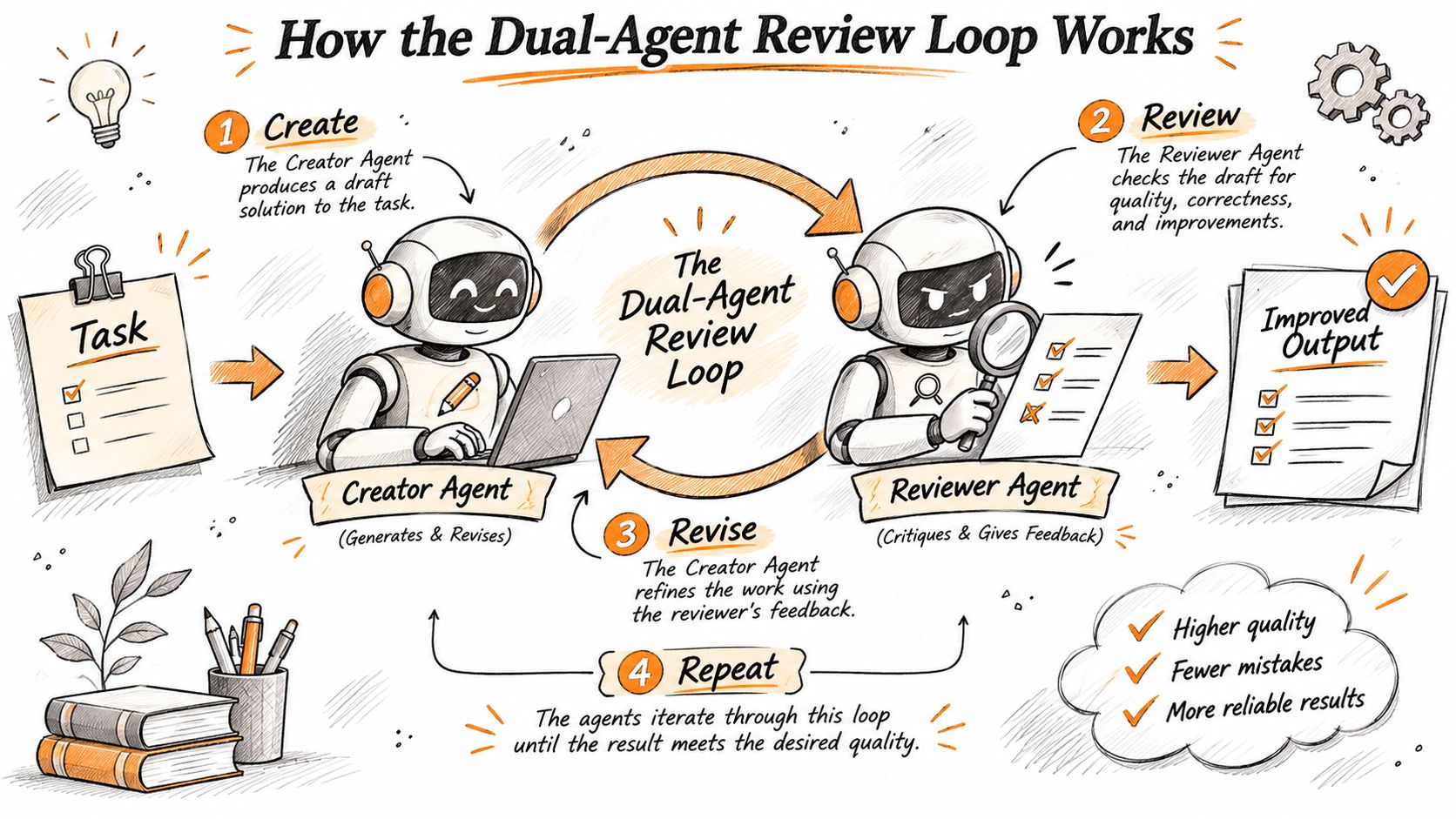
One agent builds. A different agent checks. The separation is the whole trick, because an agent reviewing its own work tends to agree with its own reasoning.
In Loupe's workflow, the implementation worker builds from the approved design and opens a pull request, and a second agent reviews the change against that design before a human sees it. The second agent reviews each design as well as each pull request, so the plan gets checked before code exists.
One round, start to finish
The worker opens the pull request with build notes tagged build-notes. Those notes carry its intent: which design section it followed, what it chose to ignore, and why. The reviewer reads the design and the diff without inheriting the worker's conclusions.
Say the approved design states that the invoice total is calculated once, at issue time. The reviewer finds a second calculation in the PDF renderer and files a finding: file, line, severity, and a test that fails on the current branch.
The worker answers that finding under a Review answers section, citing the code or the test that resolves it. The next review round checks those answers, then looks for anything new. Nothing gets marked fixed because someone said so.
That structure keeps intent and evidence attached to the change. The reviewer can judge whether the code matches the plan, not just whether it compiles.
Why the cap is three rounds
Set a hard limit of three fix rounds. If the change still fails after that, stop the loop and send it to a person. Repeated failures almost always mean the design is unclear or the context is missing, and more rounds dig the hole deeper.
Security evidence backs the cap. A 2025 controlled study of iterative AI-generated code changes found a 37.6% increase in critical vulnerabilities after only five rounds of repeated "improvements". Refinement is not monotonic.
Human review is still the last mile. A large study of 567 pull requests created with Claude Code across 157 open-source projects found 83.8% were eventually merged, but only 54.9% of merged ones landed without changes. Bug fixes were the top revision reason at 47.7%. That's the normal shape of the work: agents draft, people correct.
Human Checkpoints You Should Not Remove
Agents do the first pass. People own the decisions. Strip out the checkpoints below and you get speed without accountability.
- A person approves the technical design before any code is written. Every later finding is judged against that design, so a vague or unapproved plan poisons the whole loop.
- A named human approves every pull request. Use a second GitHub account for your agents, so their work arrives as a normal pull request you can approve and track.
- Every pull request gets a preview deployment. A URL lets a person click through the actual change and leave a note on the page instead of guessing from a diff.
- Any security-sensitive path gets a human reviewer. No exceptions based on how clean the AI report looks.
- The person who merges owns the rollback. Someone has to know how to undo it at 2 a.m.
- A human reads the findings log once a week. Weekly reading turns scattered comments into patterns you can fix at the source.
The security checkpoint isn't ceremony. A study of security code review found that none of the participants identified every confirmed vulnerability, and greater reviewer experience didn't reliably produce more accurate results. Both missed findings and false alarms survive expertise, which is why a named security owner signs off on sensitive paths.
What makes a checkpoint real: someone at that checkpoint can say no and the change stops. A checkpoint with no authority is a formality with a calendar invite.
Metrics That Show Whether Review Works
Counting AI comments proves nothing. Counting how many became real fixes proves plenty. Track six numbers, grouped by repository and by defect class.
| Metric | What it measures | How to read it |
|---|---|---|
| Verified-defect recall | Share of known defects the AI found | Low means a clean report is weak evidence |
| Accepted-finding precision | Share of AI findings a human accepts | Low means too much noise to keep |
| Fix rounds per pull request | Loops before a change passes | Rising counts point to design or context gaps |
| Post-merge escape rate | Bugs found after merge that review missed | Track by defect class, not as one number |
| Time to merge | Hours from pull request open to merge | Should drop after the first month, not rise |
| Comment resolution rate | Share of AI comments acted on, by category | Low in one category means turn that check off |
Resolution rate is the metric teams skip, and it's the one that stings. A 2025 study of 178 mature repositories found that 60% of valid human-authored review comments led to code changes, while valid AI-generated comments led to changes only 0.9% to 19.2% of the time. Same repositories, same reviewers. The AI comments were valid and still mostly ignored.
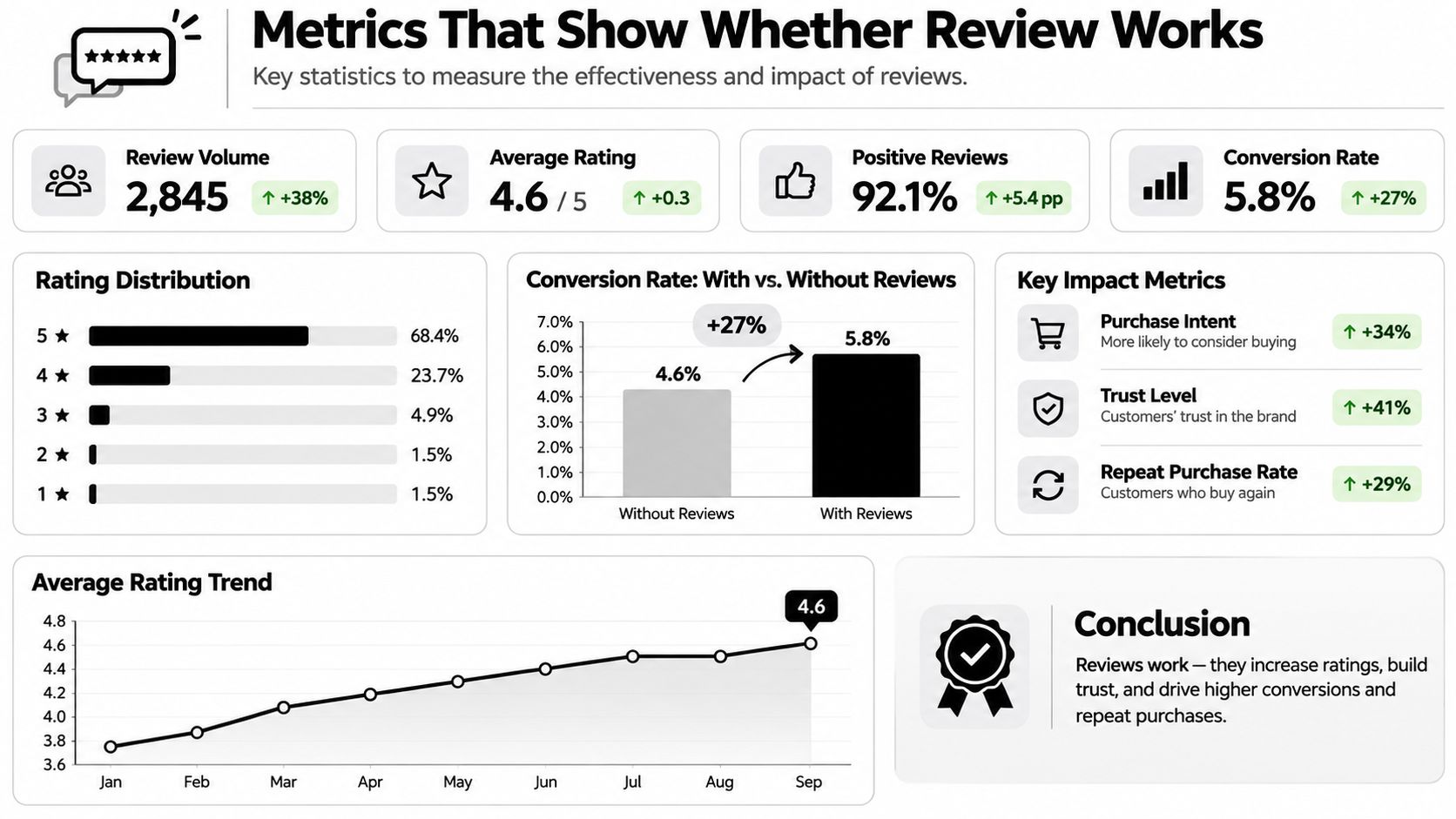
Read the table by asking one question per row: what would change my mind? If precision sits low for two weeks, tighten that category or switch it off. If fix rounds climb, the design stage is leaking, not the reviewer.
Analytics close the loop. Loupe's analytics show cost per finished card, merge rate, fix rounds and hours to merge, and you can compare models with experiments. That gives you a fair test of whether a change to the pipeline helped, instead of a feeling.
For the wiring between runs, logs and review outcomes, this piece on agent observability covers which events are worth recording.
Compare AI findings against blinded human reviews for the first month. After that, review the numbers monthly by repository and drop whatever check earns nothing.
Common Problems and How to Fix Them
Most AI review failures start in the data, not the prompt. A study of the CodeReviewer benchmark found that only 64% of sampled review comments were valid. Train or tune a model on unfiltered comments and it learns reviewer noise, personal style preferences, and outdated guidance as if they were rules.
Filtering helps, but the fix that matters most is format. The same analysis found the presence of an inline code suggestion was the strongest predictor that a developer resolved an agent comment, while long, complex comments were less likely to be acted on.
| Symptom | Likely cause | Fix |
|---|---|---|
| Developers ignore most comments | Too many style-only findings | Drop style checks or set a cap per pull request |
| Long comments are never acted on | Comments are too complex | Shorten them and add a patch-ready suggestion when safe |
| Team stops trusting the bot | Several false positives in a row | Track rejected findings and raise the threshold for that category |
| Clean AI report, then a production bug | Low recall and no executable tests | Add tests and static analysis, keep humans on risky paths |
| Fix loops never end | Unclear design or missing context | Cap rounds at three, then escalate to a human |
| Code drifts from the approved design | Reviewer does not get the design | Add the approved design to the reviewer's context |
One habit makes the whole table easier to act on: measure precision and recall together, per category. A filter that catches most noise and also kills half your real findings is a bad trade, and you can only see it if you log both.
Start With One Repository This Month
Pick one repository with frequent small changes and a test suite you already trust. That is the trial ground. Rules for which changes get which review come first. The tool comes after.
Record a two-week baseline before you turn anything on: fix rounds, hours to merge, and bugs found after merge. Then enable AI review for docs, tests, and small bug fixes only. Compare every AI finding with a human review of the same change. Keep pull requests small during the trial, or the comparison stops being fair.
Log which findings were accepted. After a month, look at those numbers and decide what to keep, what to drop, and which change types to add. Review thresholds monthly, and keep a named owner for each checkpoint.
The trial matches a staged workflow. A card moves through product design, tech design, implementation, agent review, live review, and done. People still hold the decision points.
This week: write the policy table for that repository, using the rows from the review level table above. Fill in the names, not the roles. A table with real names in it gets followed.
Loupe's agent review checks every design and every pull request against the approved design, and sends it back for fixes before you see it. A second agent reviews each design as well as each pull request, and fix rounds run until the change passes. Loupe's analytics report cost per finished card, merge rate, fix rounds and hours to merge, and let you compare models with experiments. If you want a review gate that runs before a human opens the diff, Loupe is worth a look.