Technical Design Workflow: How to Set One Up
Learn how to set up a technical design workflow with clear stages, review checkpoints, agent review, metrics and hosting options.
In this article
- Map Your Stages, Owners and Exit Checks
- How to Write Workflow Rules and Human Checkpoints
- Set a Baseline Before You Roll Out
- How to Add Agent Review Before Human Review
- What the Review Agent Checks
- Connect the Repo, Designs and Live Preview
- Metrics That Show Whether the Workflow Pays Off
- Run It in Three Steps
- Common Pitfalls and How to Fix Them
- Split Work by Risk
- Choose Self-Hosting or the Hosted Beta for Your Team
A card sits in review on your board. An agent wrote the code two hours ago, the design doc lives in a folder nobody opened, and the pull request has thirty changed files. Three more cards land in the same column before lunch.
That's a normal week once agents do the building. In 2025, 85% of developers reported using at least one AI tool for coding or other development activities, according to JetBrains' Developer Ecosystem Surveys. Writing code stopped being the slow part. Deciding who approves what, and when, became the slow part.
A technical design workflow fixes that. It names the stages, gives each one an owner and an exit check, and lets agents run fast inside those boundaries. Here's how to set one up without turning your board into a queue of things waiting for you.
Map Your Stages, Owners and Exit Checks
Start with the stage map. Every rule, checkpoint and metric depends on it, and a map you can't draw on one screen is too complicated for a small team.
| Stage | Who acts | Output | Exit check |
|---|---|---|---|
| Product design | Agent drafts, second agent reviews, you review | Product document and clickable prototype | You approve before any code |
| Tech design | Agent writes, second agent reviews, you approve | Technical design | Design has no open questions, or you approve |
| Implementation | Worker agent | Pull request on GitHub | Builds from the approved design |
| Agent review | Second agent | Review against the approved design | Passes after fix rounds |
| Live review | You | Preview with page notes | You approve the change |
| Done | Team | Merged change | Merge recorded |
Product design is where an agent drafts the product document and a clickable prototype, a second agent reviews the draft, and you look at both before any code exists. Tech design repeats the pattern one level down. An agent writes the technical design from the approved product, a second agent reviews it, and you comment and approve.
Implementation is the worker agent building from the approved design and opening a pull request on GitHub. In agent review, a second agent checks that change against the approved design, and fix rounds repeat until it passes. Live review is yours. You open the preview, click through the change, leave notes, then approve. Done means merged, and the merge is recorded on the card.
Rule of thumb: if a stage has no exit check you can point at, it isn't a stage. It's a place where cards go to sit.
The design stage deserves the most care, because defects found there are the cheapest ones you'll ever remove. NASA's Software Engineering Handbook reports that inspections typically remove 60% to 90% of existing defects, whether the artifact is a requirements document, a design or code, and that fixing requirements problems during analysis costs far less than fixing the same problems later, especially after delivery (NASA Software Engineering Handbook). That's a measurable reason to review a design before anyone writes code.
Write your own version of this table before you write a single automation rule. One owner and one exit check per stage is enough. If you can't name the owner, you've found your first problem, and if the artifact itself is still vague, start with how to write a technical design document.
How to Write Workflow Rules and Human Checkpoints
Write rules after the map, never before. A rule that fires without a named owner just shuffles cards and hides the decision. The four decision points that carry the most weight are product approval, tech design approval, pull request review and preview approval.
Each of those stops belongs to a person, and each one either moves the card or blocks it.
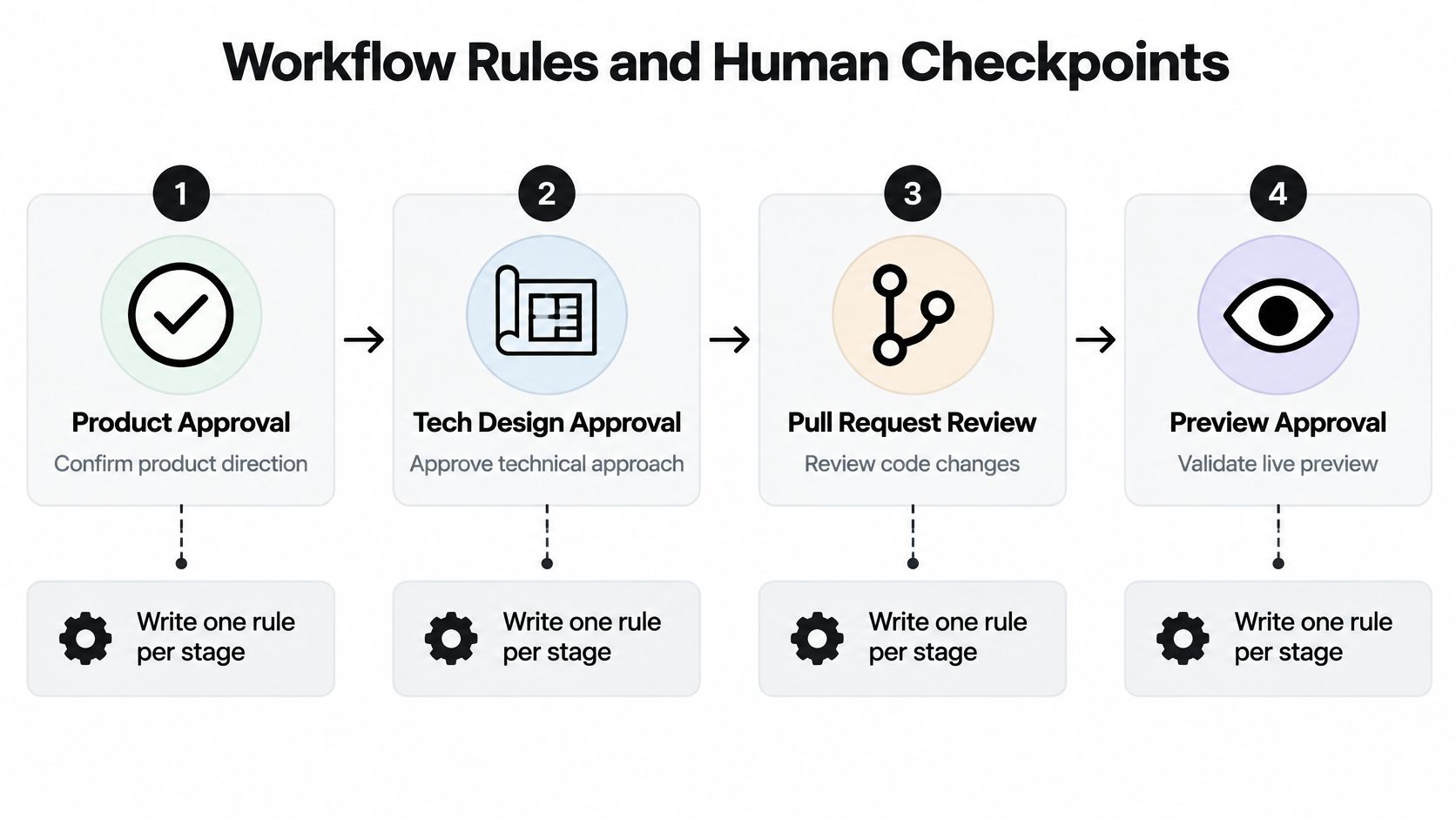
- List the human decision points. Product approval, tech design approval, pull request review, preview approval. Four is usually plenty. Double it and the board becomes a list of things waiting for you.
- Write one rule per stage that moves the card forward when the work is done. Keep the rule beside the exit check so the two can't drift apart.
- Label every stop with its owner, including the ones that belong to you. "You" is a real owner and far clearer than "the team".
- Decide which designs may approve themselves. A design with no open question can approve itself when published and move the card forward, with your workflow template determining which designs and card types that covers. I keep a person on security, data migrations, permissions and public API changes even where the template would let them through.
- Name the evidence each reviewer needs. The design document, the code diff, the preview link. A reviewer who has to hunt for the artifact will approve on instinct.
- Set a rollback rule. Decide what undoing an approval does before anyone does it. A sound convention: the card returns to that design's stage, work downstream pauses, and nothing moves again until the design is re-approved.
- Test every rule on one real card before the team meets them.
Practical rule: a stop that can't name the decision it changes is a delay, not a checkpoint.
This isn't process theatre. NIST's AI Risk Management Framework asks organizations to define, assess and document human oversight processes, and its governance guidance says policies should define and differentiate roles and responsibilities for human-AI configurations and oversight (NIST AI Risk Management Framework). A checkpoint that states who decides, what they inspect and whether work may continue can be audited. An assumption that someone will notice a problem can't.
The common slip is a rule that approves everything automatically. It removes the checkpoints you need most, and the board looks fast right up until something ships that nobody read. In Loupe, every draft product design and tech design gets an agent review, and a fix round when it fails, before the app publishes it to the owner. The owner can publish at any time to skip that loop, which is the right call when a card is urgent and a rough draft today beats a polished one next week. The automation absorbs the easy findings; the checkpoint stays where judgement is needed.
Set a Baseline Before You Roll Out
Record two to four weeks of numbers first: cost per finished card, merge rate, fix rounds, hours to merge, review queue time and deployment rework rate. Run the full rule set on one real card, then compare the same figures after rollout. Without a baseline you can't tell a faster workflow from a busier one.
How to Add Agent Review Before Human Review
Agent review sits between implementation and human review, and its only job is to take easy problems off a person's plate. That job is bigger than it sounds. A 2025 study of 415 software practitioners found that 84.3% of frequent GenAI users didn't spend less time on code review, and instead did more reviews (study of AI-assisted software work). Generating code faster pushed the work downstream, where it piled up.
Speed matters as much as accuracy here. DORA's 2023 research identifies fast code reviews as a technical capability linked to stronger delivery and operational performance, and a DORA research discussion on the impact of AI reports that teams with faster code reviews had about 50% better software delivery performance. A review bottleneck eats the gain you got from generating code quickly.
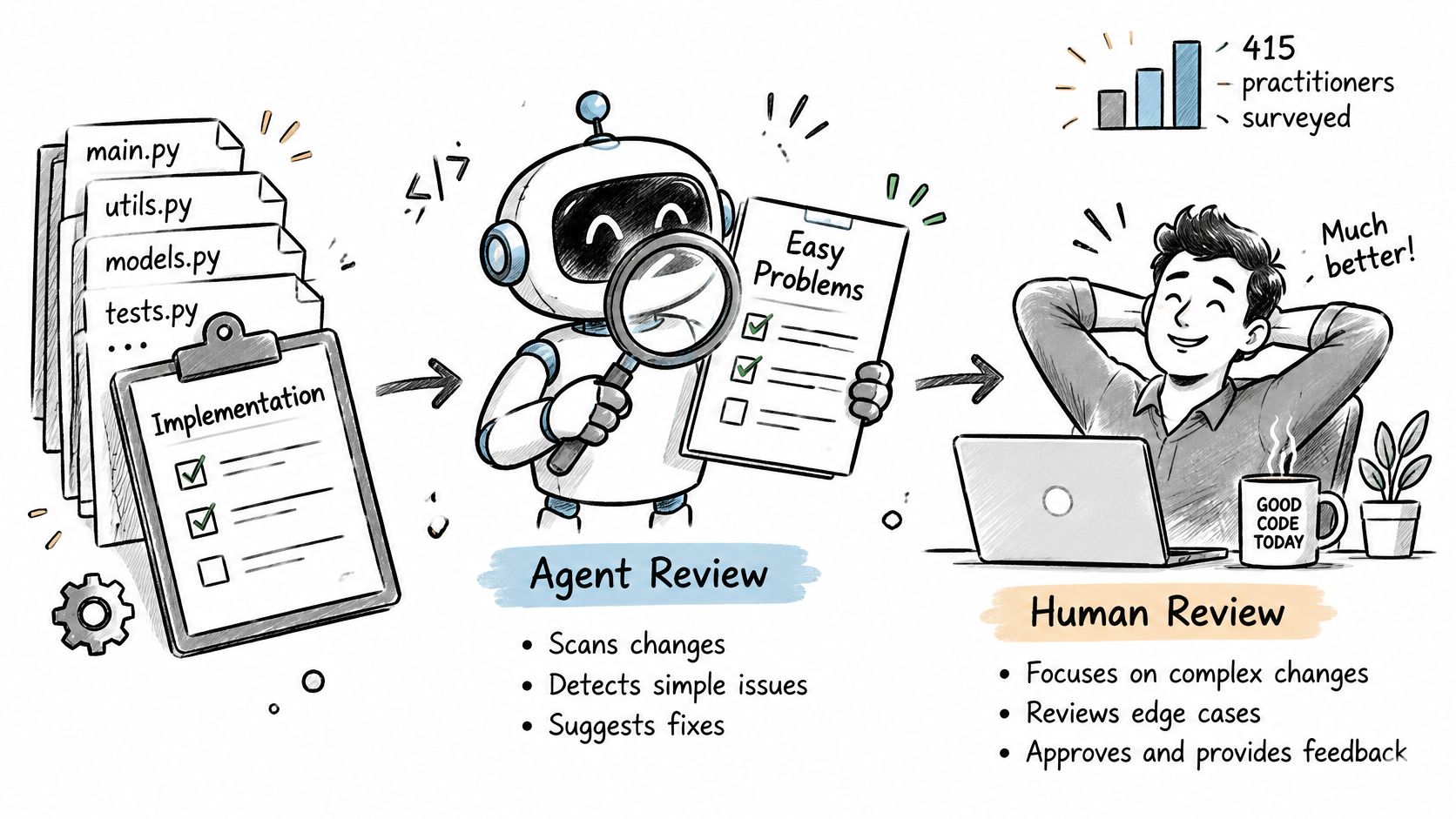
What the Review Agent Checks
- Store the approved technical design as the reference the reviewer reads. Not the chat thread, not the product doc.
- Give it a short checklist. Does each change map to a design requirement, do the acceptance criteria pass, are the affected components and security assumptions covered?
- Let the worker answer each finding, then re-review until it passes.
- Send only passing changes to a person.
- Track review time and review cycles, so you can see whether the agent is saving attention or spending it.
Say a team adds a new permission check. The design lists three affected endpoints. The review agent flags a fourth that was missed, the worker fixes it in one round, and the human reviewer reads only the logic.
Keep three questions apart, because they get tangled constantly. Does the code work? Does it match the approved design? Is the design still right now that implementation taught you something? Our agent review checks every design and every pull request against the approved design, and sends it back for fixes before you see it, which settles the second question so reviewers can spend their time on the first and third.
Connect the Repo, Designs and Live Preview
Reviewers need two places to comment, and the worker needs a committed path to read those comments. Wire both before the first card runs.
- Point the worker at the repo, so implementation opens a GitHub pull request from the approved technical design rather than from a fresh prompt.
- Commit a lifecycle file naming each stage, its owner and its exit check. A worker sees only what you push, so read that file, correct its guesses and commit it before the first card.
- Render each design in place, so reviewers leave line comments and suggested rewrites on the document itself.
- Approve in that same view, or send the design back with the comments attached to it.
- Let agents revise from the notes, with each fix round answering one finding.
- Create one preview deployment per change once the build passes.
- Open the preview and mark the exact element with the site review widget.
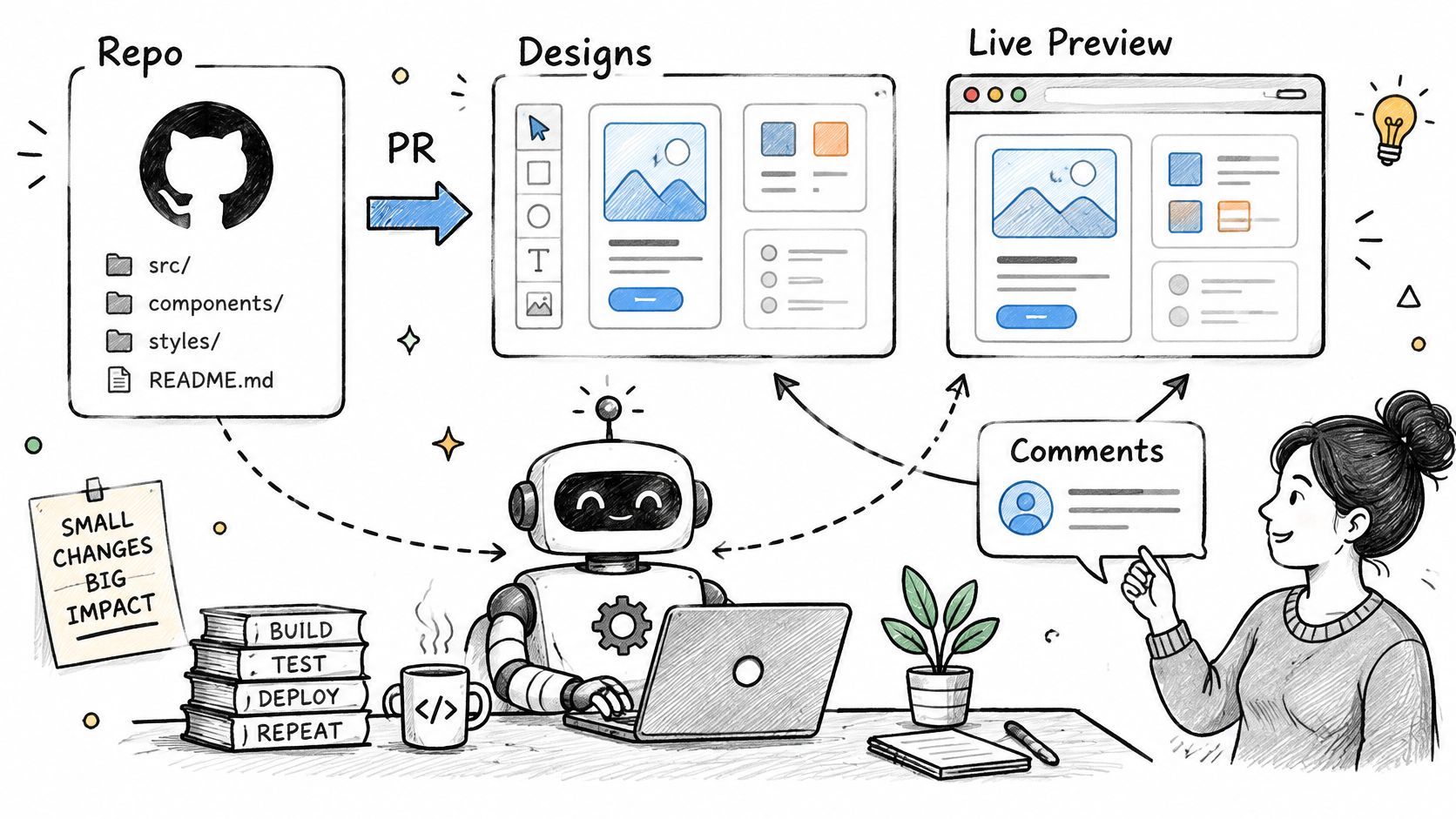
The last two steps are where most friction lives. Say the save button is hidden on small screens. The note lands on the matching card, the worker fixes the layout, and the next preview shows the button where it belongs. The history stays on the card, so the reviewer's comment and the fix sit together a month later. We use that same loop on every UI change, from a label tweak to a new settings page.
Before you approve a preview: the change matches the approved design, every note you left is resolved or answered, and nothing unrelated moved in the diff.
Skipping the in-place rendering is the most common mistake here. If a reviewer has to open a separate tool to read the design, they'll review the code alone and approve on the strength of the diff. Compare your options for design-to-code tools before you commit to a chain, since swapping that layer later means redoing every comment thread.
Metrics That Show Whether the Workflow Pays Off
DORA began measuring software delivery in 2014 to test whether IT performance could be linked to organizational performance. By 2015 the research had settled on four measures: deployment frequency, lead time for changes, time to restore service and change failure rate. The set has moved since. Failed-deployment recovery time replaced the older mean-time-to-recovery term in 2023, and deployment rework rate arrived in 2024, defined as the percentage of deployments that are unplanned work caused by production incidents or user-facing bugs (DORA metrics history). The lesson holds for agent workflows: throughput without stability tells you nothing.
| Metric | What it shows | Better when |
|---|---|---|
| Cost per finished card | Money spent for each completed card | Lower, at the same quality |
| Merge rate | Share of pull requests that get merged | Higher |
| Fix rounds | Revision loops before a card passes | Lower |
| Hours to merge | Time from start of work to merge | Lower |
| Review queue time | Wait before a review starts | Lower |
| Deployment rework rate | Share of deployments that are unplanned fixes | Lower |
Read them in pairs, never one at a time. Fewer fix rounds with longer hours to merge usually means reviewers are queuing, not that the workflow improved. A rising merge rate at a flat cost per card is the result you want.
Run It in Three Steps
- Record a baseline for two to four weeks before you change any rule.
- Compare the same metrics after each change, not after six changes at once.
- Test one model or rule at a time, then keep the option with the lowest cost per finished card at the same merge rate.
A team watches cost per finished card fall while fix rounds climb. They tighten the design template so designs arrive with fewer open questions, and both numbers improve over the next two weeks. Cost per finished card is the simplest return check you'll get: if it falls and merge rate holds, the workflow is paying off. If you want the raw telemetry behind those numbers, this guide to AI agent observability covers what to capture.
Common Pitfalls and How to Fix Them
Most of these failures trace back to trust and unclear stops rather than the tool itself. A global 2025 DORA survey of nearly 5,000 technology professionals found that more than 80% reported productivity gains from AI, while only 24% expressed substantial trust and 30% expressed little or no trust (DORA report 2025). A stop with no named owner and no evidence to inspect is a stop people learn to wave work through.
| Symptom | Likely cause | Fix |
|---|---|---|
| Cards pile up in one stage | Too many human stops with no owner | Name one owner per stage and remove stops that change no decision |
| Pull requests drift from the design | Review checks code only | Add a design conformance check and link each requirement to a test |
| Agent passes every card with no comments | Reviewer checklist is vague | Write specific acceptance criteria and check a few passes by hand |
| Fix rounds never end | Design is unclear or incomplete | Pause the card, fix the design, then restart the fix round |
| Cost rises without better output | No per-card metrics | Track cost per finished card and compare models before you switch |
Match the symptom, confirm the cause, then apply that one fix and leave every other rule alone for the week. Two changes at once make the numbers unreadable, because you can no longer tell which one moved them. The fix-rounds row deserves extra patience: restarting a loop on a broken design just produces faster failures, so repair the design first and let the round start clean.
Split Work by Risk
Visual polish, copy edits and small refactors can move with a light check. Security, data migrations, permissions and public API changes always stop for a person, no matter how clean the agent's summary looks. That split keeps small teams fast without letting the expensive mistakes through.
Where your workflow template allows it, push the light tier further: a design with no open questions can approve itself when published and move the card forward on its own. Keep the heavy stop list deliberately short. Every item on it should be expensive to get wrong, which is what justifies the wait.
Add one habit on top: pull a passing card at random each week and read it by hand. Quiet drift shows up there long before it shows up in a metric. The fastest workflow is a short stop list where every stop changes a real decision, so if review latency, fix rounds or rework don't improve after you add a stop, delete that stop.
Choose Self-Hosting or the Hosted Beta for Your Team
The last decision is where the workflow runs. Two options, and the right one depends on who's on your team.
| Option | Best for | What you run | Data control |
|---|---|---|---|
| Self-host | A team with a DevOps or platform engineer, or any team that must keep data in-house | Docker Compose with a web service, a worker and Postgres; software under the AGPL license; workers on your machines through the local bridge | Model usage and artifacts stay under your control |
| Hosted beta | A small team that wants to test quickly and can wait for access | Private beta; new projects start on the Lifecycle workflow, so there's no template to pick | You don't run Docker or the database; access depends on the beta |
Self-host if you have someone who can run Docker and a database, or if model usage and artifacts have to stay inside your walls. Choose the hosted version if you're a small team that wants to see results this month and can wait for beta access. A new project gets the Lifecycle workflow with no choice, so there's no template decision to make on day one.
Whichever you pick, the next step is the same. Take one stage from the stage table, name its owner and exit check, and run one real card through it this week. Compare the result against your baseline, then add the next stage.
Loupe gives you a board where product design, technical design, implementation and review run as defined stages, with agents doing the work and you stepping in at the checkpoints you named. Every design and pull request gets checked against the approved design before it reaches you, so your review time goes to judgement instead of catching the obvious. Start with the free self-hosted version or join the hosted beta at Loupe.