Technical Design Document Guide: Template and Steps
Learn how to write a technical design document with a copy-ready template, clear steps, and checks that keep it accurate as the code changes.
In this article
- The Technical Design Document Template
- The Eight Parts
- How to Write a Technical Design Document Step by Step
- Steps One to Four
- Steps Five to Seven
- Which Tasks Agents Can Take and Which Stay With People
- Keeping the Design in Sync With the Code
- The Control Loop
- Common Design Mistakes and How to Fix Them
- What the Table Doesn't Show
- Confirm Your Next Design Before Coding Starts
You've got a feature to build, two engineers with different views on how to build it, and a deadline that won't move. Someone says, "Write it up first." If you skip that step, you'll argue again in code review, then again in production. A good technical design document stops that loop. It's not paperwork before work. It's a living decision record that says what you'll build, why, and how you'll prove it works.
The Technical Design Document Template
A technical design document records how a system will be built, why that way, and how the team will know it works. That's the whole job. If a section doesn't help with one of those three things, cut it or keep it to one line.
This idea isn't new. The IEEE software design description standard first came out as IEEE 1016 in 1987 and was revised in 1998 and 2009. It treats a design as information made to be shared with stakeholders, not as notes for the author alone. It also allows the design to live in tools and databases, not just on paper.
The Eight Parts
Use these eight parts as your base template. A small feature can fit in two pages. A platform change will need more, but it still needs the same parts.
| Section | What to write | Done when |
|---|---|---|
| Context and scope | Problem, goals, non-goals, stakeholders | The owner agrees on what is out of scope |
| Quality goals | Latency, availability and security targets as numbers | Each goal has a measurable target |
| Current state | Services, data and dependencies as they are today | The diagram matches the repository |
| Options | At least two alternatives | Each option has a named trade-off |
| Decision | Chosen option and rejected options with reasons | A reviewer signs off |
| Interfaces and data | APIs, schemas and events | The contract is versioned |
| Failure and rollout | Failure modes, rollback steps, feature flags | Each failure has a clear response |
| Tests and checks | Acceptance criteria | Each criterion can be run in code or in deployment |
Practical rule: Drop a section only when it truly doesn't apply, and say why in one line. "No new data stored" is a valid entry. A blank section is not.
The Done when column is the part most templates miss. It turns writing into a check. If you can't say how you'll know a section is finished, the section is probably vague. I would keep that column in your own copy of the template and review against it before you ask anyone else to read the document.
How to Write a Technical Design Document Step by Step
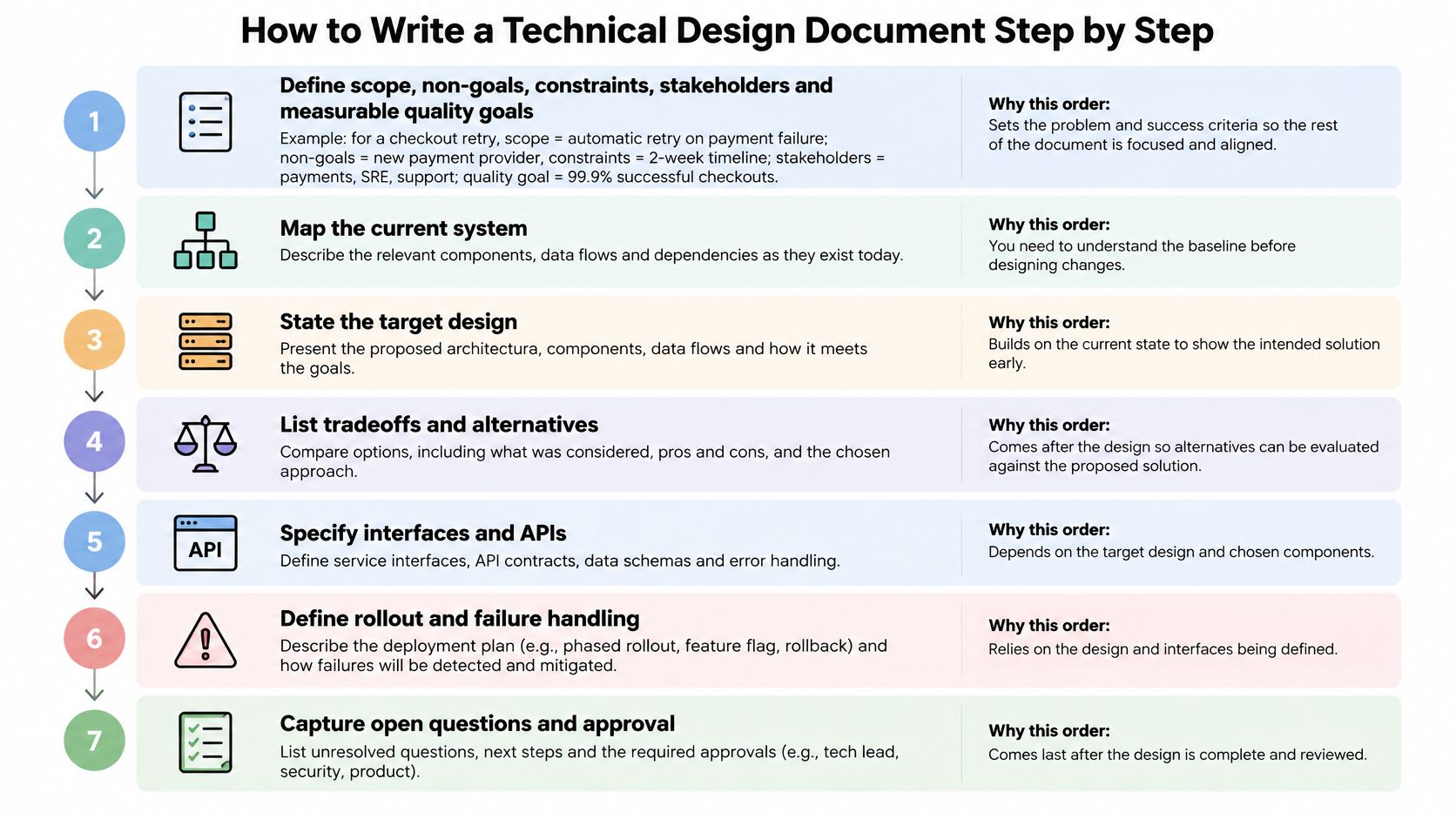
Write in this order. Each step limits the next one, so you don't design details for a problem you haven't scoped yet.
Steps One to Four
- Define scope first. Write the problem, goals, non-goals, constraints, stakeholders, and quality goals as numbers. For a checkout retry feature, a clear non-goal is changing the payment provider. This comes first because every later argument should point back to it.
- Record the current state. List the services, data stores, and dependencies the change touches, as they are today. Check the diagram against the repository. A design based on a system that no longer exists will fail in review or in code.
- List alternatives, including doing nothing. Two real options are enough for most changes. "Do nothing" forces you to state the cost of the status quo, which is often the strongest reason to act.
- Compare options on named criteria. Use latency, availability, security, operability, cost, and migration risk, and drop any that don't matter here. Say which criteria matter most. That's what makes the choice defensible later.
Steps Five to Seven
- Pick one option and record why the others lost. One short reason per rejected option is enough. This stops the same debate from restarting when a new person joins.
- Specify the build. Cover interfaces, data contracts, failure modes, observability, rollout, rollback, and test strategy. If your product needs aren't clear yet, fix that first with a solid AI product requirements document before you lock the technical design.
- Attach acceptance checks. Each check should run in code or in a deployment, for example a contract test, a load test, or an alert on a dashboard. This turns intent into claims a reviewer can challenge now and a test can confirm later.
A finished draft is short enough to read in one sitting. Every goal has a number, and every claim points to a file, schema, or test.
That last point matters more than format. In a controlled study with 65 participants, there was no statistically significant performance advantage for structured documents over narrative essays on architecture questions. Prior exposure to the source code was the main factor linked to answer quality. So link each major requirement to its source file, schema, or test. For an unfamiliar system, add a short codebase note that tells the reader where to start reading.
Which Tasks Agents Can Take and Which Stay With People
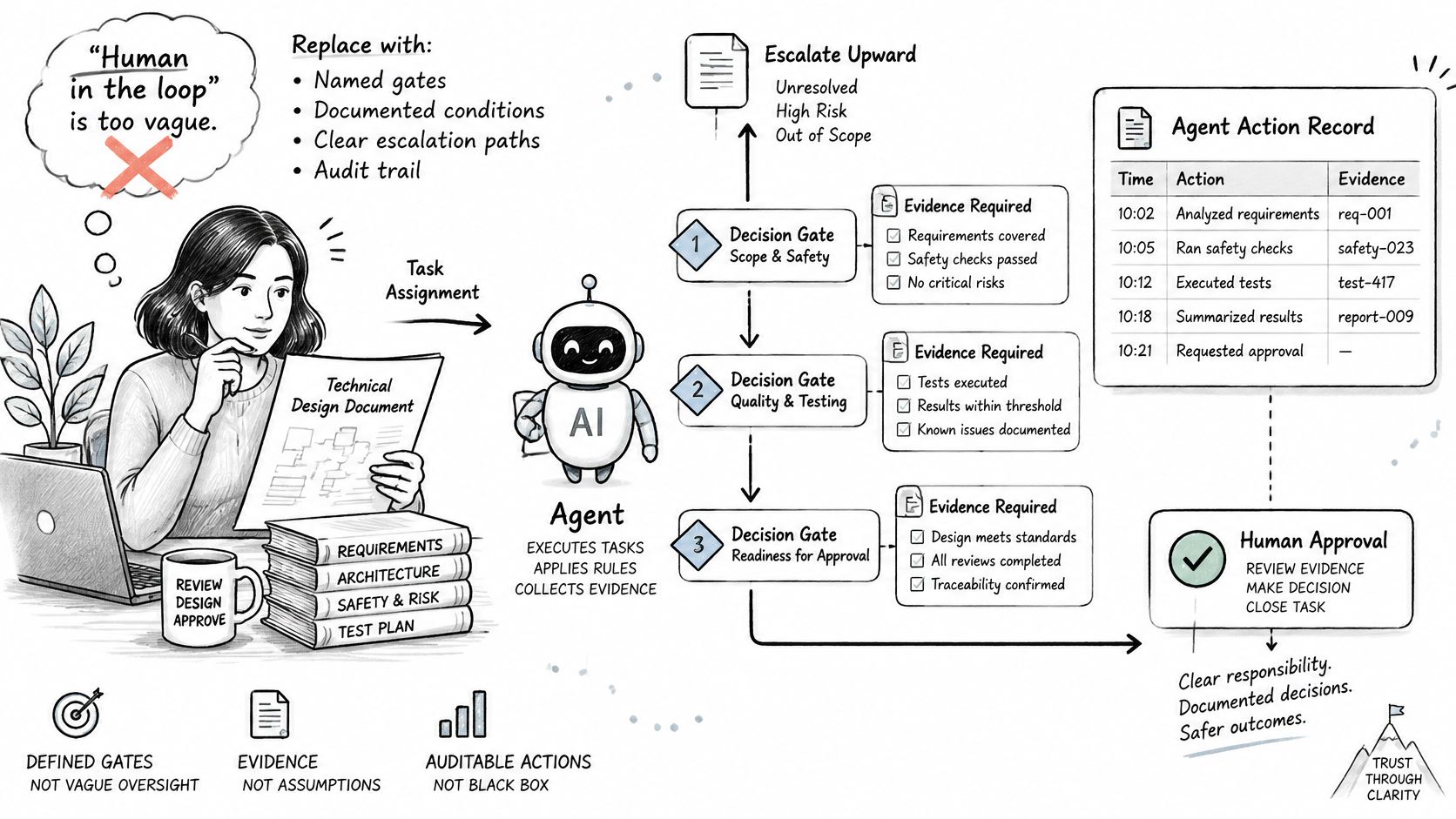
"Human in the loop" sounds safe, but it doesn't tell a reviewer what to do. Which decisions need a person? What evidence does that person need? When does a decision go to someone more senior? If your process can't answer those questions, you don't have a gate. You've got a slogan.
The split in practice is fairly clear. Developers are happy to hand over repetitive work and keep complex judgement for themselves. The JetBrains developer ecosystem research reports Stack Overflow's 2025 survey found 69% of developers who had used AI agents at work reported increased productivity, but 38% said they did not plan to use AI agents. Speed alone doesn't settle trust. Named gates do.
| Task | Owner | Why |
|---|---|---|
| Formatting and layout | Agent | Low risk and easy to check |
| Consistency across sections | Agent | Finds conflicting numbers and names quickly |
| API and interface inventory | Agent | Mechanical listing from the code |
| Test case enumeration | Agent drafts, person reviews | Missing cases are costly to find later |
| Stale link detection | Agent | Simple to verify |
| Choosing the trade-off | Person | Depends on business priorities |
| Defining unacceptable failure modes | Person | A judgement about risk |
| Security and privacy implications | Person | Needs accountable sign-off |
| Approving irreversible migrations | Person | Hard to undo once started |
Here's a concrete split. An agent lists every endpoint the design touches. A person decides whether the new endpoint needs a deprecation window for old clients. The first task is counting. The second is a commitment to other teams.
Agent drafts are fine, but the draft must mark what it assumed. Write down which assumptions the agent was allowed to make, and don't let a fluent draft present a guess as settled architecture. If you want a fuller model for these checkpoints, see how human in the loop AI agents can be set up with explicit gates instead of vague oversight.
If a mistake would be hard to undo, a person signs it off.
Keeping the Design in Sync With the Code
A design that nobody revisits becomes technical debt with a title page. The document says one thing, the code does another, and new readers trust the wrong one. A systematic mapping study on technical debt reports that approximately 36% of software-maintenance effort can be wasted on technical debt. Practitioner research in that same body of work ranks bad architecture choices as the leading source of debt.
The Control Loop
Run each significant decision through the same loop.
- Capture the decision with its context, assumptions, alternatives, and consequences.
- Assign an owner and a review date so someone is responsible for checking it.
- Classify the risk by impact, urgency, and how hard it is to reverse.
- Choose measurable signals such as dependency violations, latency budget breaches, or rework.
- Validate the design with tests, architecture checks, and a staged rollout.
- Revisit the decision when evidence shows an assumption no longer holds.
Make the trigger concrete. Say a team picks a message queue sized for a stated throughput target. The design can set a review trigger when real traffic passes a set share of that target. Now the revisit isn't based on someone's memory. It's based on a number anyone can check on a dashboard.
When a decision changes, mark the old one superseded and link it to the new one. Don't edit history to make it look like you always planned the current design. The old reasoning is often the most useful part for the next reader, because it shows what conditions made the first choice right.
Keep it linked: A design should point to its issues, pull requests, and production evidence. A document with no links to real work goes stale fast.
Common Design Mistakes and How to Fix Them
Vague goals are a frequent failure. "Fast" and "reliable" sound fine in a meeting, but no reviewer can test them and no engineer can prove them. The fix is boring and effective. Put a number on it.
| Symptom | Likely cause | Fix |
|---|---|---|
| Goals like fast or reliable | No numbers were set | State a target, for example a p95 latency limit |
| Diagrams do not match the code | Not updated after merge | Regenerate from code or check links each release |
| No alternatives shown | Author skipped comparison | Add a rejected-options list with reasons |
| Failures not covered | Only the happy path was written | List timeouts, retries and the response to each |
| No way back | Rollback was not planned | Write rollback steps and the trigger that starts them |
| Document is hard to read | Everything in one file | Split into a short decision record and a detail section |
What the Table Doesn't Show
Most of these mistakes share one cause. The author wrote for approval, not for use. A document written to get a quick sign-off hides weak spots. A document written for the person who'll build and run the system names them.
Tool speed doesn't fix this. Faster drafting can produce a longer, smoother document with the same gaps. An analysis of about 800 developers found no significant improvement in pull-request cycle time or pull-request throughput after GitHub Copilot adoption, and reported 41% more bugs among Copilot users. That doesn't mean you should ban the tools. It means you need explicit human checkpoints and design checks instead of treating faster output as proof of quality.
I would add one review question for every draft. Ask, "What would make this design wrong?" If the author can't answer, the failure section isn't done yet.
Confirm Your Next Design Before Coding Starts
Pick the next feature that'll take more than a week and write its document with the template. Don't start with a huge platform change. Start with something real but bounded.
Check it against the Done when column, then confirm these points.
- Every goal has a number a test or dashboard can check.
- At least two options are compared and the rejected ones have reasons.
- Every failure mode has a response and the rollback steps are written.
- Each acceptance check can be run in code or in deployment.
- An owner and one review trigger are named in the document.
A structured software design review process helps you run that check the same way every time. In Loupe's tech design stage, an agent writes the technical design from the approved product, a second agent reviews it first, and you comment then approve.
A design a reviewer can test is worth more than a long one.
Bring your next feature to Loupe and run it through the tech design stage, where an agent drafts the design from your approved product document, a second agent reviews it, and you comment and approve before any code is written. You'll keep the human gates that matter and cut the busywork that doesn't.