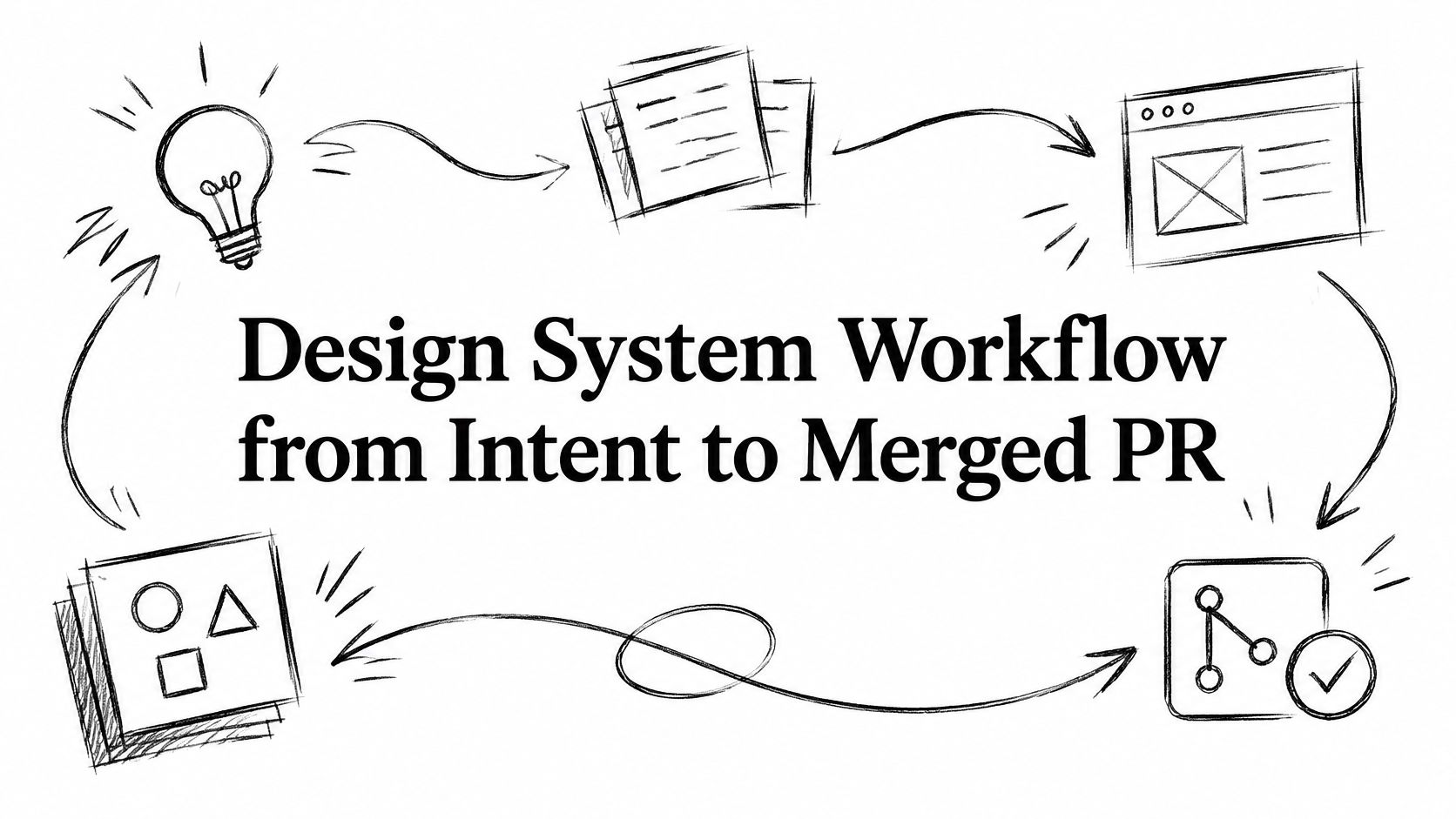
Design System Workflow from Intent to Merged PR
A design system workflow from product intent to a merged PR: stages, owners, rules, metrics, and the pitfalls that stall adoption.
In this article
- What a Design System Workflow Actually Does
- What travels with the change
- Where people get confused
- Stages from Product Intent to a Merged PR
- The seven exits
- Roles and the Decision Points That Stop Work
- Why the seats exist
- Four decisions that are not stages
- Documentation is not governance
- Rules Tokens and Automated Distribution
- One change, in order
- How distribution stays reviewable
- Tooling and Integrations at Each Stage
- Three integrations that earn a seat
- What "finished" looks like on a board
- Metrics That Prove Adoption Not Output
- Read the pairs
- Pitfalls When the Component Is Fine
- Six moments, then the traps
- Run One Card Through the Full Workflow
A 2025 Design Systems Report surveyed 294 practitioners and found that 79% of teams had a dedicated design-systems team, up from 72% in 2024. In that same report, design-token adoption rose from 56% in 2024 to 84% in 2025, and only 32% of respondents both build or maintain a design system and actively use it. Figma's design-systems research, cited there, found that designers with a relevant, up-to-date system completed tasks 34% faster than designers without one.
Those numbers point at a simple gap. Many teams publish a library. Fewer teams run a path that a real UI change can walk until it ships and still matches the need. A design system workflow is that path.
What a Design System Workflow Actually Does
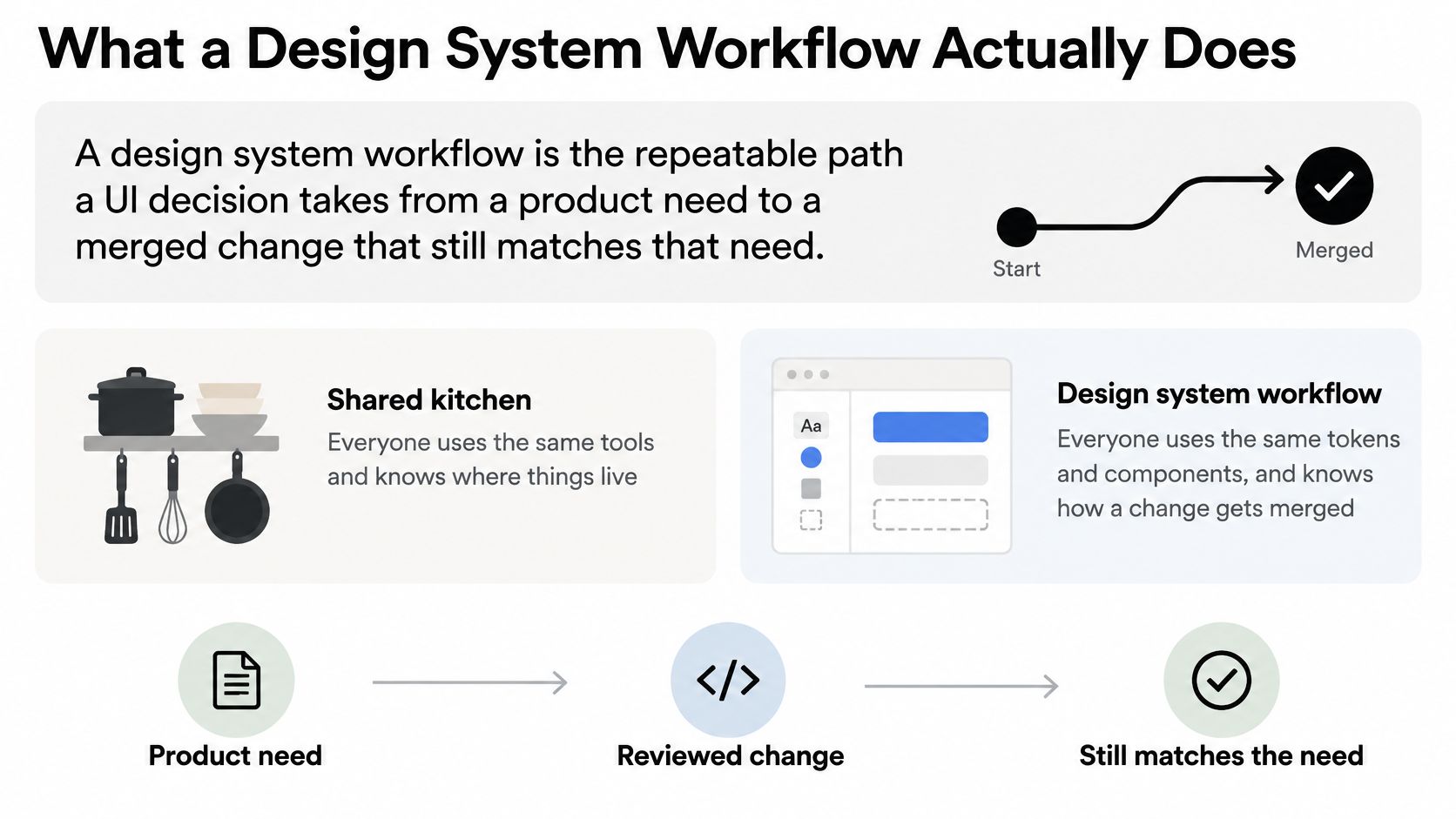
A design system workflow is the repeatable path a UI decision takes from a product need to a merged change that still matches that need. It is not the website that lists your buttons. It is the sequence of decisions that keeps the button, the screen, and the code saying the same thing.
Think of a shared kitchen, not a photo album of finished plates. In a shared kitchen, people use the same pans, the same labels, and the same rule for who tastes the soup before it goes out. A photo album only shows what looked good last time. You can't cook from it when the order changes.
What travels with the change
Four things move together. If one drops off, the next person invents a replacement, and the screen drifts.
- Intent: the user job, the constraint, and what done looks like.
- Tokens and components: the color, type, spacing, and parts the screen is allowed to use.
- Review: a named person, or a check, that can send the work back.
- The shipped screen: the merged change, plus a note of where it is used.
A library site can hold the second item and still miss the other three. That is why a team can look well staffed and still re-decide spacing on every feature. The fast task time only shows up when the system is current and people can apply it. A shelf of unused parts doesn't shorten the work.
A component page is a reference. A workflow is a decision that survives the handoff.
Where people get confused
People mix up three objects. The system is the set of tokens, components, and rules. The workflow is how a change to those things, or a screen built from them, gets proposed, checked, and merged. The product is the screen a user meets. A compliant component is not a compliant product. Keyboard order, focus, contrast, and states have to be checked on the assembled screen, on the same card as the design and the code.
The practical test is small. Pick one UI change. Can you see the intent, the approved design, the pull request, and the sign-off without leaving the work item? If the answer lives in chat, you have assets. You don't have a workflow yet.
Stages from Product Intent to a Merged PR
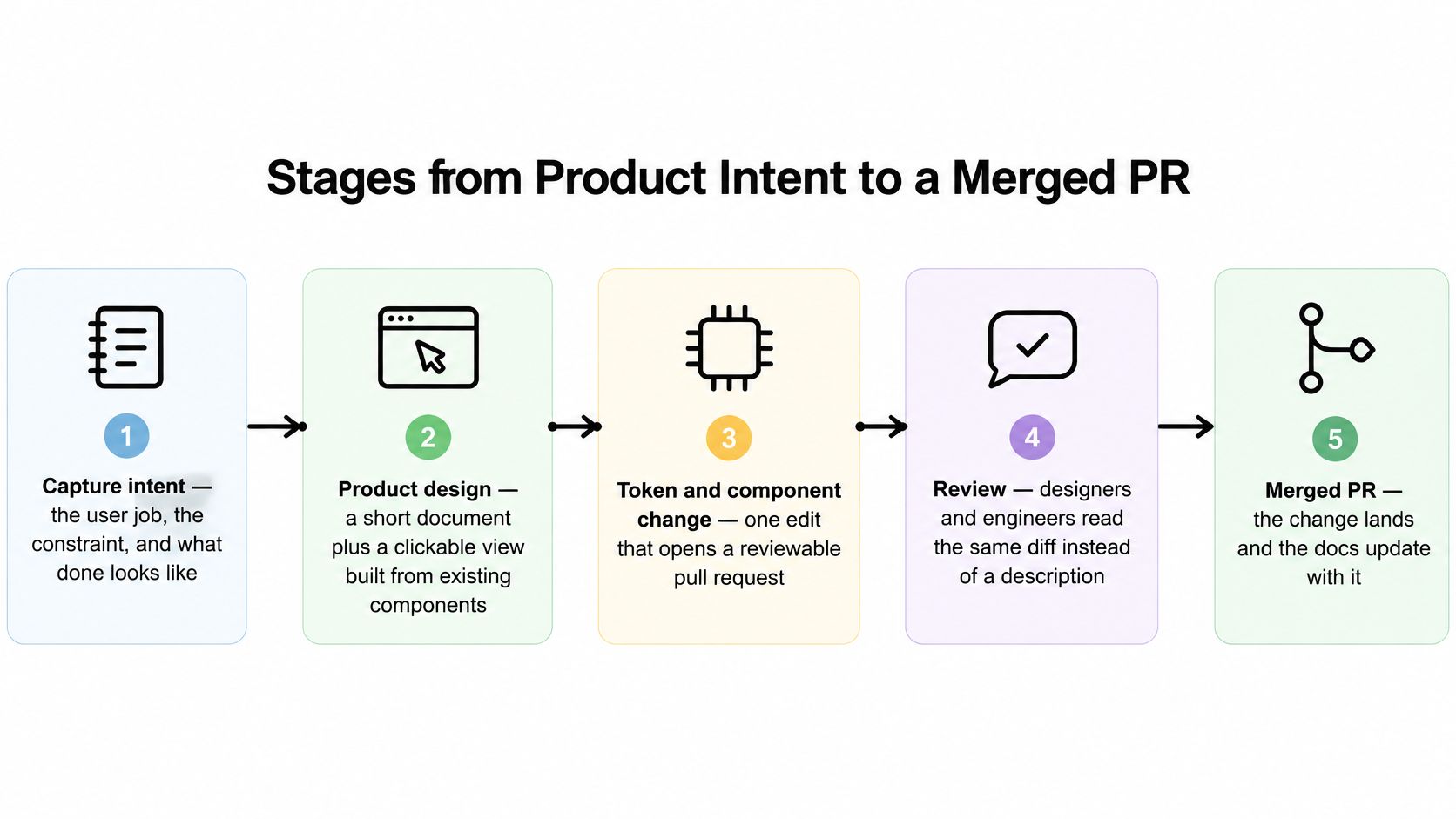
A card should move along one line. Each stage has an exit. The exit is the test, not the activity. Writing a document is not done. An accepted document is done.
The seven exits
Capture intent. Write the user job, the constraint, and what done looks like. Exit: the intent is written and accepted by the product owner. A vague ticket such as “make checkout nicer” is not an exit. Discovery checks for a Design System artifact on claude.ai instead of a standalone Claude Design project, and no longer checks for a starter project.
Product design. An agent drafts the product document and a clickable prototype from the Design System artifact and its shell components. A second agent reviews the draft first, and you review it before any code. Exit: the document and prototype are approved, with no open questions. A design with no open question approves itself when published and moves the card forward, with the workflow template determining which designs and card types are covered.
Say a settings page needs a density control. The clickable prototype uses the existing shell, not a new control drawn from scratch. Product design skills follow three principles: find the intent behind an action, meet what a user expects, and surprise the user least.
Technical design. An agent writes the technical design from the approved product design, a second agent reviews it first, and you comment then approve. The plan says how the change uses tokens, components, and APIs. Exit: the plan matches the approved product design and names the tokens and APIs. That review catches “we will just hard-code the gray.” A clean tech design can approve itself for every card type, including bug, tooling, and documentation cards.
Implementation. A worker builds the approved design and opens a pull request on GitHub. Exit: the pull request exists. Until it exists, there is nothing to compare. How that request should be shaped is covered in a pull request workflow.
Agent review. A second agent reviews the change against the approved design, and fix rounds run until it passes. Loupe's agent review checks every design and every pull request against the approved design, and sends it back for fixes before you see it. Exit: the change conforms to the approved design, including keyboard behavior, focus, contrast, and states. If it drifts, the card goes back for fixes.
Live review. Open the preview, annotate what you see, and save the notes on the same work item. Exit: notes are resolved, or deferred with an owner. A comment in a document nobody reopens is not an exit.
Done. Merge, publish versioned tokens or components if they changed, and note where the change is used. Exit: the pull request is merged and usage is written down. The person who merges is the checkpoint.
Two edges surprise teams. First, a clean design can approve itself and move the card forward when the template allows that card type. That keeps a boring change from waiting on a meeting. Second, undoing a design approval returns the card to that design's column, stops its background workers, and requests changes on the later design. Otherwise a coder keeps building a picture that is no longer true.
| Stage | Input | Exit test | Human checkpoint |
|---|---|---|---|
| Intent | User job, constraint, and definition of done | Intent is written and accepted | Yes, product owner |
| Product design | Design System artifact and shell components | Document and clickable prototype approved, with agent review first | Yes, unless a clean design auto-approves |
| Tech design | Approved product design | Plan matches the product design and names tokens and APIs | Yes, you comment then approve; clean tech design can auto-approve |
| Implementation | Approved product and tech designs | Pull request opened on GitHub from those designs | No, until the PR exists |
| Agent review | Pull request and approved design | Second-agent review passes after any fix rounds | No, before human review |
| Live review | Preview deployment | On-screen notes resolved or deferred with an owner | Yes, product or design |
| Done | Approved preview | Pull request merged and usage noted | Yes, person who merges |
Read the table when you are unsure who must act. The activity can be short. The exit cannot be fuzzy. A completed exit also keeps accessibility and adoption on the same card as design and code. A switch can be correct in the system, and the stepper can pass its own checks, while the assembled screen still fails focus order, contrast, or expected behavior. That is why conformance and live review stay attached to the work item rather than living as a separate badge on a component page.
Roles and the Decision Points That Stop Work
Decision rights matter more than job titles. Put the names on the card even when one person holds two seats. A card is like a workshop bench: stages show where the work sits, while seats show who may touch the tool.
- Requester: someone on a product team who needs the change.
- Design owner: accepts or rejects the product picture.
- Engineering owner: accepts the technical plan and the code path.
- Accessibility owner: can stop a card when the assembled screen fails, even if the primitive is fine.
- System maintainer: publishes versions and retires old patterns.
A three-person team may combine seats. The card should still show the name. Otherwise a question dies in a hallway.
Why the seats exist
A correct switch or stepper still fails if nobody can discover it, trust it, or apply it. Adoption is often a decision problem disguised as a design problem. A component can pass review in isolation and still fail on the composed page, especially when focus order, contrast, labels, or expected states break in the product screen.
That is why accessibility and adoption belong on the same card as design and code. The accessibility owner does not audit a museum piece. The accessibility owner checks the actual path a person takes through the product. A compliant component is not proof of a compliant product.
Loupe gives that distinction a practical shape. A work request carries a role that agent review tools and design review facts read, in place of the kind names of the Lifecycle template. Workers review a draft product design or tech design with the loupe-stage-design-review skill, the fix round answers each finding, and design writers leave drafts for agent review.
The path stays narrow. A draft product design or tech design gets an agent review, and a fix round when it fails, before the app publishes it to the owner. The owner can publish at any time to skip the loop. In product design, an agent drafts the product document and a clickable prototype, a second agent reviews the draft first, and you review it before any code. In tech design, an agent writes the technical design from the approved product, a second agent reviews it first, and you comment then approve.
Four decisions that are not stages
Stages say where the card is. These four decisions say what a person may do to it.
Accept a contribution. The change enters the system, with an owner and a version path.
Reject it with a reason. “No” without a reason trains people to detach components and move on. A reason gives the next draft something concrete to answer.
Waive an exception. Sometimes a screen must break a token or an accessibility rule for a real constraint. The person who waives it is named on the card. The exception does not live in chat, where it vanishes.
Deprecate a pattern. Old usage gets a date and a replacement. Shipping the old pattern is how systems rot.
The person who waives an accessibility or token exception is named on the card.
The same gate logic applies after approval. Loupe's agent review checks every design and every pull request against the approved design, and sends it back for fixes before you see it. A second agent reviews each design as well as each pull request. In the agent review stage, a second agent reviews the change against the approved design, and fix rounds run until it passes. That keeps human review focused on judgment, not on catching a diff that ignored the approved picture.
Undo is part of governance too. Undoing a design approval returns the card to that design's column, stops its background workers, and requests changes on the later design. The system treats approval as a live dependency, not a ceremonial stamp.
Documentation is not governance
A 2022 Design Systems Survey found that 85% of respondents had component documentation and 61% had a process allowing subscribers to contribute, while only 44% had a governance model or shared product roadmap. Pages are common. The right to accept, reject, waive, or retire is less common.
Use the design principles as another checkpoint. Product design skills apply three rules: find the intent behind an action, meet what a user expects, and surprise the user least. Those rules help a reviewer see whether a draft solves the user's job without inventing novelty at the wrong moment.
A longer look at who may change the system sits in this note on design system governance.
Rules Tokens and Automated Distribution
Rules are the small agreements that stop every screen from inventing its own spacing, color, or focus behavior. "Use the spacing token" is a rule. "The focus ring uses this token and stays visible on the composed page" is a rule. A wiki page that nobody's build reads is not a rule.
Treat tokens and components as versioned production assets. A token is the source of truth for a value such as color, type, spacing, or a similar interface property. When the token changes, products should receive a reviewable update, not a message that says "please update gray-200 when you can."
One change, in order
Walk a single token change so the order stays obvious.
- Propose the token or component change, with the visual and technical impact written down.
- Review that impact before it spreads. A color that fails contrast on text is cheaper to catch here.
- Publish a version. The version is the artifact, not a screenshot.
- Run checks: visual regression, accessibility of the primitive, and a conformance pass against the approved design.
- See whether products took it. A published token that no app consumes didn't land.
In a controlled Sparkbox study, teams built the same interface up to 47% faster when using a design system, because repetitive implementation work had already been encoded in reusable components and design decisions, as described in this write-up of that study. The speed is front-loaded. You pay once for states, focus behavior, and tokens. Later screens spend that work down. If every screen still hand-tunes padding, you paid for a library and didn't get the speed.
How distribution stays reviewable
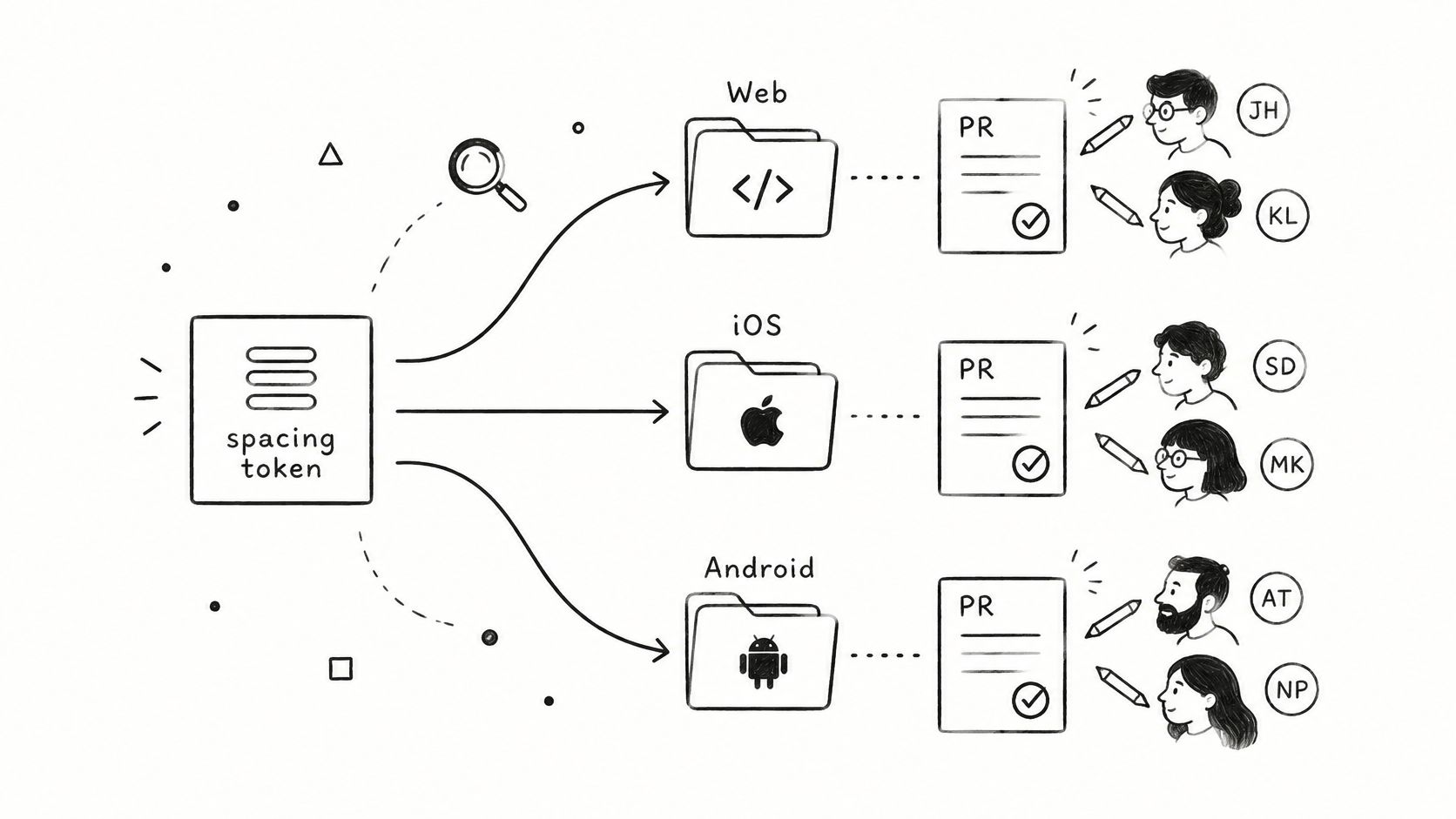
Telefónica describes an automated GitHub Actions workflow that pushes token updates into separate platform repositories and opens pull requests. A multi-brand change becomes a small number of clicks, not a hand edit in each codebase. The pull request is the point. People review a diff. They don't re-type a value from a slide.
Each change should carry an owner, compatibility notes, release status, and migration guidance. Without those, a "minor" token bump becomes a surprise in production.
A compliant switch or stepper can still be assembled into a bad page, so automation doesn't replace live review. Automate distribution and checks. Don't automate taste.
Tooling and Integrations at Each Stage
Every stage needs two things in one place: the card, and evidence the stage finished. A tool that only lives in another tab doesn't count.
| Stage | Tool category | What it must leave on the card | Loupe fit |
|---|---|---|---|
| Intent | Work board or issue tracker | Written intent with a definition of done | Card holds the intent and the done criteria |
| Product design | Design tool plus a short document | Approved clickable view with no open questions | Agent drafts document and prototype, second agent reviews it, person approves |
| Tech design | Spec template in the repo | Token, API and state plan checked against the product design | Tech design runs on the same card |
| Implementation | Code repo and CI | Pull request opened from the approved designs | Worker builds the approved design and opens a GitHub pull request |
| Conformance review | Diff viewer and CI checks | Visual-regression and accessibility results attached to the PR | Agent review compares the change with the approved design before a person |
| Live review | Preview deployment and annotation | Notes resolved or deferred with a named owner | Preview annotation loop saved on the originating card |
| Done | Token pipeline and package registry | Versioned token or component plus usage notes | Merge closes the card and records where the change is used |
Three integrations that earn a seat
Design to code. The approved product design and its clickable view attach to the card. Implementation starts from that artifact, not from a screenshot in chat. When the template allows it, a design with no open question can approve itself. A practical comparison of design to code tools helps when you are picking the handoff, but the test stays the same: the approved view has to be on the card.
Token pipeline. One source turns into platform packages and opens a reviewable pull request per repository. Visual-regression and accessibility output posts back on that same pull request. A multi-brand update is a review, not a manual sweep through web, iOS, and Android.
Preview review. A preview deployment plus annotation puts notes on the work item. The note names the control and the defect. It doesn't sit in a document nobody reopens after the meeting.
What "finished" looks like on a board
On our board the same path is six stages: product design, tech design, implementation, agent review, live review, and done. An agent drafts the product document and a clickable prototype, a second agent reviews that draft, and a person approves before any code. A worker then opens a GitHub pull request from the approved design. Agent review compares the change with that design before a person does site review. The software is AGPL for self-hosting with Docker Compose, and a hosted version is in private beta.
A tool earns its place only if it leaves an artifact on the card.
If a tool can't do that, keep it off the critical path. Chat is fine for questions. It is a bad system of record.
Metrics That Prove Adoption Not Output
Component count is the wrong score. A system with 200 components and no users is a catalog. Governance works when you watch contribution flow and adoption, not volume. The Pegasus Design System governance notes treat contribution lead time, proposal response rate, product adoption, component detach rate, and deprecated usage remaining before release as the operational set. Each one exposes a different failure.
Contribution lead time is how long a proposal sits before a decision. Many weeks means the review is the bottleneck, not the design.
Proposal response rate asks whether contributors get an answer. Silence teaches people to fork.
Product adoption after release asks who moved to the current version. Low adoption usually means people can't find the part, or they don't trust it in their app.
Component detach rate counts parts people disconnect so they can restyle them. A high rate means the component doesn't fit real screens. That is a requirements miss.
Deprecated usage still shipping is the old pattern still in the build. If it isn't near zero before the next release, the deprecation was a blog post.
Fix rounds to merge count how many times work bounced. Rising rounds mean design drift or a weak review.
Hours from proposal to merge show whether gates are slow. This should trend down after you automate distribution, not after you skip review.
Token propagation lead time is how fast a token change becomes a pull request in each repo. Hours, through generated pull requests, beats a week of hand copies.
Visual-regression failures should show up before a person opens the preview. If people are the first to notice a spacing jump, the check is late.
| Metric | Failure it exposes | Healthy signal |
|---|---|---|
| Contribution lead time | Review bottleneck | Days, not many weeks |
| Proposal response rate | Contributors ignored | Most proposals answered |
| Product adoption after release | System not used | Most teams on the current version |
| Component detach rate | Parts do not fit real UI | Low detach after release |
| Deprecated usage still shipping | Old patterns remain | Near zero before the next release |
| Fix rounds to merge | Design drift or weak review | Few rounds and a falling trend |
| Hours from proposal to merge | Slow gates | Trend down after automation |
| Token propagation lead time | Manual copy across repos | Hours, via generated pull requests |
| Visual-regression failures | Unintended UI change | Caught before human preview |
Read the pairs
Long lead time plus high detach means governance is slow and the system is wrong for real UI. Short lead time plus low adoption means the library is easy to change and hard to discover. Speed only counts if reuse rises and fix rounds fall. Shipping faster while detach climbs is just a faster way to leave the system.
Once a month, read five numbers: hours to merge, fix rounds, adoption, detach rate, and open deprecations. If a number moves the wrong way, name an owner that week. A dashboard nobody acts on is another ceremony.
Pitfalls When the Component Is Fine
Three cases show the failure even when the library looks healthy.
A multi-platform token change. One edit opens a reviewable pull request in each platform repository. Web, iOS, and Android reviewers see a diff. They don't hear a promise in a slide. If your update still depends on someone remembering to copy a number, the component was never the problem.
A squad detaches a button. They detach it because the system button can't do their layout. That is a requirements miss, not a discipline problem. It should come back as a proposal that names the missing case. Scolding the squad for "not using the system" hides the gap in the component.
An automated build uses only approved components and still fails keyboard order. The parts are fine. The page is not. Focus jumps from the footer back to a modal that was never in the tab order. Contrast on the primitive passed. The composed heading on a photo did not.
Who owns accessibility when the system component is compliant but the assembled experience is not? That question, raised in work on accessibility inside design-system practice, doesn't have a default answer. Design systems can scale accessibility through accessible components and through guidance for the people who consume them. Designers also have little spare time, so the checks have to sit inside the normal path, not in a separate audit week.
Six moments, then the traps
Put a check at requirement acceptance, design annotation, component selection, generated-code review, browser interaction testing, and a named human sign-off when someone wants an exception. Cover keyboard behavior, focus, semantics, contrast, motion preferences, and responsive states. Centralizing accessible primitives cuts repeated errors. It can also create false confidence when custom compositions leave the library.
Name the traps once, so they are easy to spot:
- No contribution path. People detach instead of proposing.
- Review with no time limit. Cards sit, and teams route around the system.
- Preview notes skipped. The diff looked fine, and the page wasn't.
- A green component checklist taken as proof the product is accessible.
The fix pattern is plain. One owner, one card, one exit test per stage. Accessibility and adoption sit on that card with design and code. A green badge on a switch doesn't answer for the page.
Run One Card Through the Full Workflow
You don't need a new team to start. You need one real UI change small enough to ship in a few days.
- Pick that change. A label, a spacing fix, or one missing state is enough.
- Write the intent in a few lines: user job, constraint, definition of done.
- Design it with components that already exist.
- Get the product design approved, with no open questions left.
- Write the tech design: tokens, APIs, states.
- Implement only that design and open a pull request.
- Review the diff against the design. Include keyboard order, focus, contrast, and empty, error, and loading states on the composed screen.
- Merge, and publish a version if a token changed.
- Record two numbers: hours from intent to merge, and fix rounds.
One card through all seven exits is the workflow, even if the library is thin. Run it weekly. The two numbers make the case for tooling better than a slide about consistency.
Then decide one thing for the week. Should human checkpoints sit on the card, with agents working between them? If yes, put the path on a board before you add any agent: a card per change, an agent drafting the design, an agent implementing it, an agent reviewing it, and a named person at every checkpoint. On our side, product design still starts with an agent draft of the document and a clickable prototype, a second agent reviews that draft first, and a person reviews it before any code. Implementation is a worker that builds the approved design and opens the GitHub pull request. Start with one card either way. Add agents only once every exit test is written down.
Loupe runs this design system workflow on one board, from product design through technical design, implementation, and review, until the pull request merges. Agents draft and check the work between checkpoints, and a named person still accepts intent, design, and exceptions. See how that card moves at Loupe.