Agentic Workflows: How Agents, Tools and People Fit
Agentic workflows let AI agents plan, use tools and pause for human approval. A simple guide with software development examples and a stage table.
In this article
- What Agentic Workflows Really Mean
- Chatbot, agent, workflow
- Where the industry actually is
- The Six Stages of a Software Workflow
- Tools are hands, checkpoints are brakes
- Where the six failures actually come from
- Where Humans Should Step In
- Three ways to run the gate
- The Context Every Agent Needs at Each Step
- The minimum context package
- Why stale design poisons implementation
- Start With One Card and Three Checkpoints
- How to tell if the loop is healthy
- Three ways to set this up
- A Day in One Work Item
- The same week without a workflow
A team hands a coding agent a ticket and a repository, then goes to lunch. They come back to forty changed files, a broken build, and no way to tell where things went wrong. The model did exactly what it was asked. Nobody had decided where it should stop and wait.
An agentic workflow is a set of stages where AI agents plan, use tools, and hand off to a person at checkpoints you choose. The workflow, not the model, decides what happens next. That distinction matters right now because a minority of organizations are scaling agentic systems while many more are still experimenting, and the difference between the two groups is rarely the model. It is the structure around it: which context each agent receives, and where a human must approve before work moves on.
What Agentic Workflows Really Mean
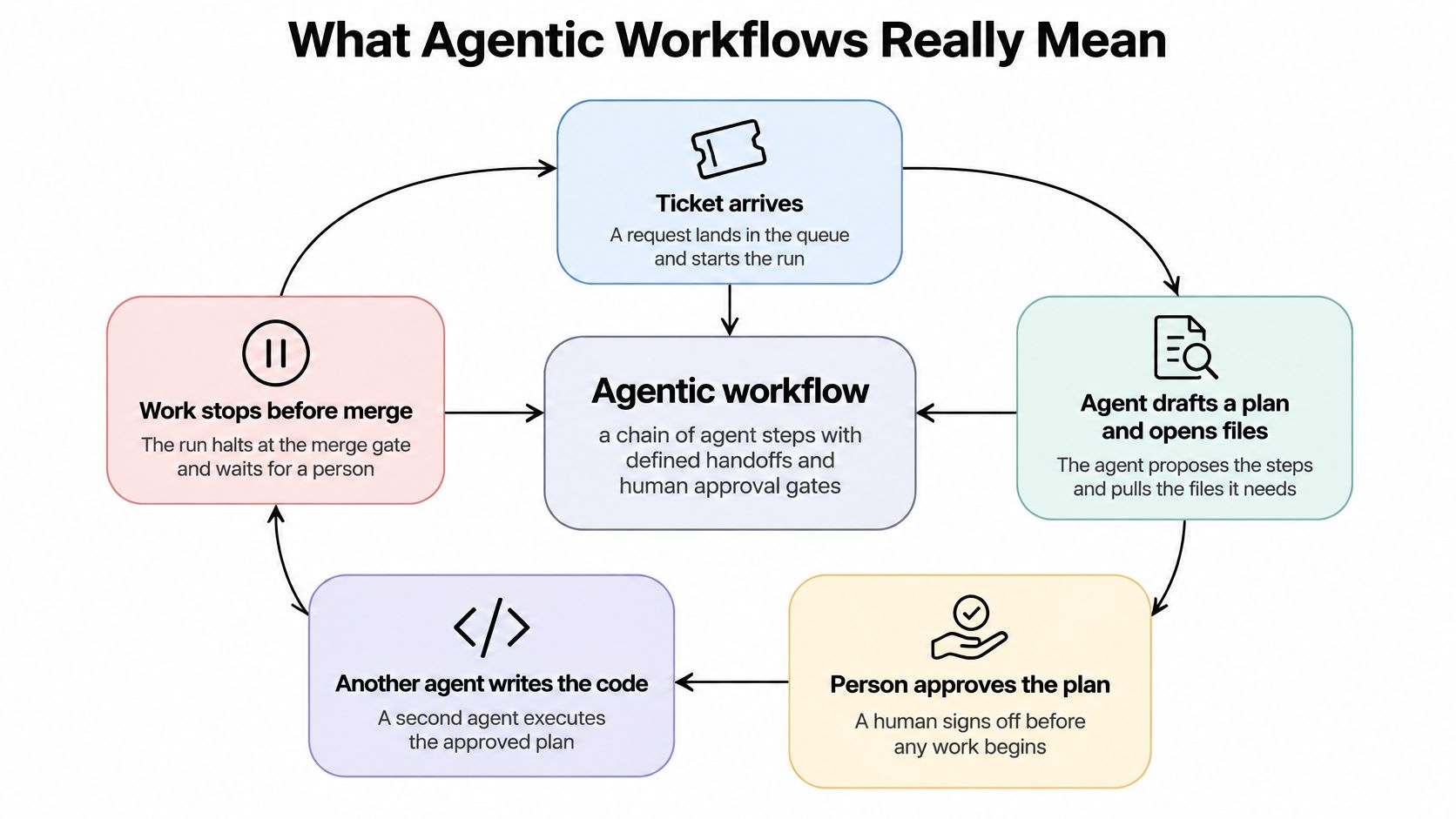
A ticket lands in the queue on Tuesday morning: add a password reset page. An agent reads it, drafts a plan, and opens the four files it thinks matter. Nothing gets written yet. A person reads the plan, changes one step, and approves it. A second agent writes code against that approved plan and stops again, this time in front of the merge button.
That second pause is the whole idea. An agentic workflow is a chain of stages where AI agents act on their own inside each stage, use tools such as code editors, test runners, GitHub and search, and pass the work to another agent or a person at set points.
The agent decides how to do the step. The workflow decides which step comes next and when a person steps in.
Chatbot, agent, workflow
Four things get called "AI doing work". They're not the same, and mixing them up is where most disappointment starts.
- Chatbot: one answer, no tools, no access to your repo. Useful for a question, useless for a change.
- Single agent: one loop with tools, but no defined exit and no handoff. It runs until it decides it's finished, which is a judgement call you've outsourced.
- Plain automation: a fixed script. A linter or a CI job runs the same way every time and never improvises. Reliable, and blind to anything it wasn't written for.
- Agentic workflow: stages, tools inside each stage, and rules between them that say what must be true before the work advances.
The distinction that matters in practice is the third and fourth. A script can't decide that a requirement is ambiguous. An agent can, and then it needs somewhere to say so.
Where the industry actually is
Adoption of AI in general is high, and agent scaling is not. McKinsey's 2025 state of AI survey, which collected responses from 1,993 participants between June 25 and July 29, 2025, found that 88% of organizations regularly used AI in at least one business function, up from 78% a year earlier. Its definition of agentic systems covers software that acts autonomously across a workflow, including coding agents, not chat interfaces.
Scaling those systems is still the exception. That gap is not a model problem. It's a control problem, and control lives in the stages.
Here's the shape of the thing before the details.
The Six Stages of a Software Workflow
A useful agentic workflow looks a lot like a good human process, written down precisely enough that a machine can follow it. Here is the version most software teams converge on.
| Stage | Agent does | Tools it uses | Human checkpoint | Moves on when |
|---|---|---|---|---|
| Product design | Drafts the product doc and a clickable prototype; a second agent reviews the draft | Docs editor, design tools, prototype builder | Approves product intent before any code | Product doc approved and no open question |
| Technical design | Writes the technical spec, interfaces and test plan | Repo browser, API docs, diagram tools | Approves design and edge cases | Tech design approved |
| Implementation | Writes code against the approved design, runs tests, opens a pull request | Code editor, test runner, GitHub | Sets scope, reads the plan | Pull request opened and checks run |
| Agent review | Checks the code against the approved design and lists findings | Diff reader, linters, test results | Reviews findings, decides what to fix | Findings resolved or accepted |
| Live review | Deploys a preview, captures pages, collects notes | Preview deploy, browser, screenshot tools | Clicks through the preview and annotates | Preview accepted |
| Done | Merges after checks pass | GitHub merge, CI | Authorizes merge where the rule requires it | Merge complete |
Tools are hands, checkpoints are brakes
Tools are how an agent touches reality: the repo, the test runner, the preview URL, an MCP server that reaches your issue tracker. Give an agent a tool and it can change something you'll have to live with. That's the point, and it's also the risk.
Checkpoints are the brakes. Not a meeting, not a status update, just a rule that says this card does not move until a named thing is true and a person has seen it. Write the rule in a sentence a new hire could apply: move to technical design when the product doc is approved and no open question remains. If you can't write that sentence, you don't have a stage yet, you have a mood.
Where the six failures actually come from
Almost every problem people blame on the model traces back to a weak stage exit.
- Requirements drift after coding starts. No feedback checkpoint existed after planning, so the agent kept building on a reading nobody confirmed. Fix it with a design approval gate that blocks implementation until the design is approved.
- The agent forgets a constraint. Context wasn't carried forward, so "don't touch the billing table" vanished by stage three. Fix it by linking the approved design on the card, not pasting it into a prompt.
- The output is almost right. There was no structured review, just a person squinting at a diff. Fix it with a review stage, numbered fix rounds, and a cap on how many rounds before a human takes over.
- Behavior broke but the checks passed. The checks were shallow. A reliability study proposing twelve metrics across consistency, fault tolerance, predictability and safety found that gains in model capability produced only small reliability gains across 14 models and two benchmarks (arXiv reliability study). Fix it with deterministic tests and linting before review, not after.
- The card sits with no progress. A tool failed or a wait never resolved. Fix it with an explicit stuck state, bounded retries, and escalation to a person.
- Costs rise without better results. Someone picked a model by reputation. Fix it by tracking cost per finished card and running model experiments per task type.
Most agent failures are stage-exit failures. An agent review against the approved design, run before a human opens the pull request, removes more of them than any model upgrade will.
Where Humans Should Step In
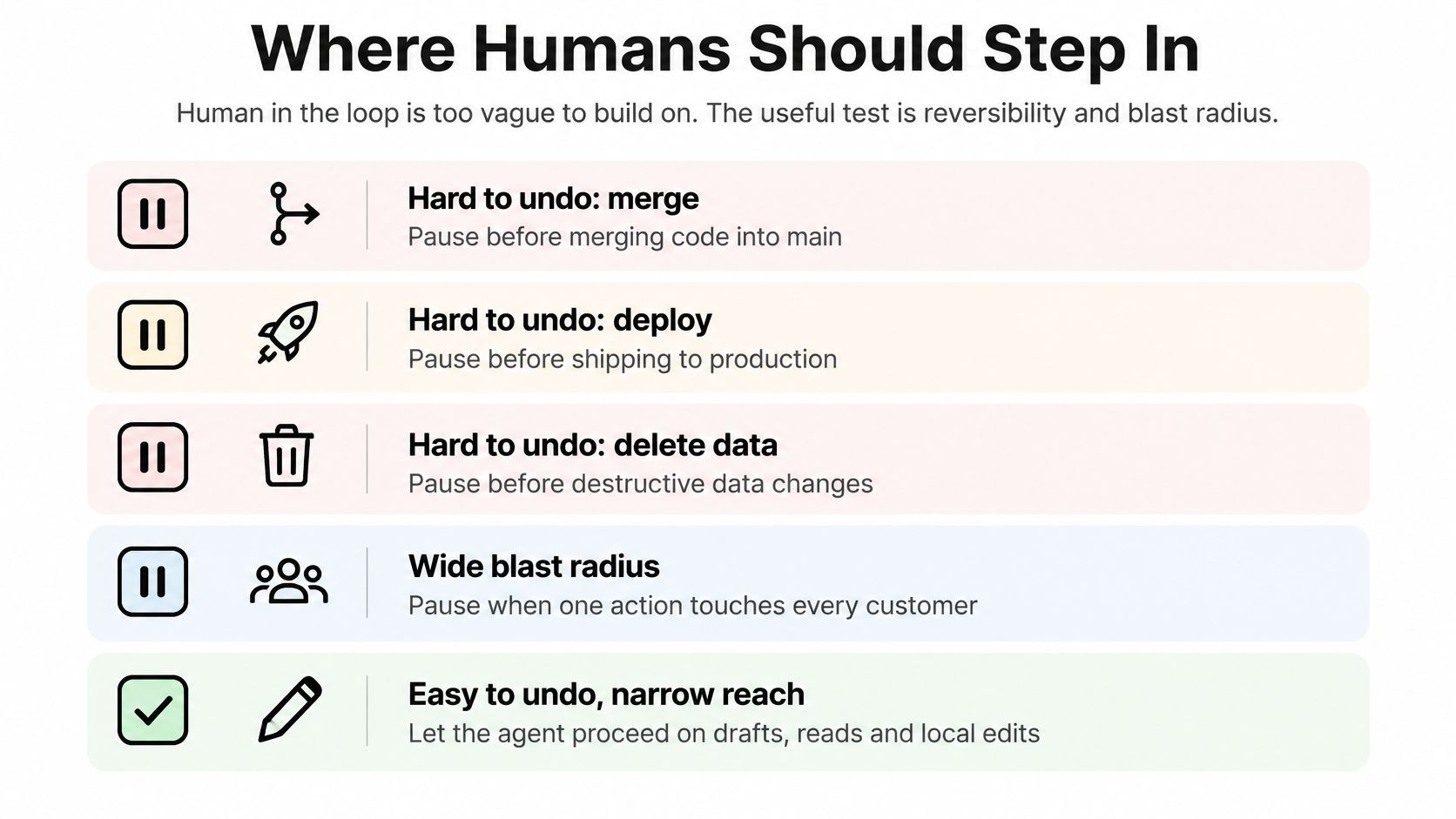
"Human in the loop" is too vague to build on. It doesn't say which loop, how often, or what the person is looking at. The test that works is reversibility and blast radius: how hard is this to undo, and how many people does it touch?
- Hard to undo: merging to main, deploying to production, deleting data, sending anything to a customer. Pause.
- Ambiguous input: an unclear requirement, two docs that disagree, a ticket that contradicts itself. Pause and ask.
- The agent says it's unsure: low confidence or an explicit question. That's a cheap signal. Use it.
- A policy needs a name: someone has to be accountable on the record. Pause and record who.
Everything bounded and reversible should run without you: drafting a doc, running the test suite, fixing a lint error, opening a pull request, capturing preview screenshots.
Practical rule: if the agent's action would take longer than ten minutes to reverse, a person approves it first.
Three ways to run the gate
| Style | Control | Speed | Typical failure | Best for |
|---|---|---|---|---|
| Continuous manual review | Highest, a person checks every step | Slowest, a queue of approvals | Review fatigue and skipped checks | Early pilots, high-risk work |
| Checkpoint-based | High at chosen gates, low elsewhere | Fast, agents run between gates | A gate with weak evidence lets a bad change through | Most product and engineering teams |
| Fully autonomous | Low, monitoring only | Fastest | Silent drift and hard-to-audit changes | Narrow, reversible, well-tested tasks |
The middle row is where day-to-day operations should live. It's also the one that's hardest to get right, because the quality of a gate depends on the evidence the reviewer sees. Independent 2026 research found that 69% of organizations still review or validate most agentic decisions and 44% rely on manual methods to monitor agent interactions, while only 21% had mature governance covering decision boundaries, real-time monitoring and complete audit trails (Dynatrace agentic AI report).
The distrust numbers explain why the gates exist. Stack Overflow's 2025 Developer Survey found that 46% of developers distrust the accuracy of AI tools against 33% who trust them, and only 3% highly trust the output. In the same survey, 45% said debugging AI-generated code takes more time, and 66% were frustrated by answers that are almost correct but still need fixing. A checkpoint before merge earns its cost against those numbers.
Some teams also keep one escape hatch: an interactive session where a person takes the wheel on a stuck card, works through it with the agent, then hands control back to the workflow. That beats editing a prompt from the outside and hoping.
For a fuller look at human in the loop AI agent design, the pattern to copy is fewer gates with better evidence, not more gates.
The Context Every Agent Needs at Each Step
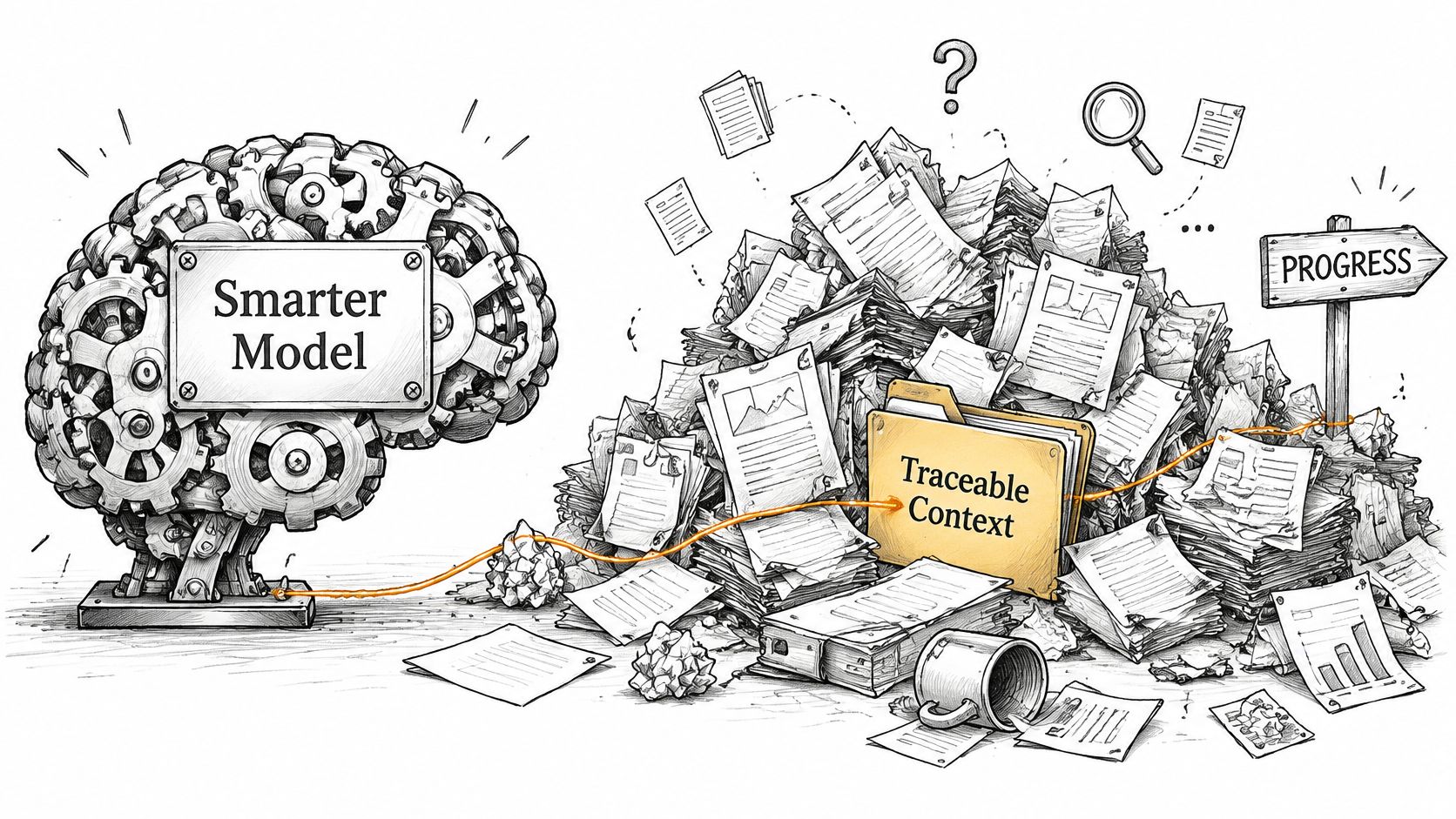
A smarter model will not fix missing context. If the approved design isn't in front of the agent at implementation time, a better reasoner just builds the wrong thing faster and more elegantly.
The data backs that up. A 2026 global survey of technology leaders found that 77% said 20% or less of their enterprise data and knowledge was ready for reliable agent use, citing fragmented systems, missing context and weak governance as the barriers (Teradata, why agentic AI stalls in the enterprise).
The minimum context package
Every stage needs a small, explicit bundle. Not a giant prompt, a bundle of named artifacts.
- Approved product intent: the doc a person signed off, with its approval recorded.
- Approved technical design: interfaces, constraints, the edge cases someone already argued about.
- Current state: repo branch, test results, anything the last stage changed.
- Prior review notes: the findings from the last round, with which ones are resolved.
- A do-not-assume list: pricing rules, permissions, customer data handling, anything the agent must ask about rather than invent.
Why stale design poisons implementation
If the design doc on the card isn't the version that was approved, the agent builds to a spec nobody agreed to, competently. This is not hypothetical. In SWE-Interact, agents that solved roughly 50% of single-turn baseline tasks solved only about 25% when requirements were revealed progressively through feedback, planning, workspace inspection and revision (SWE-Interact). Autonomy without a feedback checkpoint amplifies drift.
Link the approved artifact. Paste the prompt. One of those survives a week.
Habits that keep context clean:
- Link, don't paste. A pasted spec goes stale without notice. A linked doc shows its current version and its approval state.
- Approve, then freeze. Once a design is approved, later edits create a new version that needs its own approval.
- Make assumptions visible. Require the agent to state what it assumed when it was unsure. That sentence is the cheapest bug report you'll get.
- Keep the history on the card. Escalations, fixes and decisions belong in one place, so the next agent doesn't rediscover them.
When design and implementation are separate stages sharing one card, the human approval of the design becomes the control that stops drift. Not a reminder in a chat thread. A gate.
Deeper patterns for AI agent context management start with this same question: what must the agent receive, and what must it be forbidden from guessing?
Start With One Card and Three Checkpoints
A team picks one settings toggle and puts it on a single card. Product design must be approved before a spec is written. Technical design must be approved before a worker writes code. The preview must be accepted before anyone authorizes the merge. Between those three stops, the card runs on its own.
That is the pilot. One small, repeatable feature, one team, a real UI and a real test. Watch it for two weeks before you copy the pattern anywhere else.
The work item is what you automate, not the model. A sharper model still drifts when the card never says when a stage ends or who has to say yes. A board with explicit stages and human checkpoints beats a smarter model that has neither. The agent is only as good as the context and the approval points that card gives it.
Write each stage exit as a sentence, not a tool setting. "Implementation starts when the tech design is approved." That sentence is the workflow. Runners, scripts and boards are plumbing around it.
Keep three checkpoints, and only these three, while you learn the loop:
- Approve the product design.
- Approve the technical design.
- Accept the preview and authorize the merge.
Three is enough to test the way of working. Connect the tools the agents will call: the repo, the test runner, the preview deployment. An agent that cannot run tests cannot tell you it broke something.
Measure for two weeks. Fix rounds per card. Human interventions per card. Hours from the first line of the request to the merge. If a gate fires and nothing on the card changes, the gate is theater. If a card sails through with no review, the gate was decoration. Loosen or tighten from those numbers. The signals that predict rework are covered in this piece on AI agent observability.
How to tell if the loop is healthy
A healthy card has one fix round and three human checkpoints. It waited at those three checkpoints, ran unattended between them, and merged after a review that changed something small.
An unhealthy card stacks fix rounds, or a person grabs the wheel at every stage. The exit rule is weak, or the context on the card is missing a piece. A card that merges with zero review is an unmonitored deploy.
Three ways to set this up
The differences are defined stages, human checkpoints, linked artifacts, tool integrations, self-hosting, and cost per card. Model choice matters less than those.
A specialist orchestration board gives you stages, gates and linked artifacts already shaped. That is the shortest path to measuring fix rounds and hours to merge.
A home-built script chain fits existing CI and leaves you in control. You write the state machine yourself, and you own every stuck card at 2am.
A general agent framework is the most flexible and the least opinionated. It runs one agent well and leaves the stage rules, the review evidence and the cost tracking to you.
Loupe is one option that puts those pieces on one board. A card moves through six stages: product design, tech design, implementation, agent review, live review, and done. Workflow rules decide when the card moves, which work it needs, and where it waits for a person. Designs are reviewed in place. A worker agent opens a pull request, and a second agent reviews it against the approved design. On a preview, notes on the UI are saved back to the card. Loupe is a software factory for coding agents that runs on your agents, your machine, and your rules, self-hosted with Docker under the AGPL or hosted in private beta.
Pick one card. Write its three checkpoints as sentences. Run it to the merge before you add a second card.
A Day in One Work Item
Monday, 9:40am. A product manager types one line: "Customers can't reset their own password, they email support. Build a reset page." That's the whole request.
By 10:15 the product agent has produced a short doc and a clickable prototype, and a second agent has flagged two open questions on the card: what happens for SSO accounts, and how long a reset link stays valid. The PM answers both in a ten-minute interactive session, approves the design, and the card moves itself to technical design.
Tuesday morning a tech lead approves the spec, including the token expiry the PM chose. The worker agent implements it, runs the tests, and opens a pull request overnight. The reviewer agent compares the code against the approved design and posts two findings, one about the expiry being read from the wrong config key. The worker fixes both. One fix round.
On the preview deploy, the PM clicks through, annotates a button placement directly on the page, and the note lands on the card. Wednesday, 9:20am, the pull request is approved and merges.
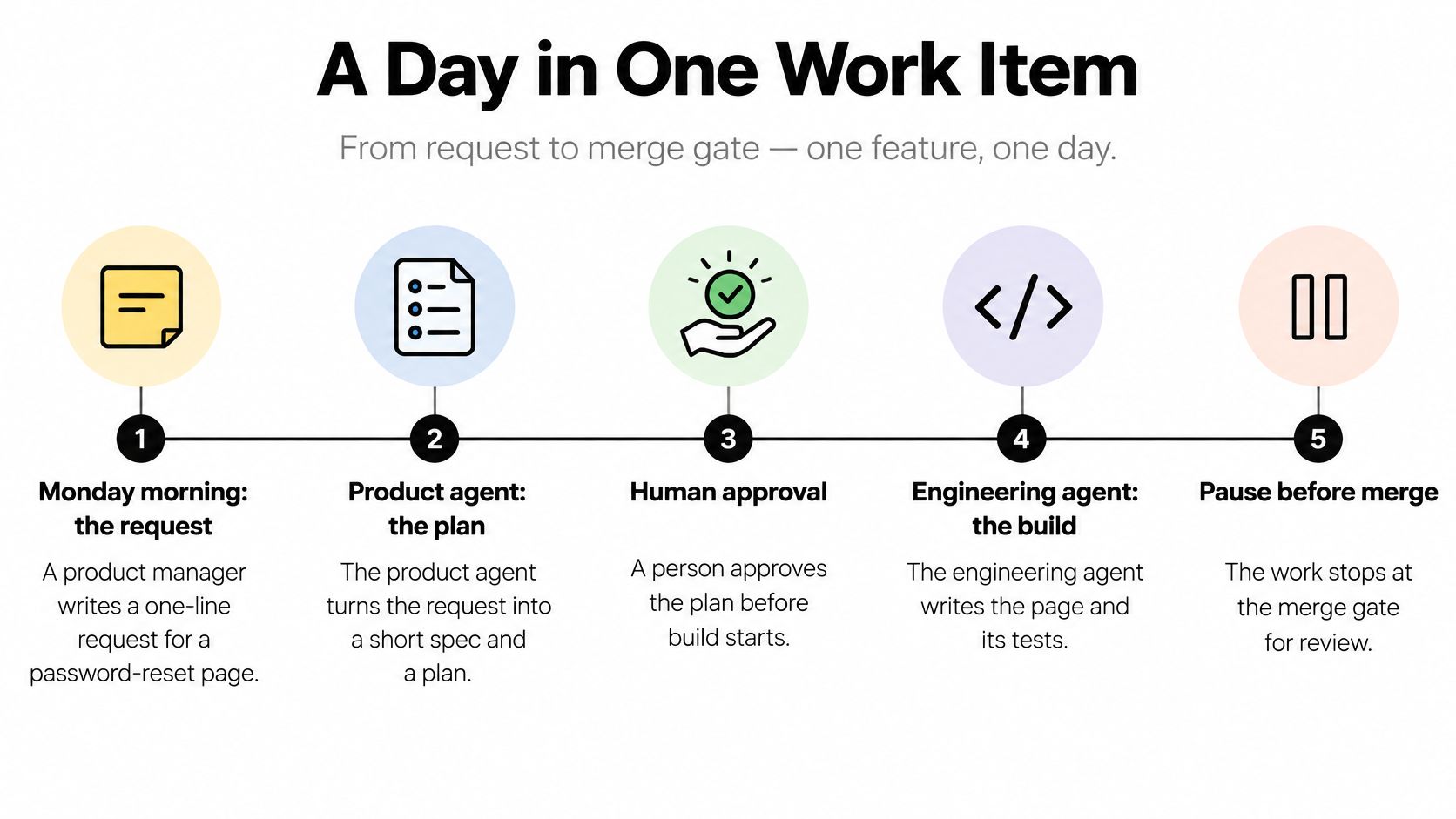
Count what happened. The card waited at three human checkpoints and ran unattended between them. The team can point at one fix round and at the hours from first line to merge. Nobody spent a meeting deciding what to build next, because the card already said what was true.
The same week without a workflow
Now replay it with no shared card. The request lands in a chat channel. The PM's answers live in three threads. A design doc gets written, then edited after implementation starts, and the developer builds against the first version. The reviewer leaves four comments, two of which were already resolved somewhere else. Someone debugs a change that's almost right for an afternoon, and nobody can say whether the reset link expiry was ever a decision or just whatever the agent picked.
The second version isn't slower because the model is worse. It's slower because the work item has no memory, no exits, and no place where a person can see the whole thing at once.
Loupe gives you that board. A card moves through six stages with rules that decide when it advances and where it waits for you, and agents run between those gates with your models on your machine. If you want to see one work item go from a one-line request to a merged pull request, visit Loupe and try it on a feature you already have queued.