AI Workflow Automation: How It Works and How to Start
Learn AI workflow automation in simple terms: how agents hand off work, which patterns to use, and how to start with one safe, measurable workflow.
In this article
- What AI Workflow Automation Means in Plain Terms
- Using AI isn't the same as connecting a workflow
- How Work Passes Between Agents and People
- Define delegation before granting access
- How to Build and Pilot Your First Workflow
- Keep the tool test simple
- Reliability Checks That Keep Automations Safe
- Build a safe failure path
- Metrics That Show Real Time Savings
- Include the cost of checking
- Real Examples of Automated Workflows at Work
- Support ticket triage
- Marketing content approval
- Code change pipeline
You've asked an AI tool to write a change, draft a document, or sort incoming requests. The first result arrives quickly. Then you spend the afternoon checking it, finding missing details, and asking for fixes.
AI workflow automation connects those steps so you don't have to carry work between tools yourself. But the benefit isn't more generated output. It's more work that reaches a clear finish and gets accepted, without creating a larger checking burden.
What AI Workflow Automation Means in Plain Terms
AI workflow automation means agents move a piece of work through connected steps, while people step in where judgment is needed. An agent is an AI system that can use tools to carry out a task. A workflow defines what happens next.
Think of an assembly line. Each station does a specific job, passes the item forward, and leaves it ready for the next station. People check quality at the points where a mistake would matter.
The value comes from those handoffs, not from any single tool. An excellent drafting agent won't help much if the reviewer receives the wrong brief or nobody knows who can approve the result.
Workflow stages and where AI and people fit
| Stage | Typical work | AI can handle | Person decides |
|---|---|---|---|
| Request | Describe the task | Turn notes into a clear brief | Approve what gets built |
| Design | Plan the solution | Draft the design document | Approve the design |
| Build | Write the change | Make the first version | Check the result before release |
| Review | Check quality | Run checks and flag issues | Accept or reject the change |
| Release | Ship to users | Prepare and deploy the change | Approve production changes |
| Done | Close the work | Record results and metrics | Confirm the outcome |
These are common stages, not a required layout. A content team might combine design and build. An engineering team might separate product design from technical design.
The important distinction is between making work and deciding whether it's acceptable. An agent can prepare a release without having permission to send it to production.
Using AI isn't the same as connecting a workflow
McKinsey's 2025 global survey found that 23% of respondents said their organizations were scaling an agentic AI system in at least one business function, while nearly two-thirds hadn't begun scaling AI across the enterprise.
Those are different measures, but the practical gap is clear. Using AI within a team isn't the same as connecting work from request to accepted outcome.
Treat the workflow as a relay. A fast runner doesn't help if the next runner never receives the baton.
The practical questions are how work passes between steps, how to pilot the process, which checks keep it reliable, and which measures show genuine savings.
How Work Passes Between Agents and People
State is the record of what's finished, what's waiting, and what evidence is attached. Without it, an agent may repeat completed work or wait for an approval that nobody knows it needs.
Different tasks need different ways of coordinating that movement.
Common orchestration patterns
| Pattern | How it works | Best for | Main risk |
|---|---|---|---|
| Sequential chain | One agent finishes, then the next starts | Clear, fixed steps | One weak step slows the whole run |
| Parallel fan-out | Several agents work on parts at once | Independent subtasks | Results may conflict and need merging |
| Orchestrator and workers | One controller assigns tasks to worker agents | Large or mixed tasks | The controller becomes a bottleneck |
| Human gate | The run pauses until a person approves | Irreversible or sensitive actions | Delays if there are too many gates |
| Event trigger | A new event starts the workflow | Routine intake such as tickets or forms | Duplicate runs without safe, repeatable steps |
For a sequential chain, a support ticket moves through triage, a proposed fix, and sign-off. With parallel fan-out, separate agents inspect a change for accessibility and security before someone combines their findings.
An orchestrator might split a feature request into interface and backend work. A human gate pauses a refund for approval. An event trigger starts intake when a customer submits a form.
Define delegation before granting access
For each stage, write down:
- Permission: Which state may the agent advance on its own?
- Evidence: Which document, test result, or decision must it attach?
- Approval: What requires a named person to say yes?
A paused run should resume with the approved brief, previous findings, and latest decision intact. Don't make the person reconstruct the conversation.
The 2026 agentic-coding report reports that tracking state was the most common adoption blocker in a development survey, cited by 35.7% of respondents, and describes developers using AI in roughly 60% of their work while fully delegating only 0–20% of tasks.
That's why human-in-the-loop AI agents need explicit decision points, not occasional supervision.
Let agents act alone where the output is easy to verify. Keep people involved where mistakes are costly.
How to Build and Pilot Your First Workflow
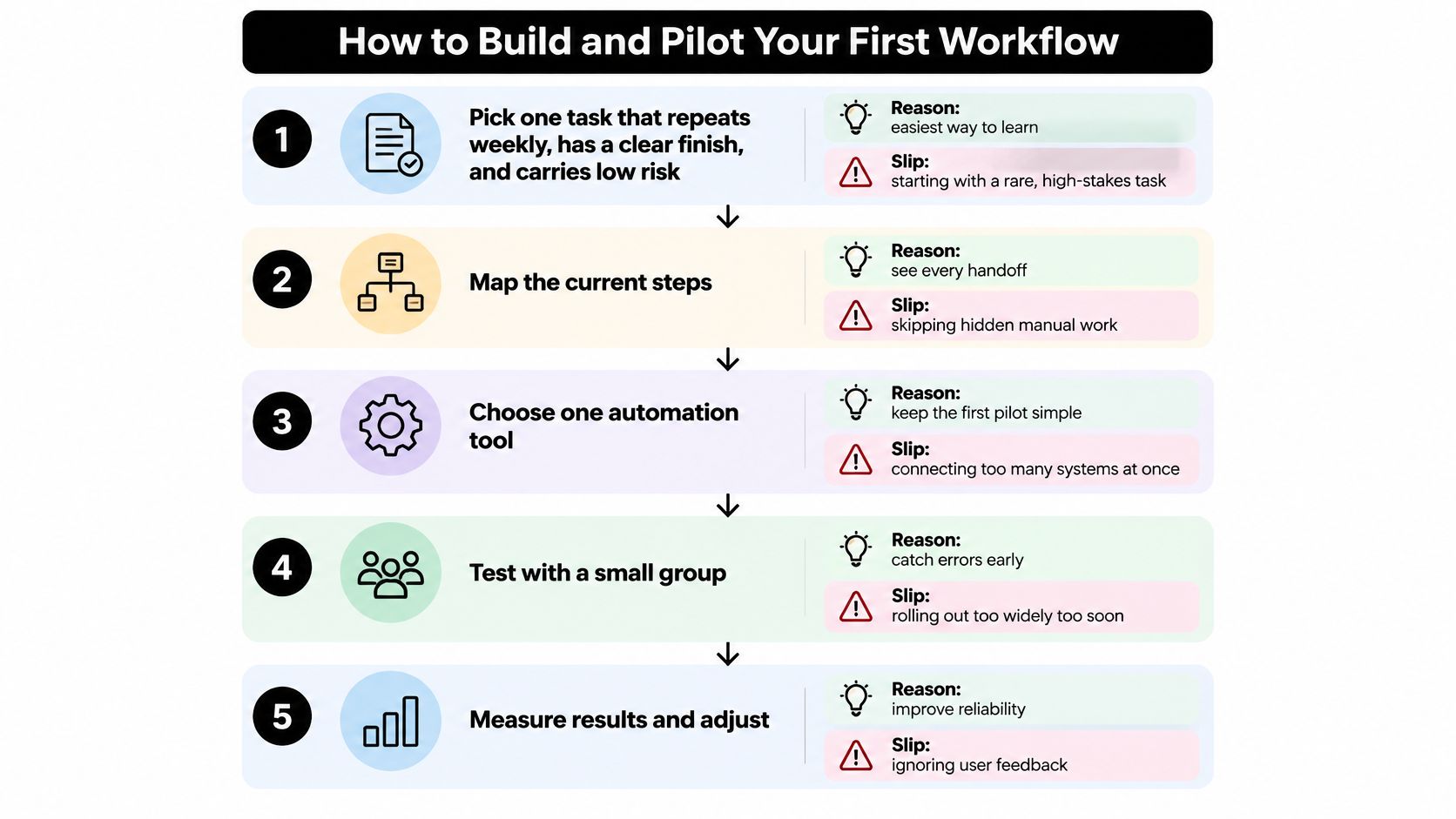
A weekly task with a clear finish makes a useful first pilot. For example, an agent can draft release notes from approved changes, while a person checks that the draft matches the work. Start with familiar, low-risk tasks where errors are easy to spot.
Use this build order as a pilot, not a promise of automatic savings.
Pick a repeatable task. Choose work your team knows well enough to recognize a poor result. A rare, high-stakes decision is a poor first test, even if it takes a long time.
Map the steps and inputs. Include quiet manual work, such as finding the right design or copying review notes. If an agent lacks an input, it may wait or guess.
Define done at each stage. Specify an output someone can check, such as a design with resolved questions or a passing test tied to an acceptance requirement. “Make it good enough” gives the agent and reviewer no shared finish line.
Assign makers and decision-makers. Let agents handle production tasks, and name the person responsible for each checkpoint. If approval belongs to the whole team, it can become nobody's task.
Check each handoff. Set required formats and retry limits, then pause the workflow when the limit is reached. A confident summary is not a substitute for the actual work.
Compare ten real items with the manual method. Treat ten items as a small pilot sample. Compare elapsed time, checking effort, and errors, using similar tasks so routine edits are not measured against difficult feature work.
Fix the weakest stage before expanding. Find where work waits or comes back for corrections. Add another workflow only when the first consistently produces accepted work.
Keep the tool test simple
When comparing workflow automation tools, check whether you can see why an item moved and who must act next. Start with only the connections needed to finish the task.
Loupe's workflow rules decide when a card moves, which work it needs, and where it waits for a person. Its six stages are product design, tech design, implementation, agent review, live review, and done. Apply the same pilot test: count work that is finished and accepted, not just work an agent generates.
After the pilot, review where people spent time checking, where cards waited, and whether accepted results matched the manual baseline. Use those findings to decide what to change before expanding the workflow.
Reliability Checks That Keep Automations Safe
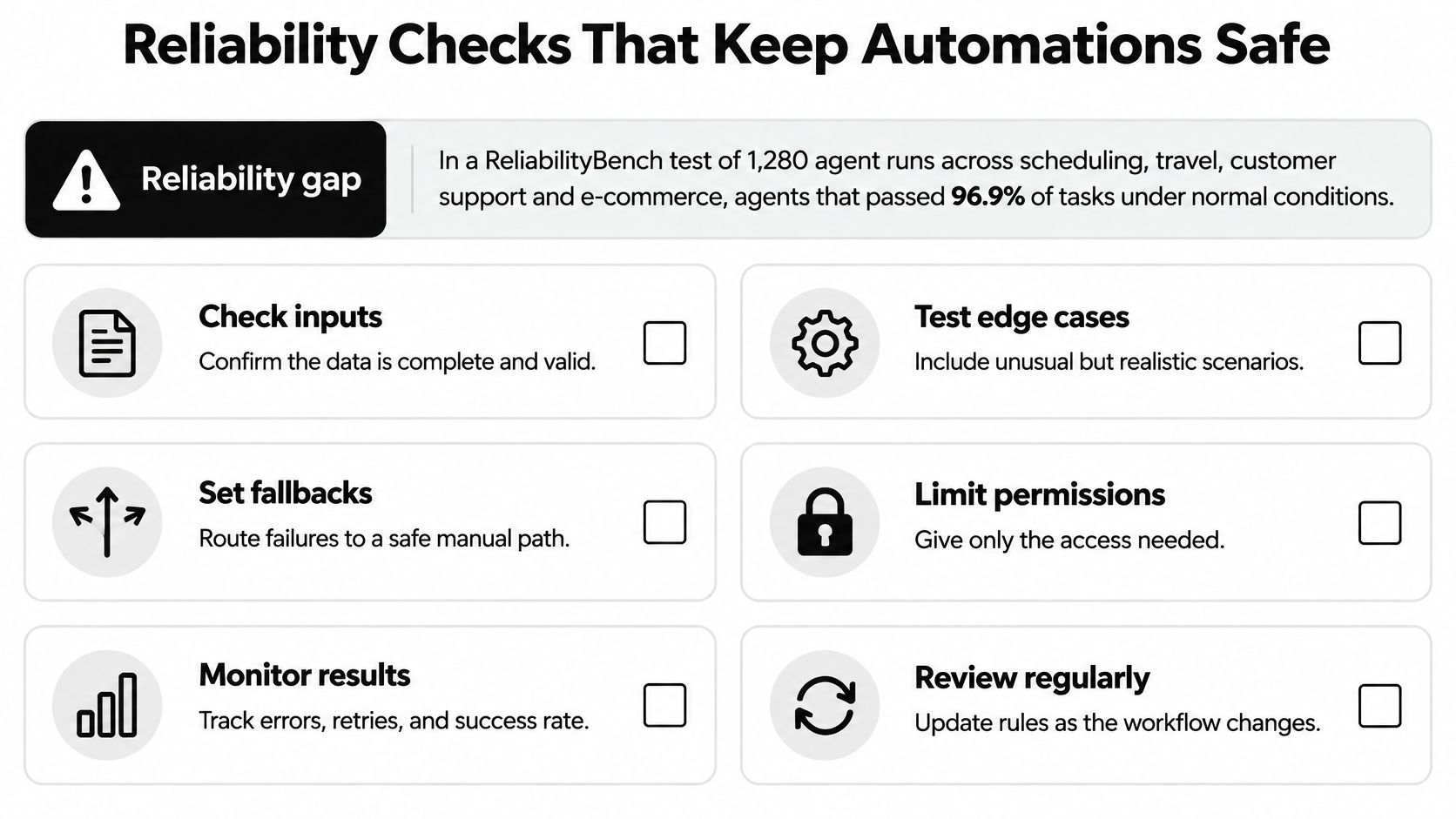
In ReliabilityBench's test of 1,280 production-like agent episodes across scheduling, travel, customer support, and e-commerce, agents with a 96.9% pass@1 rate under unchanged conditions fell to 88.1% under moderate perturbation, an 8.8-percentage-point drop.
A demo that works once proves little about what happens when a field is missing, a tool times out, or a customer phrases a request differently.
Build a safe failure path
Use controls that make failures visible and contain their effects:
- Validate the format: Check required fields, allowed values, and document structure before passing work forward.
- Cap retries: Stop after a defined limit rather than spending indefinitely on the same failure.
- Make actions safe to repeat: Use a unique request identifier so a retry doesn't send another refund or create another ticket.
- Mark stuck work clearly: Show the failed step, reason, and person who can resolve it.
- Keep replayable logs: Save inputs, tool responses, versions, and state changes, while protecting sensitive information.
- Restrict permissions: Give each agent only the access its task needs.
For example, suppose a triage agent receives a ticket in an unusual format. It fails validation, retries once, then marks the card as stuck with the missing field named. A person can repair the input without guessing what happened.
Before merging code or changing a live system, require a person to inspect the relevant evidence. A checked box isn't enough if the approver can't see the change or test results.
Practical rule: A failed run should leave a clear explanation and a safe next action, not a mystery.
Report distinct measures for single-run success, success within a defined number of attempts, sensitivity to changed inputs, and recovery after failure. Also check repeated-run consistency: success within several attempts isn't the same as succeeding every time.
One blended score can hide an agent that needs frequent rescue.
Metrics That Show Real Time Savings
Count completed, accepted work first. Lines of code, token counts, and opened pull requests measure activity. They don't tell you whether users received a useful change or whether reviewers inherited more work.
DORA's 2024 research found that a 25% increase in AI adoption was associated with improvements in documentation quality (7.5%), code quality (3.4%), and code-review speed (3.1%), but also reductions in delivery throughput (1.5%) and delivery stability (7.2%).
These are associations, not a forecast for your team. They show why faster work within a stage doesn't establish better delivery overall.
Metrics to track for each automated workflow
| Metric | What it shows | Warning sign |
|---|---|---|
| Change lead time | Time from commit to production | Rising even as output grows |
| Deployment frequency | How often changes reach production | Frequent releases with more rollbacks |
| Change-failure rate | Share of deployments that break production | Any rise after automation starts |
| Failed-deployment recovery time | How fast service is restored | Long fixes that need manual work |
| Rework rate | Extra work caused by delivery problems | Fix rounds keep growing |
| Cost per finished item | Total agent and model cost per completed task | Cost climbs while finished items stay flat |
DORA's software-delivery definitions distinguish delivery speed from stability and include rework caused by unintended delivery problems. Track both rather than choosing whichever measure looks best.
Include the cost of checking
Measure a baseline before enabling automation. For a practical pilot, compare similar work over four to six weeks, keeping task type and acceptance standards consistent.
Cost per finished item beats cost per run because cheap failed attempts still consume money. For the full business calculation, add human review time, security checks, and correction work to agent and model costs.
Record fix rounds too. If reviewers keep returning items, investigate whether the brief is unclear, the agent lacks context, or the acceptance check misses defects.
Use AI agent observability to connect each finished item to its runs, waits, and corrections. Don't stop at a dashboard showing model activity.
If accepted items stay flat while total cost rises, the automation isn't paying off yet.
Real Examples of Automated Workflows at Work
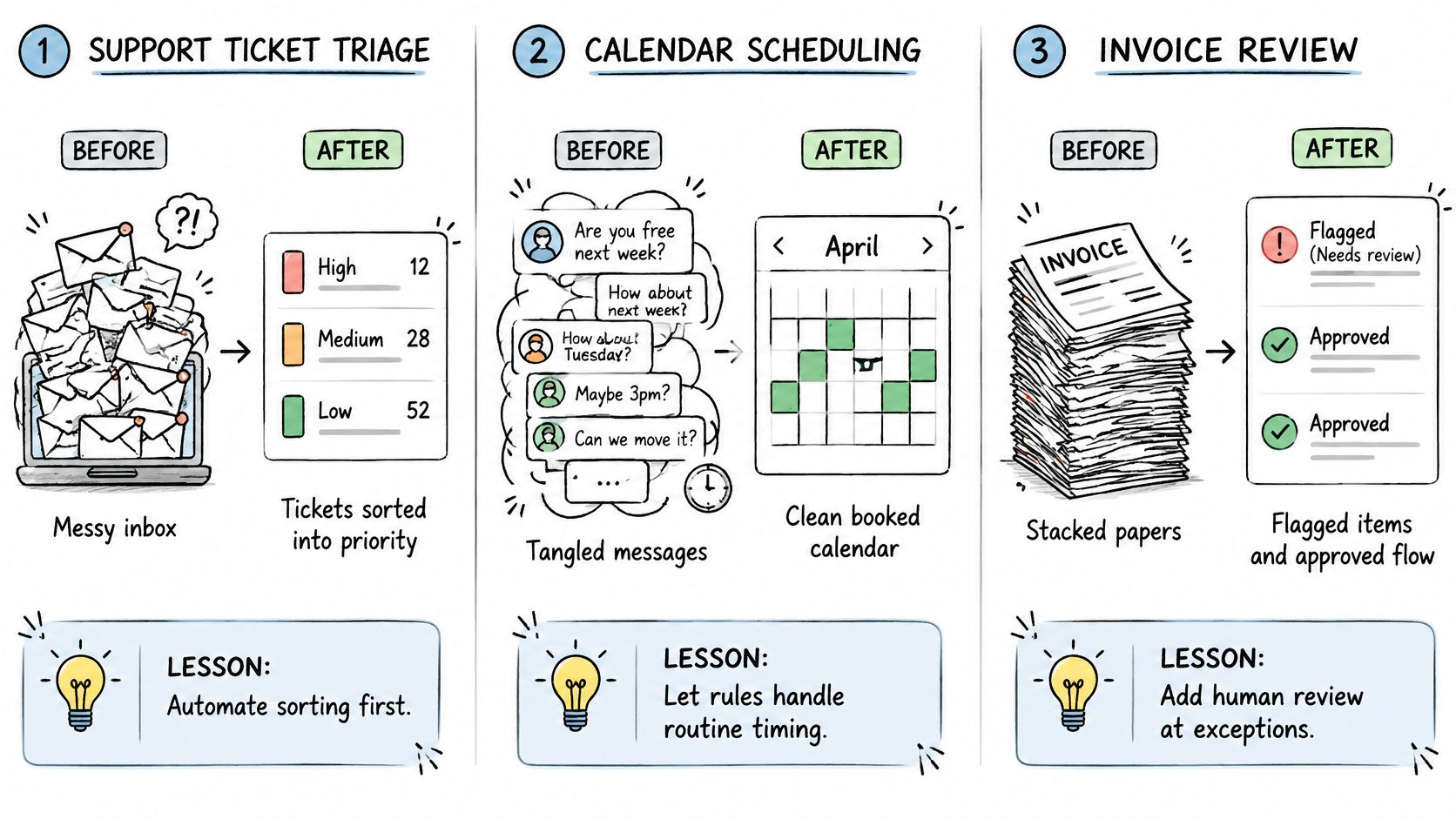
These are illustrative scenarios, not reported case studies. Each shows how a team could move routine production work to agents while keeping a person responsible for acceptance.
Support ticket triage
Before: A support lead reads each ticket, chooses a topic, and forwards it to a queue. A request containing both a login problem and a refund question may need another handoff.
After: An intake agent reads the ticket, adds topic tags, and routes it with a short explanation. Refunds and account changes wait for a person's approval rather than following automatically from the classification.
Lesson: Routine sorting is a strong fit. Permission to classify a money-related request shouldn't include permission to move money.
Marketing content approval
A marketing manager previously turned a brief into copy, checked brand rules, and chased approval through email. Comments could refer to different versions.
With automation, a drafting agent creates the first version from an approved brief. A reviewer agent checks the draft against a shared checklist, then a person signs off before publishing.
The useful change isn't quicker writing alone. A specific checklist gives the human reviewer named issues to inspect, such as unsupported claims, incorrect product names, or missing approval.
Code change pipeline
Before automation, a developer translates a design into code and asks a teammate to review it. The teammate must work out whether the implementation still matches the intended behavior.
In an automated version, a worker builds from the approved design and opens a GitHub pull request. Another agent checks design conformance before a person reviews the change for merge.
That second check can flag design drift, but a long trail of correction rounds still needs investigation. Generating another patch isn't always better than clarifying the design.
Repeatable, low-risk tasks are the strongest starting candidates. Ambiguous decisions need more discussion, not just more autonomous execution.
Loupe connects coding agents across design, implementation, and review, with workflow rules and human checkpoints that keep decisions visible. Visit Loupe to explore a board-based workflow, then test it on a repeatable task and judge the result by finished, accepted work.