10 Claude Code Alternatives for 2026 Teams
Compare 10 Claude Code alternatives for 2026, from hosted tools to self-hosted agents. See pricing, model support, privacy, and which fits your team.

In this article
- 1. Loupe
- Where the handoff gets designed
- 2. OpenAI Codex
- 3. OpenCode
- 4. GitHub Copilot CLI
- 5. Cline
- 6. Aider
- The productivity math nobody checks
- 7. OpenHands
- 8. Cursor
- 9. Google Gemini CLI
- Availability is the catch
- 10. Windsurf
- How the main Claude Code alternatives compare on cost, access, and deployment
- Pick the Right Agent Before You Commit
A developer finishes a feature in the terminal at 4pm. The agent ran the tests and the diff looks right. Then the waiting starts. A designer reviews the copy, a tech lead reads the pull request, and someone opens a preview build to check button spacing. Each handoff loses context, and the agent sits idle.
That gap is why teams look past Claude Code. The tool writes code well. It doesn't own the path from a product idea to a merged pull request, and it doesn't tell you what a week of agent work cost per finished task.
The market is stuck in the same middle stage. Stack Overflow's 2025 Developer Survey found that 84% of respondents were using or planning to use AI tools, but only 31% were using AI agents at work. Autocomplete is normal. Autonomous work is not.
This list covers 10 Claude Code alternatives. Each one gets the same four checks: who pays for model usage, where the workers run, whether humans approve steps, and how review and handoffs work. You'll get the honest limits and the team each tool suits.
1. Loupe
Loupe is an open-source software factory for coding agents. It runs a board where each work item moves through product design, technical design, implementation, agent review, and live preview review. Instead of one terminal session, you get a queue of cards with a visible state: working, waiting, stuck, or needs you.
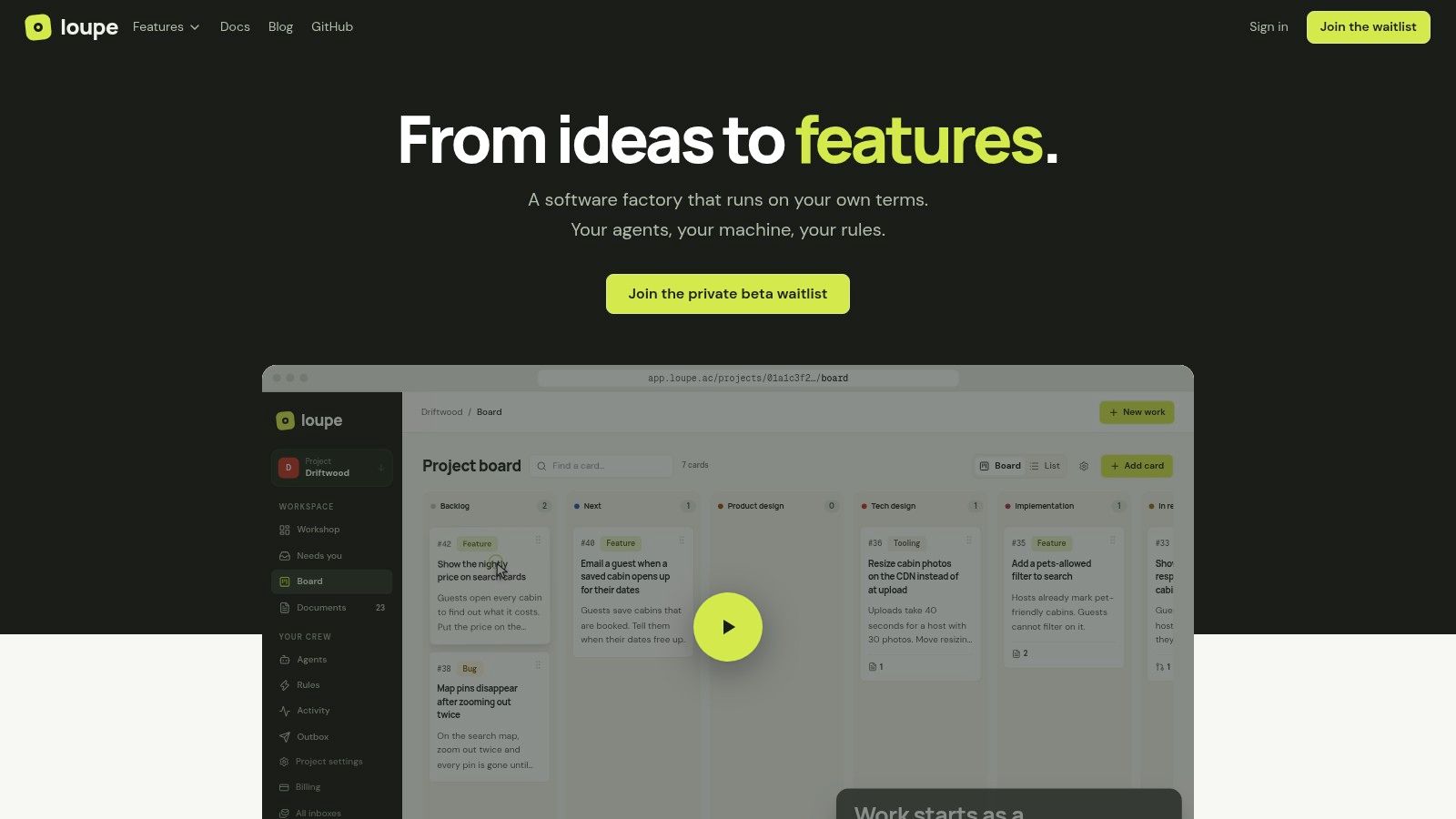
The four checks land like this. Model cost: you bring Claude Code or Codex on your own subscription or API key. Where it runs: a worker on your own Mac or Linux machine, through a local bridge. Human approval: configured into the workflow as checkpoints labeled "You." Review and handoff: a second agent checks designs and code against the approved specification before a human opens the pull request.
Where the handoff gets designed
Design documents render in place for line comments, suggested rewrites, and approvals, and the agent revises from the annotations. Preview deployments accept notes on individual UI elements, and those notes save back to the card. A consolidated inbox collects questions, reviews, and waiting cards so an agent doesn't stall overnight.
Practical rule: put the human checkpoint before the pull request, not after it. Catching design drift in a design document costs minutes. Catching it in review costs a redo.
The board tracks cost per finished card, merge rate, fix rounds, and hours to merge, so you can run two models on the same kind of task and compare before committing. Workers run on your machine and your subscription, which keeps model spend and artifacts where your team can see them.
Self-hosting is free under AGPL-3.0 with Docker Compose. The hosted service is in private beta with no published price, so plan the self-hosted path first.
- Good fit: teams that lose days between design, implementation, and merge.
- Weak fit: GitHub Enterprise shops, since the site lists GitHub.com support and not other forges, and anyone without a spare Mac or Linux machine for the bridge.
2. OpenAI Codex
Codex is OpenAI's coding agent for substantial engineering work: implementing a feature, fixing a bug, refactoring a module. It lives inside the ChatGPT family, so the first question for teams evaluating it is whether they already pay for ChatGPT.
Model cost: bundled into paid ChatGPT plans, with usage limits that vary by tier. Where it runs: OpenAI's environment, through Codex experiences and developer tools. Human approval: you review the returned change rather than approving stages inside a pipeline. Review and handoff: you get a session you can return to, not a board that routes work between people.
The arithmetic is simple. If the team already has a ChatGPT subscription, Codex adds no marginal cost for basic use. JetBrains' State of the Developer Ecosystem 2025 found that 62% of developers relied on at least one AI coding assistant, agent, or code editor, and a large share of that group already sits inside one vendor's billing.
- Multi-step work: features, bugs, and refactors instead of single-line completion.
- Session continuity: return to a coding session, extend it with skills and plugins.
- Business controls: the Business plan adds a shared workspace and admin settings.
The limits are what you'd expect. Heavy agent use pushes you toward a higher tier, and the experience centers on OpenAI's models, so provider-neutral routing isn't the point of the product. The Codex product page is the place to confirm current plan access.
3. OpenCode
OpenCode is an open-source coding agent with three front ends: terminal, desktop, and web. The MIT license and multi-provider support make it the default answer for developers who don't want one vendor holding the keys.
Model cost: the software is free, and model usage is separate, either through your own provider credentials or OpenCode's optional model service. Where it runs: on your machine, in whichever client you prefer. Human approval: you confirm tool actions as the session runs. Review and handoff: git diff and your normal pull request process.
That split matters more than the license. A team can route routine edits to a cheap model, keep a stronger one for architecture work, and read a breakdown of LLM costs across providers before signing anything.
- Flexible providers: your own keys or local models.
- Extensible: MCP servers, plugins, and workflow skills.
- Customizable: MIT-licensed code you can change.
The cost of that freedom is admin work. Provider configuration and key management land on you, and the tool is free while the tokens are not. Nobody caps your spend for you. OpenCode's site documents the model service and the client options.
4. GitHub Copilot CLI
Copilot CLI puts an agent in the terminal and wires it to issues and pull requests. For a team already on GitHub, it removes integration work that other agents make you build yourself.
Model cost: included with Copilot plans, with agent use drawing on the plan's AI Credits allowance. Where it runs: your terminal, modifying local files, with GitHub as the system of record. Human approval: you stay in the loop before a pull request moves forward. Review and handoff: issues in, pull requests out, which is the handoff you already run.
It also plans tasks and can split work across parallel agents. Reach matters here. In Stack Overflow's 2025 AI survey, GitHub Copilot was the second most used assistant at 68%, behind ChatGPT at 82% and ahead of Google Gemini at 47%, Claude Code at 41%, and Microsoft Copilot at 31%.
Popularity is not a quality score. It tells you where the integrations and the hiring pool already sit.
- Low friction on GitHub: issue and pull request links come built in.
- Editor optional: repository work from the terminal, no specific IDE required.
- Parallel agents: task planning across several runs.
The constraints are plan-shaped. No Copilot plan, no agent, and agent usage draws on the AI Credits allowance. If you want to route across many model providers, this isn't the neutral option. Check the Copilot CLI page for the current allowance.
5. Cline
Cline is an open-source coding agent that ships as a VS Code extension and a CLI. It's what people reach for when they want Claude Code's agent loop inside the editor, with their own API keys.
Model cost: bring your own key. Inference is billed by whichever provider you point it at, or through Cline's own service. Where it runs: your editor or terminal. Human approval: file edits and commands ask for approval by default. Review and handoff: your existing git and pull request flow, unchanged.
That approval loop is the product. Trust is the weak spot in this market. The 2025 Stack Overflow findings reported by TechSpot show only 29% of developers trusting AI output accuracy, while 72% rejected casual "vibe coding" for production use. Teams respond to that by reviewing every diff, which is exactly the behavior Cline builds around.
- No individual subscription: open source and free for solo developers.
- Provider choice: OpenAI, Anthropic, Google, OpenRouter, and local models.
- MCP marketplace: extend the agent without writing glue code.
Per-file approval scales poorly on large refactors. When the agent touches twenty files, approving each one becomes its own job. Inference is separate and varies by provider and context size, and enterprise features like centralized administration and SSO are custom-priced. If you want the human step designed rather than improvised, read how human in the loop AI agents should be structured. Cline's site lists the supported providers.
6. Aider
Aider is a terminal pair programmer with a git habit. It maps your repository, makes edits, runs lint and tests, and commits the result with a message. If you work in a shell and read git log for fun, the workflow feels familiar.
Model cost: the software is free and open source, and you supply an API key or a compatible local model. Where it runs: your machine, in a terminal. Human approval: Aider applies and auto-commits its edits by default, so you review the commit history and can roll back a change with /undo, or turn off auto-commits if you want to approve each change first. Review and handoff: commits are the handoff, and they're small enough to read.
The productivity math nobody checks
A METR randomized study of 16 experienced open-source developers completing 246 real repository tasks found that allowing AI coding tools increased task-completion time by 19%. Speed on a greenfield demo is not speed on your codebase.
Measure the tool on work you already shipped, not on a kata. Fix rounds and review time count as cost too.
- Git native: commits, change tracking, and clean diffs.
- Test aware: runs lint and test commands after edits.
- Model range: cloud or local, many languages.
The auto-commit default cuts both ways. Every edit lands as a normal commit, so your existing git diff and revert tooling works unchanged, and /undo reverses the last one inside the session. Teams that review in an editor pane rather than in git history will fight that flow instead of using it.
Two things push people away. The command-line-first interface is uncomfortable for IDE users, and model access plus costs are yours to configure. Aider's documentation covers model setup and the lint and test hooks.
7. OpenHands
OpenHands is an open-source software-agent platform rather than a single interface. It runs locally, as a hosted service, or self-hosted for enterprises, and it exposes a web GUI, a terminal UI, a CLI, and an agent SDK.
Model cost: your own key or a pay-as-you-go provider. Where it runs: wherever you deploy it, which is the differentiator. Human approval: the web and terminal interfaces let you watch and intervene mid-run. Review and handoff: GitHub, Bitbucket, and GitLab integrations, plus SDK and API hooks for your own automation.
Deployment spread matters because teams often don't run one agent. A 2026 report cited by Dark Reading found that 91% of organizations use at least two coding tools and 54% use three or more. Once that's true, the question stops being which agent and starts being which layer coordinates them.
- Deployment options: local, hosted, enterprise self-hosted.
- SDK and API: build agent workflows programmatically.
- Multiple forges: GitHub, Bitbucket, and GitLab.
The limits are commercial and practical. Hosted individual accounts have a daily conversation limit, enterprise capability and support need a sales conversation, and model-provider costs stay yours. OpenHands documents the deployment routes.
8. Cursor
Cursor is an AI-native editor, a VS Code fork with an agent mode in the middle of it. It suits developers who want navigation, editing, and agent actions in one window instead of a terminal beside an editor.
Model cost: a free plan with limited agent requests, paid individual and team tiers, and some third-party model usage billed separately. Where it runs: your desktop editor. Human approval: you review diffs and accept edits in the editor. Review and handoff: git and pull requests, same as before.
The trade-off is honest. You get frontier models on paid plans and a familiar keymap, and you commit your team to Cursor's editor. That's a bigger decision than a per-seat price, because editor habits are sticky.
- One environment: navigation, chat, and agent in the same window.
- Team controls: shared administration and usage analytics on team plans.
- Extensible: MCPs, skills, and hooks.
Some model usage sits outside the plan price, and costs track your plan's usage limits. If you're comparing generation tools more broadly, this roundup of AI code generation tools covers the wider field. Cursor's site has the current tiers.
9. Google Gemini CLI
When a team wants to try an agent in the terminal before choosing a paid workflow, Gemini CLI is a practical option. It is an open-source Google tool that reads project context, runs shell commands, and supports extensions, hooks, and scripting.
Model cost: access depends on account eligibility and can vary by account type. Where it runs: your terminal, in interactive or non-interactive mode. Human approval: you confirm commands and edits. Review and handoff: git, as with other CLI agents.
Availability is the catch
Gemini CLI authenticates through supported Google services and is tied to Google's models. That limits teams looking for one agent across several providers. Check current Google terms before standardizing on it.
The Stack Overflow 2025 Developer Survey tracks developer adoption of AI tools. For teams evaluating an agent, the practical question is whether its access and controls fit the work.
- Free and open source: a documented release channel.
- Automation friendly: non-interactive mode, hooks, and skills.
- Project memory: session resumption across runs.
Account eligibility affects access, so confirm what your team can use before building a workflow around it. The Gemini CLI repository lists current authentication options and features.
10. Windsurf
A developer who prefers an editor to a terminal can keep code and AI interaction in one workspace with Windsurf. The trade-off is less direct control through shell commands than with terminal-first agents.
Model cost: Windsurf offers individual and team plans, with model usage and limits varying by plan. Where it runs: your desktop editor. Human approval: review changes in the editor before they land. Review and handoff: Git and pull requests, without a staged design-to-preview trail.
Adoption is no longer the bottleneck. Google's DORA report for 2025 found that 90% of surveyed technology professionals reported adopting AI in software development, a 14 percentage point increase from the previous year. The practical question is how well the workflow carries generated code through review and merge.
- Editor comfort: Keep code and AI interaction together.
- Tool choice: Compare it with Cursor and Copilot against your team's existing workflow.
- Team access: Individual and team plans support different usage needs.
Windsurf suits teams that want an editor-centered agent and are comfortable handling review through their existing Git and pull request process. Terminal-focused developers may prefer Claude Code or Aider. For current plan details, see Windsurf.
How the main Claude Code alternatives compare on cost, access, and deployment
The columns ask the questions that decide fit: what it costs to start, who pays for the models, and whether you can run it on your own infrastructure.
| Item | Free to start | Model costs | Self-hosting | Best for |
|---|---|---|---|---|
| Loupe | Free AGPL self-hosting; hosted service in private beta | Your own Claude Code or Codex subscription or API key | Yes, via Docker Compose | Teams coordinating agents across design, implementation, and review |
| OpenAI Codex | Paid ChatGPT plan required | Plan usage limits apply; heavier use may require a higher tier | No self-hosting details stated | ChatGPT users tackling multi-step engineering work |
| OpenCode | Free to install | Provider usage may cost extra; local models supported | Locally, with provider credentials or local models | Flexible model choice |
| GitHub Copilot CLI | Copilot plan required | Draws on the plan's AI Credits allowance | No self-hosting details stated | GitHub teams working from the terminal |
| Cline | Free for individual developers | Provider or Cline service usage billed separately | Locally, as a VS Code extension or CLI | Provider choice in an IDE or terminal |
| Aider | Free and open source | API access may cost extra; local models supported | Locally, in the terminal | Git-oriented terminal workflows |
| OpenHands | Open-source version runs locally | Your own key or a pay-as-you-go provider | Yes, locally or via enterprise self-hosting | Developers building agent workflows |
| Cursor | Free plan with limited agent requests | Some third-party model usage billed separately | No self-hosting details stated | Editor-centered agent work |
| Google Gemini CLI | Open source; account eligibility applies | Model access depends on supported Google services | Locally, as a CLI | Terminal users on Google services |
| Windsurf | Free tier; individual and team plans | Model access and limits set by the plan tier | No self-hosting details stated | Editor-based AI workflows |
Free to start does not mean free to run. Every free row still needs a model behind it, and the model-cost column is where the bill shows up.
That column splits three ways. Codex and Copilot CLI draw on a subscription you already pay. The key-based entries, Aider, Cline, OpenCode, OpenHands, and Loupe, put spend on your own provider accounts or subscriptions. Cursor, Gemini CLI, and Windsurf sit in between, with model access set by the account or plan tier.
Self-hosting narrows the list fastest. Loupe and OpenHands give you a deployment on your own infrastructure. The rest run on your machine or behind a vendor account.
Pick the Right Agent Before You Commit
No single tool fits every team. Start with your biggest pain: model cost, IDE habits, GitHub workflow, or the gap between design and review. That one answer removes half this list.
A cheap test: pick one small, real task. Run it in two tools. Compare cost, fix rounds, and hours to merge before anyone talks about seats.
Then weigh the four checks in order. Model cost first, because it compounds. Where workers run second, because it decides what your security team will approve. Human approval third, because the trust numbers aren't improving on their own. Review and handoff last, because that's where the hours go.
Which tool for which team:
- Cost control first: OpenCode or Cline with your own keys, or Gemini CLI if you're already on Google.
- Editor comfort: Cursor or Windsurf, or Copilot if your repos already sit in GitHub.
- Terminal and git discipline: Aider, or Copilot CLI if issues and pull requests are your workflow.
- Platform team building agent workflows: OpenHands, via its SDK.
- Design-to-merge coordination: Loupe, where the board carries a card from design through agent review to a merged pull request.
Run the pilot for a week, not a day. Agent work is lumpy. A card that looks fast on Monday can stall on Wednesday when the design turns out ambiguous. Fix rounds tell you more than a demo does.
Watch for two failure modes. The first is a tool that generates well and leaves you with an unreadable pull request. The second is a tool that costs nothing per seat and a fortune in tokens, because nothing was watching consumption. Both look fine on the invoice until month three.
Ars Technica's coverage of the 2025 Stack Overflow survey reports that 80% of developers used AI tools in their workflow, so the argument for a specific agent is rarely about whether to use AI. It's about which tool fits how your team already ships. Pick one, run the test, and move the team only when the numbers are clear.
Loupe is a software factory for coding agents that runs on your own terms, with your agents, your machine, and your rules. It carries each card from product design through agent review to a merged GitHub pull request, with human checkpoints where decisions belong. If the handoffs between design, implementation, and review are where your team loses days, visit Loupe to see the workflow.